
Lists Basics Indexing Changing Items #
When writing programs, you will often need to store more than just a single piece of data. For example, if you are creating a system for AI Learner Tech, you might want to store a collection of student names, course titles, or roll numbers. Instead of creating ten different variables for ten students, you can use a single List.
In this guide, we will break down the absolute basics of Python lists, how indexing works, and how to change items inside them.
What is a List in Python? #
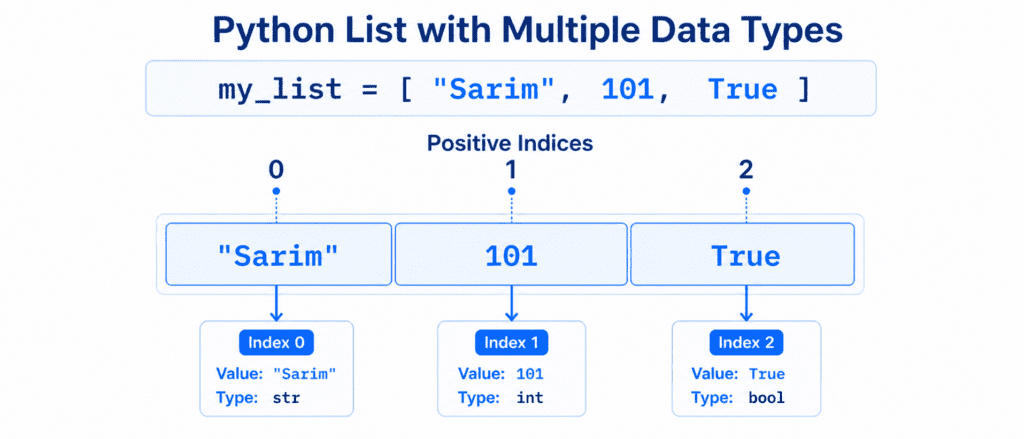
A List is a built-in Python data type used to store multiple items in a single variable. Lists are one of the most versatile data structures because they are:
- Ordered: The items inside a list have a defined order that will not change unless you modify the list directly.
- Changeable (Mutable): You can modify, add, or remove items after the list has been created.
- Allows Duplicates: Since items are identified by their position (index), a list can contain the same value multiple times.
To create a list, place your items inside square brackets [], separated by commas.
Creating a List
# A list containing student names
students = ["Sarim", "Ali", "Hamza"]

# A list containing different data types
user_data = ["Sarim", 25, True, 99.5]

print(students)
print(user_data)
List Indexes: Accessing Specific Items #
Just like strings, lists in Python use an index system. Every item has a specific number that represents its position in the list.
Positive Indexing (Left to Right) #
The first item in a list always starts at index 0, the second at 1, the third at 2, and so on.
courses = ["Python", "Machine Learning", "Data Science"]

# Accessing items using their index
print(courses[0])  # Outputs: Python
print(courses[1])  # Outputs: Machine Learning
Negative Indexing (Right to Left) #
If you want to access items starting from the end of the list, use negative indices. The last item is -1, the second to last is -2, and so on.
courses = ["Python", "Machine Learning", "Data Science"]

# Accessing the very last item instantly
print(courses[-1]) # Outputs: Data Science
print(courses[-2]) # Outputs: Machine Learning
Slicing a List: Extracting a Portion #
Sometimes you do not want just one item; you want to extract a smaller sub-list from a larger list. This process is called Slicing.
The syntax is: list_name[start:stop]
start: The index where extraction begins (included).stop: The index where extraction ends (excluded—it stops one item before this index).
topics = ["Variables", "Operators", "Strings", "Lists", "Loops"]

# Get items from index 1 up to index 3 (index 4 is excluded)
sub_topics = topics[1:4]
print(sub_topics)  # Outputs: ['Operators', 'Strings', 'Lists']

# Slicing from the beginning to index 2
print(topics[:3])   # Outputs: ['Variables', 'Operators', 'Strings']

# Slicing from index 2 to the very end
print(topics[2:])   # Outputs: ['Strings', 'Lists', 'Loops']
Change List Items: Updating Values #
Since lists are mutable, you can change the value of a specific item without recreating the entire list.
A. Modifying a Single Item #
To change a specific item, use its index and assign a new value to it.
enrolled_courses = ["Python", "Web Dev", "Data Science"]

# Change "Web Dev" to "Machine Learning" at index 1
enrolled_courses[1] = "Machine Learning"

print(enrolled_courses)
# Outputs: ['Python', 'Machine Learning', 'Data Science']
B. Modifying a Range of Items #
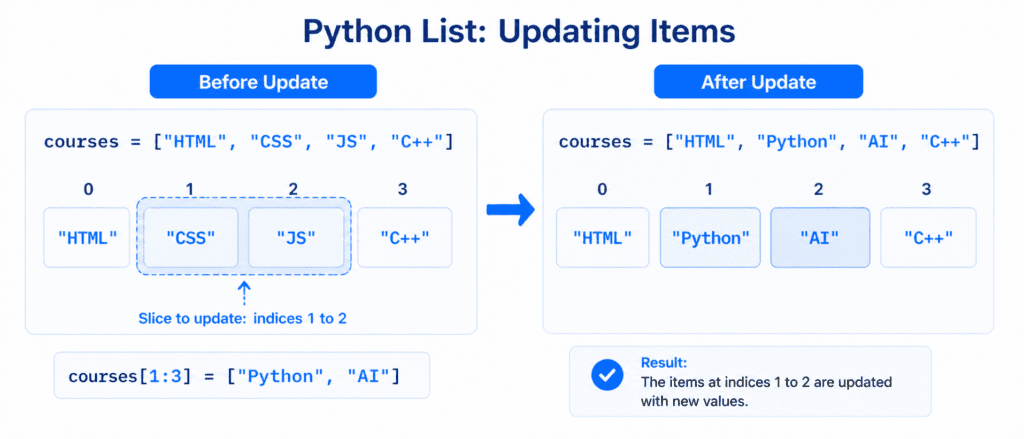
You can also change the values of multiple items at once using a slice.
skills = ["HTML", "CSS", "JS", "C++"]

# Replace "CSS" and "JS" with Python and AI
skills[1:3] = ["Python", "AI"]

print(skills)
# Outputs: ['HTML', 'Python', 'AI', 'C++']
Checking List Length and Type #
Before changing items, it is often useful to check how many items are inside a list or confirm that your variable is indeed a list.
# Create a list for AI Learner Tech courses
site_courses = ["Python Basics", "Advanced Strings", "Lists Basics"]

# Get the total number of items using len()
print(len(site_courses))  # Outputs: 3

# Check the data type using type()
print(type(site_courses)) # Outputs: <class 'list'>
Keep these core rules in mind when creating and reading lists:
| Action / Feature | Code Example | Output / Behavior |
| Create List | my_list = [1, 2, 3] | Stores ordered items inside []. |
| Read First Item | my_list[0] | Returns the first item. |
| Read Last Item | my_list[-1] | Returns the very last item. |
| Get Range | my_list[1:3] | Returns items at index 1 and 2. |
| Update Value | my_list[0] = "New" | Changes the item at index 0 directly. |