
Python Advanced Lists Comprehension #
In this guide, we will learn how to write cleaner code using List Comprehension and how to work with complex data structures using Nested Lists (lists inside lists). These tools are essential for any developer looking to write professional, concise, and efficient Python code.
Looping Through a List: The Traditional Way #
Before we learn how to create lists quickly, we must understand how to read and process them using loops. This is called iteration.
A. The Standard for Loop #
The easiest way to read every item in a list is by using a simple for loop. It goes through the list from index 0 to the end, one item at a time.
# List of enrolled students at AI Learner Tech
students = ["Sarim", "Ali", "Hamza"]

# Loop to print each name
for student in students:
    print(f"Student Name: {student}")
Output:
Student Name: Sarim
Student Name: Ali
Student Name: Hamza
B. Looping Through Index Numbers #
Sometimes you need to know the index number of the item while looping. You can do this by combining the range() and len() functions.
courses = ["Python", "AI", "Data Science"]

# Loop using index numbers
for i in range(len(courses)):
    print(f"Index {i}: {courses[i]}")
Output:
Index 0: Python
Index 1: AI
Index 2: Data Science
List Comprehension: The Pythonic Way #
List Comprehension is a shorter and faster syntax to create a new list based on the values of an existing list.
Instead of creating an empty list and using a traditional for loop to add items one by one, you can write the entire process in just one single line of code.
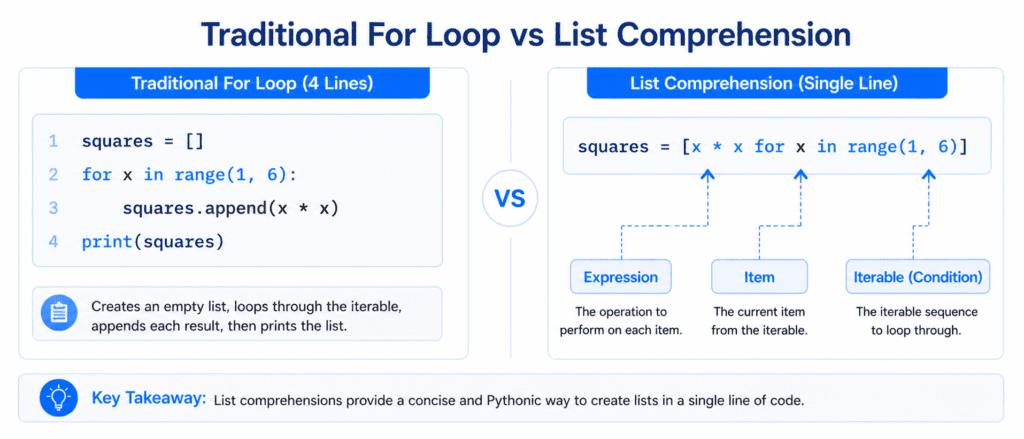
The Syntax of List Comprehension:
new_list = [expression for item in iterable if condition == True]
Expression: The current item’s modification (what you want to save in the new list).
Item: The variable representing the element.
Iterable: The existing list, range, or sequence.
Condition: (Optional) A filter to select only specific items.
Let’s Compare: Traditional Loop vs. List Comprehension #
Problem: #
Create a new list that only contains courses with the letter “o” from our master list.
Method A: The Traditional Way (4 lines of code) #
all_courses = ["Python", "AI", "Web Dev", "Django"]
courses_with_o = []

for x in all_courses:
    if "o" in x:
        courses_with_o.append(x)

print(courses_with_o)
Output:
['Python', 'Django']
Method B: Using List Comprehension (Only 1 line of code)
all_courses = ["Python", "AI", "Web Dev", "Django"]

# Single line of code
courses_with_o = [x for x in all_courses if "o" in x]

print(courses_with_o)
Output:
['Python', 'Django']
Another Example: Squaring Numbers #
You can use list comprehension to perform math operations on every number in a list.
numbers = [1, 2, 3, 4, 5]

# Square each number
squared_numbers = [num ** 2 for num in numbers]

print(squared_numbers)
Output:
[1, 4, 9, 16, 25]
Nested Lists: Lists Inside Lists #
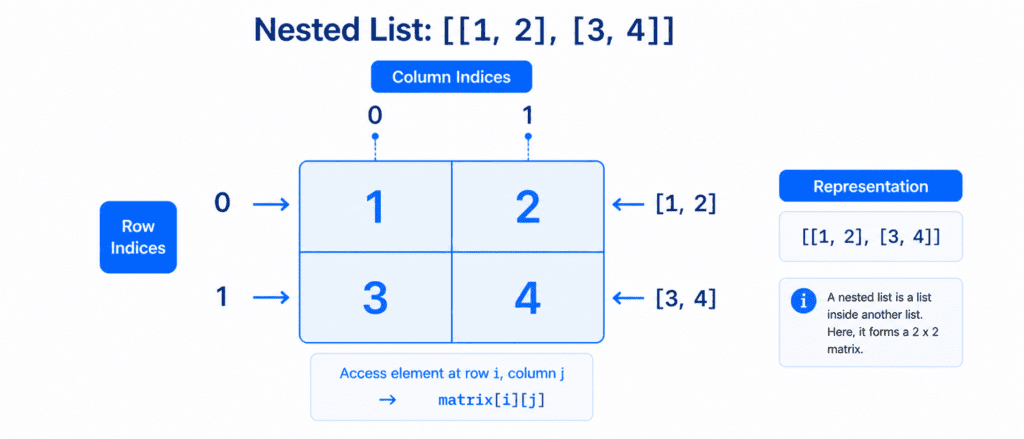
A Nested List is a list that contains other lists as its individual items. Think of it like a table where the main list is the whole table, and each inner list is a row.
# A list containing 3 smaller sub-lists (Rows)
student_records = [
    ["Sarim", 101, "Python"],   # Row 0
    ["Ali", 102, "Data Science"],# Row 1
    ["Hamza", 103, "AI"]        # Row 2
]

print(student_records)
Output:
[['Sarim', 101, 'Python'], ['Ali', 102, 'Data Science'], ['Hamza', 103, 'AI']]
Accessing and Changing Nested List Items #
Since a nested list has rows and columns, you need to use double square brackets [][] to access or modify its items.
- The first bracket refers to the outer list index (the row).
- The second bracket refers to the inner list index (the specific item in that row).
student_records = [
    ["Sarim", 101, "Python"],    # Row 0
    ["Ali", 102, "Data Science"]  # Row 1
]

# Get the name "Sarim" from Row 0, Item 0
print(student_records[0][0])  # Outputs: Sarim

# Get the course "Data Science" from Row 1, Item 2
print(student_records[1][2])  # Outputs: Data Science
Output:
Sarim
Data Science
B. Changing an Item inside a Nested List
student_records = [
    ["Sarim", 101, "Python"],
    ["Ali", 102, "Data Science"]
]

# Change Sarim's roll number from 101 to 999
student_records[0][1] = 999

print(student_records)
Output:
[['Sarim', 999, 'Python'], ['Ali', 102, 'Data Science']]
Reference Table
| Advanced Feature | Code Example Syntax | Output / Action |
| Standard Loop | for x in my_list: print(x) | Prints every element step-by-step. |
| List Comprehension | [x for x in list if x > 2] | Creates a new filtered list in 1 line. |
| Nested List Creation | nested = [[1, 2], [3, 4]] | Creates a matrix-like list of lists. |
| Access Nested Item | nested[0][1] | Extracts number 2 from the first row. |
| Update Nested Item | nested[1][0] = 9 | Replaces 3 with 9 in the second row. |