
When you start learning Python, you quickly realize that storing collections of data is essential. So far, we have covered Lists, which allow you to store multiple items that can be changed at any time. But what if you want to create a collection of data that must never change?
For example, if you are building an educational platform like AI Learner Tech, you might want to store the days of the week, fixed course IDs, or server configuration settings. To handle this type of data securely, Python provides Tuples.
In this detailed guide, we will explore the absolute basics of tuples, how indexing works, and how to extract specific items using slicing.
What is a Tuple in Python? #
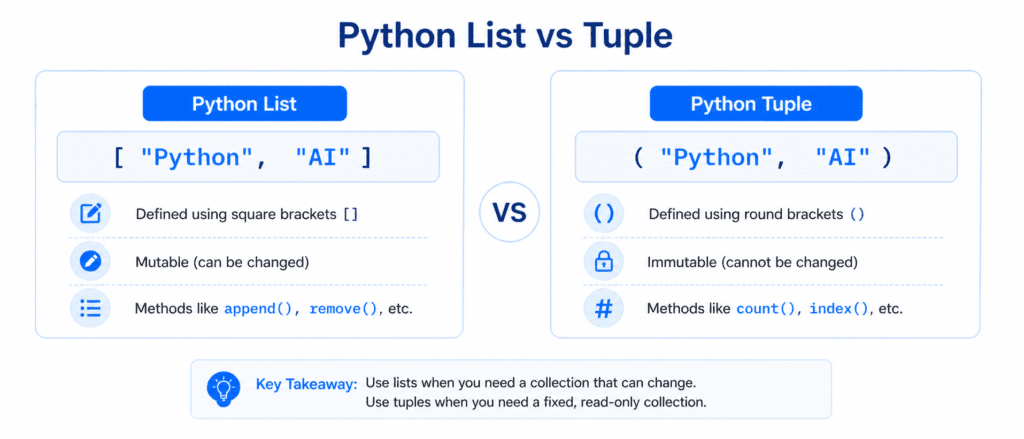
A Tuple is a built-in Python data type used to store multiple items in a single variable. While it looks similar to a list, it has distinct rules that make it unique.
The Key Characteristics of a Tuple: #
- Ordered: The items inside a tuple have a defined sequence that will not change.
- Unchangeable (Immutable): Once a tuple is created, you cannot change, add, or remove its items directly.
- Allows Duplicates: Just like lists, tuples can contain duplicate values because each item has its own position (index).
- Syntax: Tuples are written with round brackets
()instead of square brackets.
# A tuple containing course names
courses = ("Python Basics", "Advanced Strings", "Lists")

# A tuple containing mixed data types
user_profile = ("Sarim", 101, True)

print(courses)
print(user_profile)
Output:
('Python Basics', 'Advanced Strings', 'Lists')
('Sarim', 101, True)
Lists vs. Tuples: The Core Difference
Before moving forward, it is crucial to understand the exact difference between these two collection types:
| Feature | Python Lists | Python Tuples |
| Syntax | Square brackets [ ] | Round brackets ( ) |
| Mutability | Mutable (Can be changed/updated) | Immutable (Cannot be modified) |
| Performance | Slower in memory and execution | Faster in memory and execution |
| Common Use | For data collections that change often. | For fixed data that needs to be protected. |
The Single Item Tuple Rule (important for Beginners)
A very common mistake that beginners make is trying to create a tuple with only one item.
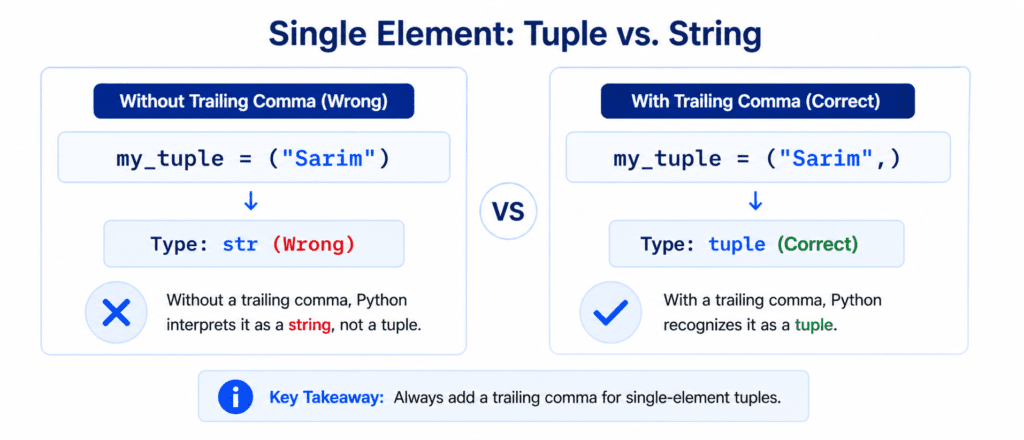
In Python, if you put a single string or number inside parentheses (), Python will not recognize it as a tuple. Instead, it thinks you are using normal parentheses for mathematical evaluation, and it marks it as a standard string or integer.
To tell Python that it is a tuple, you must include a trailing comma (,) after the single item.
# 1. Trying to create a single-item tuple without a comma
wrong_tuple = ("Python")
print(type(wrong_tuple))

# 2. Creating a single-item tuple with a comma
correct_tuple = ("Python",)
print(type(correct_tuple))
Output:
<class 'str'>
<class 'tuple'>
Tuple Indexes: Accessing Items #
Because tuples are ordered collections, every item has its own specific number called an Index. You use square brackets [] with the index number to access a specific item from a tuple.
Positive Indexing (Left to Right) #
The first item starts at index 0, the second at 1, the third at 2, and so on.
platform_details = ("AI Learner Tech", 2024, "E-Learning")

# Accessing the first item
print(platform_details[0])

# Accessing the second item
print(platform_details[1])
Output:
AI Learner Tech
2024
Negative Indexing (Right to Left) #
If you want to read the tuple starting from the end, use negative numbers. The last item is -1, the second last is -2, and so on.
platform_details = ("AI Learner Tech", 2024, "E-Learning")

# Accessing the very last item instantly
print(platform_details[-1])

# Accessing the second last item
print(platform_details[-2])
Output:
E-Learning
2024
Slicing a Tuple: Extracting Sub-Tuples #
If you need to extract a specific portion of a tuple instead of just a single item, you use Slicing. Slicing does not alter the original tuple; it returns a completely new tuple containing the selected range of items.
The basic slicing syntax is: tuple_name[start:stop]
start: The index where extraction begins (inclusive).stop: The index where extraction ends (exclusive—it stops exactly one item before this index).
topics = ("Basics", "Operators", "Strings", "Lists", "Tuples", "Loops")

# Extract items from index 1 to index 3 (index 4 excluded)
print(topics[1:4])

# Slice from the beginning up to index 3
print(topics[:3])

# Slice from index 3 to the very end
print(topics[3:])
Output:
('Operators', 'Strings', 'Lists')
('Basics', 'Operators', 'Strings')
('Lists', 'Tuples', 'Loops')
Slicing with a Negative Step #
Just like strings and lists, you can reverse a tuple instantly by leaving the start and stop blank and setting the step value to -1.
# Reversing the order of items
numbers = (1, 2, 3, 4, 5)
reversed_numbers = numbers[::-1]

print(reversed_numbers)
Output:
(5, 4, 3, 2, 1)
Quick-Reference Table
| Feature / Action | Code Example | Direct Output / Behavior |
| Create Tuple | my_tuple = ("A", "B", "C") | Creates an ordered, unchangeable collection. |
| Single Item Tuple | my_tuple = ("A",) | Must use a trailing comma to be a tuple. |
| Read First Item | my_tuple[0] | Accesses the first element using index 0. |
| Read Last Item | my_tuple[-1] | Accesses the very last item using negative index. |
| Range Extraction | my_tuple[1:3] | Returns a new tuple with items at index 1 and 2. |
| Reverse Tuple | my_tuple[::-1] | Returns a completely reversed copy of the tuple. |