
Once you know how to create a dictionary and read its contents, the next step is learning how to manage your data dynamically. In software development, data is rarely static. On AI Learner Tech, for example, you might need to change a student’s course status, remove an outdated record, or create a safe backup copy of your database.
In this guide, we will cover how to update existing values, add new information, remove keys safely, and duplicate dictionaries without creating unexpected bugs.
Adding and Modifying Items #
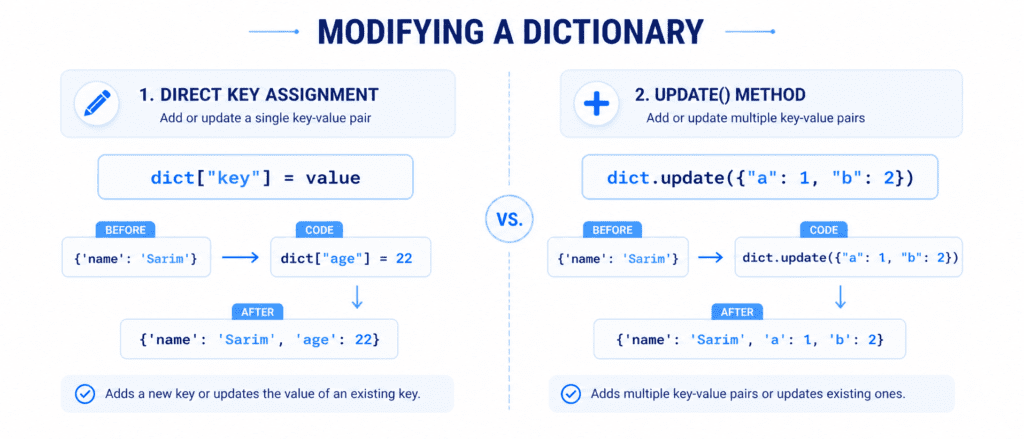
Because dictionaries are mutable, you can add new key-value pairs or change existing ones at any time.
Modifying an Existing Value #
To change the value of an existing key, use square brackets [] with the key name and assign a new value to it.
student = {
    "name": "Sarim",
    "course": "Python Basics",
    "grade": "B"
}

# Changing the grade from B to A
student["grade"] = "A"

print(student)
Output:
{'name': 'Sarim', 'course': 'Python Basics', 'grade': 'A'}Adding a New Key-Value Pair #
To add a brand-new item, use a key that does not yet exist inside the dictionary and assign a value to it.
student = {
    "name": "Sarim",
    "course": "Python Basics"
}

# Adding a new key "roll_number"
student["roll_number"] = 101

print(student)
Output:
{'name': 'Sarim', 'course': 'Python Basics', 'roll_number': 101}Using the .update() Method #
The .update() method allows you to change multiple values or add multiple new items at the same time. This method accepts another dictionary or an iterable of key-value pairs as its argument.
- If the key exists, its value will be overwritten.
- If the key does not exist, it will be created.
site_data = {
    "brand": "AI Learner",
    "level": "Beginner"
}

# Updating an existing key and adding a new key at once
site_data.update({"brand": "AI Learner Tech", "status": "Active"})

print(site_data)
Output:
{'brand': 'AI Learner Tech', 'level': 'Beginner', 'status': 'Active'}Removing Items from a Dictionary #
Python offers four different built-in tools to remove keys and values: .pop(), .popitem(), del, and .clear().
Removing a Specific Key (.pop()) #
The .pop() method removes the specified key and returns the value linked to it.
user_profile = {"username": "Sarim", "role": "Admin", "id": 101}

# Remove the "role" key
removed_role = user_profile.pop("role")

print(user_profile)
print(f"Removed value: {removed_role}")
Output:
{'username': 'Sarim', 'id': 101}
Removed value: Admin
Removing the Last Inserted Pair (.popitem()) #
The .popitem() method removes and returns the very last key-value pair that was inserted into the dictionary.
user_profile = {"username": "Sarim", "id": 101, "status": "Active"}

# Remove the last item ("status")
removed_pair = user_profile.popitem()

print(user_profile)
print(f"Removed item: {removed_pair}")
Output:
{'username': 'Sarim', 'id': 101}
Removed item: ('status', 'Active')
Using the del Keyword #
The del keyword can delete a specific item linked to a key, or it can delete the entire dictionary variable completely from memory.
courses = {"Python": 1, "Java": 2, "C++": 3}

# Delete the "Java" item
del courses["Java"]

print(courses)
Output:
{'Python': 1, 'C++': 3}Emptying the Dictionary (.clear()) #
If you want to remove all items inside a dictionary but keep the empty variable intact for future use, use the .clear() method.
cart = {"Laptop": 1, "Mouse": 1}

# Clear all items
cart.clear()

print(cart)
Output:
{}Copying a Dictionary (The Safe Way) #
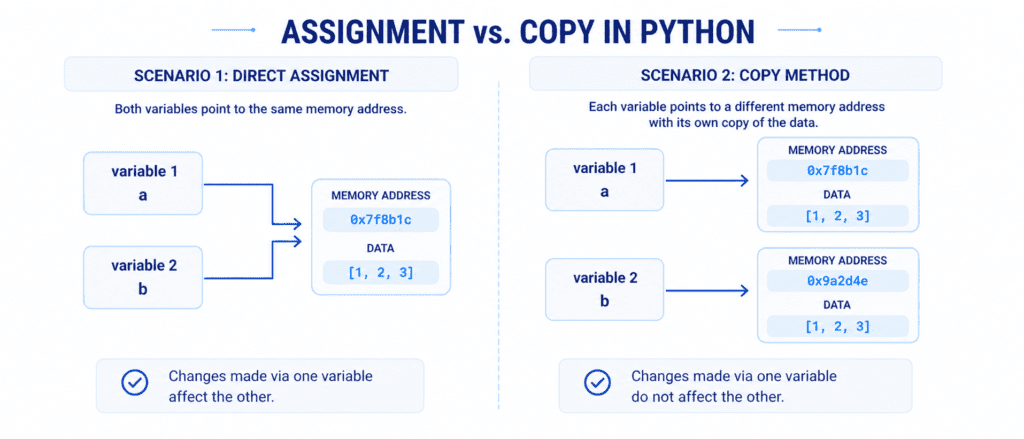
In Python, you cannot copy a dictionary by simply setting one variable equal to another (e.g., dict2 = dict1).
The Problem with Direct Assignment #
If you use direct assignment, both variables point to the same original dictionary in memory. This means that any changes you make to the second dictionary will automatically change the first one too!
The Wrong Way:
original = {"name": "Sarim", "course": "Python"}

# This is NOT a real copy
copied_dict = original

# Changing the copied version affects the original
copied_dict["course"] = "AI"

print(original)
print(copied_dict)
Output:
{'name': 'Sarim', 'course': 'AI'}
{'name': 'Sarim', 'course': 'AI'}
Use the .copy() Method #
To create a true, independent duplicate of a dictionary, use the built-in .copy() method.
original = {"name": "Sarim", "course": "Python"}

# Creating a true, separate copy
true_copy = original.copy()

# Changing the copy will not change the original
true_copy["course"] = "AI"

print(original)
print(true_copy)
Output:
{'name': 'Sarim', 'course': 'Python'}
{'name': 'Sarim', 'course': 'AI'}
Summary Reference Table #
Review this comparison table to keep the core commands fresh:
| Method Name | Code Example | Direct Output / Purpose |
| Assign Value | my_dict["key"] = "val" | Adds a new pair or overwrites the existing value. |
.update() | my_dict.update({"a": 1}) | Modifies multiple items at the same time. |
.pop(key) | my_dict.pop("role") | Removes the specific key and returns its value. |
.popitem() | my_dict.popitem() | Removes the last inserted (key, value) pair. |
.clear() | my_dict.clear() | Removes all contents, leaving an empty {}. |
.copy() | my_dict.copy() | Creates an independent copy in a new memory address. |