
Python Data Types Tutorial 2026 #
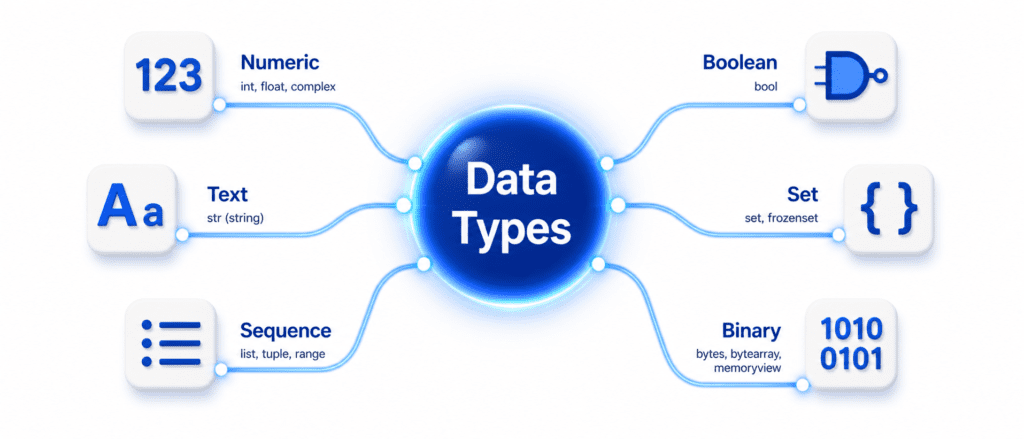
Why do we use Data Types? #
In programming, a computer is like a very fast but literal-minded worker. If you give it two things and say “add these,” it needs to know if they are numbers (to do math) or text (to join them together).
Data Types tell the computer:
- How much memory to reserve.
- What operations are allowed (e.g., you can’t divide “Apple” by 5).
- How to treat the data internally.
1. Numeric Data (Numbers) #
These are used for any mathematical calculation.
- int: Whole numbers.
- float: Decimal points.
- complex: Real and imaginary parts.
items = 10            # int
price = 15.5          # float
complex_val = 1 + 2j  # complex

print(f"Items: {items} | Type: {type(items)}")
print(f"Price: {price} | Type: {type(price)}")
print(f"Complex: {complex_val} | Type: {type(complex_val)}")
Output:
Items: 10 | Type: <class 'int'>
Price: 15.5 | Type: <class 'float'>
Complex: (1+2j) | Type: <class 'complex'>
2. Text Data (Strings) #
Strings are used to store characters, words, or sentences. They must be inside quotes.
brand = "AI Learner Tech"
location = 'Multan'

print(f"Brand: {brand}")
print(f"Type: {type(brand)}")
Output:
Brand: AI Learner Tech
Type: <class 'str'>
3. Sequence Data (List, Tuple, Range) #
These are used to store multiple items in a single variable.
- List: Changeable (Mutable) collection.
- Tuple: Fixed (Immutable) collection.
- Range: A sequence of integers.
my_list = ["Python", "C++", "Java"]
my_tuple = (10, 20, 30)
my_range = range(5)

print("List:", my_list)
print("Tuple:", my_tuple)
print("Range as List:", list(my_range))
Output:
List: ['Python', 'C++', 'Java']
Tuple: (10, 20, 30)
Range as List: [0, 1, 2, 3, 4]
4. Mapped Data (Dictionary) #
A dictionary stores data in Key:Value pairs. It’s like an ID card where “Name” is the key and “Ali” is the value.
student = {"name": "Hamza", "grade": "A"}

print(student["name"])
print(f"Full Dictionary: {student}")
Output:
Hamza
Full Dictionary: {'name': 'Hamza', 'grade': 'A'}
5. Set Data #
Sets are for unique items. They automatically delete any duplicates you try to add.
Code Example:
numbers = {1, 2, 2, 3, 4, 4}

print("Set:", numbers)
Output:
Set: {1, 2, 3, 4}
6. Binary Data #
Used for low-level machine tasks, handling images, or raw file streams.
data_bytes = bytes("Hello", "utf-8")
data_array = bytearray([50, 100, 150])

print("Bytes:", data_bytes)
print("Bytearray:", data_array)
Output:
Bytes: b'Hello'
Bytearray: bytearray(b'2dk')
7. None Type #
Represents the absence of a value. It’s a placeholder.
x = None
print(f"Value of x: {x}")
print(f"Type of x: {type(x)}")
Output:
Value of x: None
Type of x: <class 'NoneType'>
Summary Table: Python Data Types #
| Category | Type | Mutable (Can Change)? | Best Used For |
| Numeric | int, float | No | Math, Counting, Prices |
| Text | str | No | Names, Labels, Descriptions |
| Sequence | list | Yes | Dynamic lists, shopping carts |
| Sequence | tuple | No | Fixed data (Coordinates, Constants) |
| Mapped | dict | Yes | Database records, User profiles |
| Set | set | Yes | Finding unique values |
| Binary | bytes | No | Raw files, image data |
Practice Challenges #
- The Shopping List: Create a
listof 3 items. Add a 4th item to it. Now, convert that list into atupleand try to add a 5th item. Observe the error. - The Unique Filter: You have a list of zip codes:
[60000, 61000, 60000, 62000, 61000]. Use asetto find how many unique zip codes there are. - The Identity Card: Create a
dictionaryrepresenting a laptop. Include keys forbrand(str),ram(int), andis_ssd(bool). Print only theramvalue.