
Python Function Scope Explained #
When you write code, you create variables to store data. However, in Python, a variable is not automatically available everywhere in your script. Where a variable can be seen or accessed is determined by its Scope.
Understanding scope is essential when working with functions. For example, on a platform like AI Learner Tech, you might use a global variable to track a user’s total login attempts across the whole site, while using a local variable inside a specific function to temporarily check their quiz score.
In this guide, we will explore the different memory layers in Python, the difference between local and global scope, and how to manage variables without creating bugs.
The Concept of Scope #
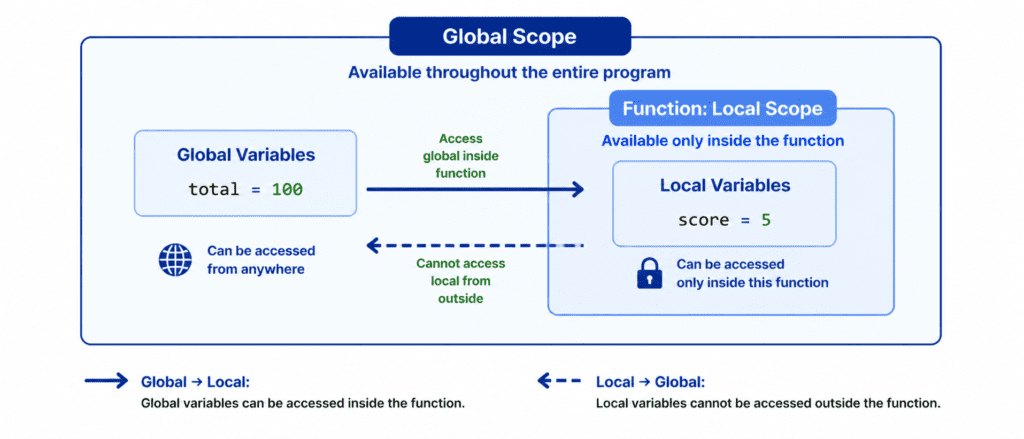
Scope refers to the region of a program where a variable is valid and accessible. You can think of it like access permissions in a building.
- Local Scope: Variables created inside a function belong to that function. They only exist while the function is running. They are like private files locked inside a specific room—people outside that room cannot see or use them.
- Global Scope: Variables created in the main body of the script, outside of any function, belong to the global scope. They are like the main lobby of the building—everyone inside has access to them.
Local Scope: Private Variables #
When you define a variable inside a function, that variable is completely hidden from the rest of your program. It is created when the function starts running and is completely erased from your computer’s memory the moment the function finishes its job.
def check_score():
    # A local variable
    student_score = 95
    print(f"Inside the function: Score is {student_score}")

# Calling the function works perfectly
check_score()

# Attempting to print the local variable outside the function causes an error
print(student_score)
Output: #
Inside the function: Score is 95
Traceback (most recent call last):
  File "main.py", line 9, in <module>
    print(student_score)
NameError: name 'student_score' is not defined
Because the main program lives in the global scope, it has no idea that the local variable student_score ever existed.
Global Scope: Shared Variables #
A variable created outside of all functions belongs to the global scope. This means it can be read by any function inside your script.
# A global variable
platform_name = "AI Learner Tech"

def print_welcome():
    # Reading the global variable inside the function
    print(f"Welcome to {platform_name}")

print_welcome()
print(f"Thank you for visiting {platform_name}")
Output: #
Welcome to AI Learner Tech
Thank you for visiting AI Learner Tech
In the example above, the function print_welcome() is able to read the value of platform_name smoothly because it is looking out into the global scope.
Modifying Global Variables with the global Keyword #
By default, Python allows a function to read a global variable, but it does not allow the function to modify it.
If you try to change a global variable inside a function, Python gets confused and creates a brand-new local variable with the exact same name instead.
points = 10

def update_points():
    # Python creates a local 'points' variable instead of changing the global one
    points = 20
    print(f"Inside the function: Points = {points}")

update_points()
print(f"Outside the function: Points = {points}")
Output: #
Inside the function: Points = 20
Outside the function: Points = 10
To tell Python that you want to update the original global variable inside a function, you must use the global keyword before assigning a new value to that variable.
points = 10

def update_points():
    global points # Explicitly link to the global variable
    points = 20
    print(f"Inside the function (updated): Points = {points}")

update_points()
print(f"Outside the function (updated): Points = {points}")
Output: #
Inside the function (updated): Points = 20
Outside the function (updated): Points = 20
Let’s Write Code: Basic to Advanced #
Let’s explore practical scenarios that show how local and global scopes operate together.
Example: Tracking Function Calls (Intermediate) #
In this scenario, we use a global variable to count how many times a user updates their password.
change_count = 0

def change_password():
    global change_count
    # Logic to change the password would go here...
    change_count += 1
    print("Password changed successfully.")

# Calling the function multiple times
change_password()
change_password()

print(f"Total password changes recorded: {change_count}")
Output: #
Password changed successfully.
Password changed successfully.
Total password changes recorded: 2
Example: Shadowing Variables (Advanced) #
When a local variable and a global variable have the exact same name, it is called variable shadowing. The function will prioritize its own local variable over the global one.
username = "Guest"

def update_user():
    # Shadowing the global username
    username = "Sarim"

    # Python searches the local scope first
    print(f"Local username in function: {username}")

update_user()
print(f"Global username outside function: {username}")
Output: #
Local username in function: Sarim
Global username outside function: Guest
Challenge Questions for Practice #
Put your understanding of scope to the test with these exercises:
Challenge 1: The Local Access Test #
Write a function called create_local_variable. Inside the function, create a variable x = 50 and print it. Try to print that same variable x outside the function. Observe what kind of error Python throws.
Challenge 2: Global Score Keeper #
Create a global variable called total_score = 0. Write a function called add_points(points). Inside the function, use the global keyword to add the value of the points parameter directly to the global total_score. Call the function with 15 and print out the updated total_score.
Challenge 3: Function Within a Function #
Create a global variable message = "Hello from the outside". Write a function called outer_scope. Inside it, define a local variable with the exact same name message = "Hello from the inside". Print the variable inside the function and observe which one Python prioritizes.