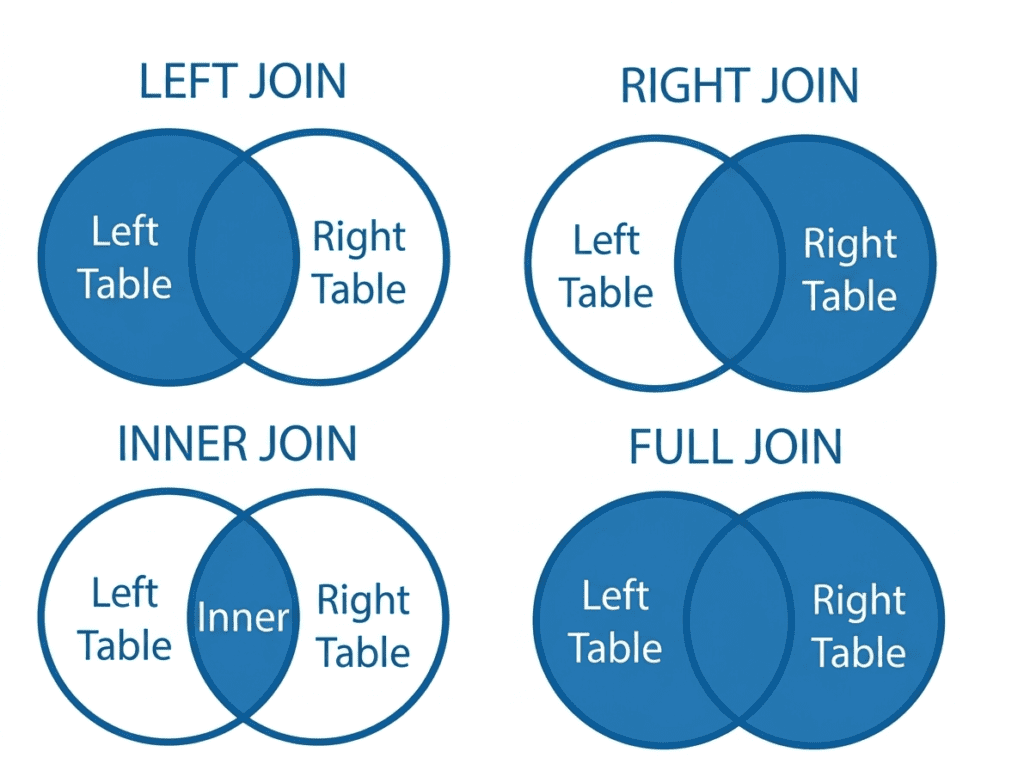
Definition of JOIN #
A JOIN is an SQL operation used to combine rows from two or more tables based on a related column (common key).
Why JOIN is Used #
In real databases, data is split into multiple tables to avoid duplication.
JOIN helps you:
- Combine related data
- Avoid redundancy
- Get meaningful results in one query
Sample Tables (Used in All Examples) #
employees #
| id | name | dept_id |
|---|---|---|
| 1 | Alex | 101 |
| 2 | John | 102 |
| 3 | Emma | 103 |
departments #
| dept_id | dept_name |
|---|---|
| 101 | Sales |
| 102 | HR |
| 104 | IT |
INNER JOIN #
Definition #
Returns only the rows that have matching values in both tables
Syntax #
SELECT columns
FROM table1
INNER JOIN table2
ON table1.column = table2.column;
Example
SELECT e.name, d.dept_name
FROM employees e
INNER JOIN departments d
ON e.dept_id = d.dept_id;
✔ Output:
- Alex → Sales
- John → HR
Emma excluded (no match)
LEFT JOIN (LEFT OUTER JOIN) #
Definition #
Returns all rows from the left table, and matched rows from the right
If no match → NULL
Example #
SELECT e.name, d.dept_name
FROM employees e
LEFT JOIN departments d
ON e.dept_id = d.dept_id;
Output:
- Alex → Sales
- John → HR
- Emma → NULL
RIGHT JOIN (RIGHT OUTER JOIN) #
Definition #
Returns all rows from the right table, and matched rows from the left
If no match → NULL
Example #
SELECT e.name, d.dept_name
FROM employees e
RIGHT JOIN departments d
ON e.dept_id = d.dept_id;
Output:
- Sales → Alex
- HR → John
- IT → NULL
FULL JOIN (FULL OUTER JOIN) #
Definition #
Returns all rows from both tables
Matches where possible, otherwise NULL
Example #
SELECT e.name, d.dept_name
FROM employees e
FULL JOIN departments d
ON e.dept_id = d.dept_id;
Output:
- Sales → Alex
- HR → John
- IT → NULL
FULL JOIN (FULL OUTER JOIN) #
Definition #
Returns all rows from both tables
Matches where possible, otherwise NULL
Example #
SELECT e.name, d.dept_name
FROM employees e
FULL JOIN departments d
ON e.dept_id = d.dept_id;
Output:
- Alex → Sales
- John → HR
- Emma → NULL
- NULL → IT
SELF JOIN #
Definition #
A table joined with itself to relate rows within the same table
Example Table #
| id | name | manager_id |
|---|---|---|
| 1 | Alex | NULL |
| 2 | John | 1 |
| 3 | Emma | 1 |
Query #
SELECT e.name AS employee, m.name AS manager
FROM employees e
LEFT JOIN employees m
ON e.manager_id = m.id;
✔ Output:
- John → Alex
- Emma → Alex
- Alex → NULL
CROSS JOIN #
Definition #
Returns all possible combinations of rows from both tables (Cartesian product)
Example #
SELECT e.name, d.dept_name
FROM employees e
CROSS JOIN departments d;
If:
- 3 employees
- 3 departments
Output = 9 rows (3 × 3)
Visual Understanding (Simple Logic) #
| Join Type | What You Get |
|---|---|
| INNER JOIN | Only matching data |
| LEFT JOIN | All left + matched right |
| RIGHT JOIN | All right + matched left |
| FULL JOIN | Everything from both |
| SELF JOIN | Table with itself |
| CROSS JOIN | All combinations |
Key Concept (Very Important) #
JOIN always uses a condition:
ON table1.column = table2.column
This is usually:
- Primary Key ↔ Foreign Key
Real-World Example #
Requirement:
- Show all employees with department names
- Even if department is missing
SELECT e.name, d.dept_name
FROM employees e
LEFT JOIN departments d
ON e.dept_id = d.dept_id;