
In the previous guides, we mastered how to iterate over sequences using the for loop and how to repeat actions based on conditions using the while loop.
But what happens when the data you are dealing with has multiple levels? For example, if you are tracking the scores of multiple students across multiple courses on AI Learner Tech, or trying to build a coordinates grid, a single loop isn’t enough.
To iterate over complex, multi-dimensional structures, Python allows you to place one loop inside another loop. This programming concept is known as a Nested Loop.
Moving Beyond Linear Iteration #
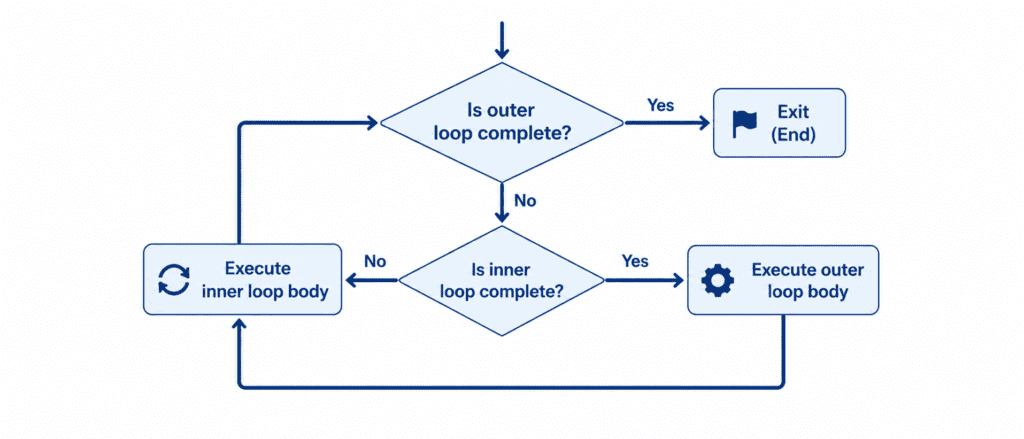
A nested loop has two main parts: an outer loop and an inner loop.
The mechanics are straightforward but require careful attention:
“For every single iteration of the outer loop, the inner loop executes its entire cycle from start to finish.”
If your outer loop runs 3 times and your inner loop runs 4 times, the code inside the inner loop will execute a total of $3 \times 4 = 12$ times. This makes nested loops incredibly powerful for generating grids, combinations, or parsing complex data tables.
Rules of Syntax and Indentation Control #
Just like nesting with conditional statements, spacing is everything when you nest loops in Python.
Python
for outer_item in outer_sequence:
    # Level 1 indentation (4 spaces)
    for inner_item in inner_sequence:
        # Level 2 indentation (8 spaces)
        print(outer_item, inner_item)
The outer loop begins at the left margin. Any code running inside this loop must be indented by four spaces.
When you place the inner loop within that indented space, it creates a second level of code execution. Consequently, the instructions running inside that inner loop must be indented by exactly eight spaces.
If you make a mistake with this alignment, Python will either execute your inner loop at the wrong time or throw an IndentationError.
Beginner to Advanced #
Let’s explore how to construct and control nested loops with practical, real-world examples.
Example: Generating Coordinates Grid #
In this beginner-friendly example, we will combine numbers to generate a basic $(x, y)$ coordinates grid.
for x in range(1, 4):
    for y in range(1, 3):
        print(f"(x: {x}, y: {y})", end=" ")
    print() # Moves to the next line after completing the inner loop
Output: #
(x: 1, y: 1) (x: 1, y: 2)
(x: 2, y: 1) (x: 2, y: 2)
(x: 3, y: 1) (x: 3, y: 2)
Example: Building a Multiplication Table Grid #
Let’s use nested for loops to generate a clean, readable math multiplication table grid from 1 to 3.
for i in range(1, 4):
    for j in range(1, 11):
        # Calculating and printing values horizontally
        print(f"{i * j:2}", end=" ")
    print() # Break line for the next table row
Output: #
 1  2  3  4  5  6  7  8  9 10
 2  4  6  8 10 12 14 16 18 20
 3  6  9 12 15 18 21 24 27 30
Example: Tracking Student Course Progress #
In this scenario, we use nested loops to iterate through a list of students on AI Learner Tech and print out their individual status for each course.
students = ["Sarim", "Ali"]
courses = ["Python Basics", "Data Science"]

for student in students:
    print(f"Checking records for student: {student}")

    for course in courses:
        print(f"  - Status for {course}: Completed")
    print("---") # Visual separator for each student
Output: #
Checking records for student: Sarim
  - Status for Python Basics: Completed
  - Status for Data Science: Completed
---
Checking records for student: Ali
  - Status for Python Basics: Completed
  - Status for Data Science: Completed
---
Example: Advanced Combinations with While and For Loops #
You don’t have to nest the same types of loops. You can combine a while loop with a for loop to build highly customizable execution logic.
batch_limit = 2
batch_number = 1

while batch_number <= batch_limit:
    print(f"Processing Course Batch {batch_number}")

    modules = ["Syntax", "Loops"]
    for module in modules:
        print(f"  * Activating module: {module}")

    batch_number += 1
    print()
Output: #
Processing Course Batch 1
  * Activating module: Syntax
  * Activating module: Loops

Processing Course Batch 2
  * Activating module: Syntax
  * Activating module: Loops
Challenge Questions for Practice #
Put your skills to the test with these practical exercises:
Challenge 1: Number Pattern Printer #
Write a program using nested for loops to print the following number pattern up to 4 rows:
1
1 2
1 2 3
1 2 3 4
Challenge 2: Total Matrix Sum #
Create a nested list (a matrix): matrix = [[1, 2], [3, 4], [5, 6]]. Use a nested loop to iterate through all the individual numbers inside the matrix, add them together, and print the total sum.
Challenge 3: Team Match Scheduler #
Set a list teams = ["Team A", "Team B", "Team C"]. Use nested loops to generate a complete list of matches where every team plays against every other team exactly once. (Hint: Prevent a team from playing against itself by using an if condition inside the inner loop).