
Python Strings Methods & Slicing #
Once you understand the basics of creating strings, the next step is learning how to manipulate and extract specific information from them. Whether you are extracting a username from an email address or cleaning up messy text data, Indexing, Slicing, and String Methods are the most powerful tools at your disposal.
String Indexing: Accessing Individual Characters #
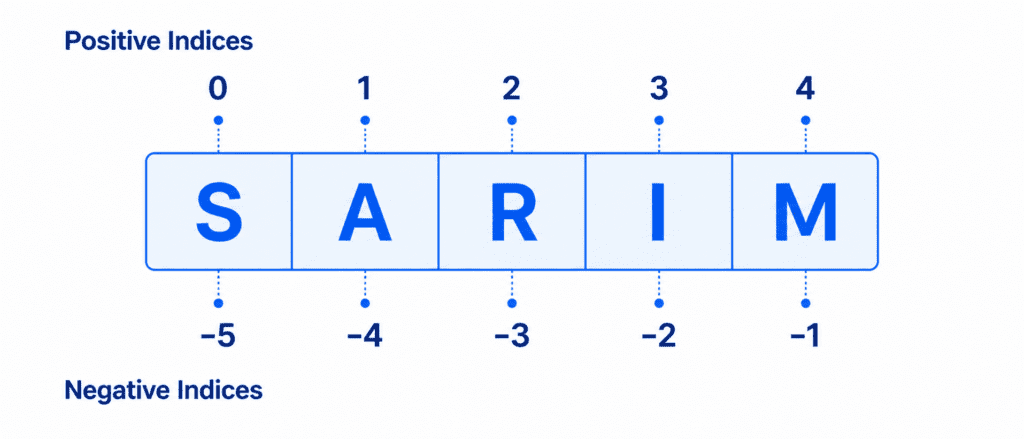
In Python, strings are ordered sequences of characters. This means that every character in a string has a specific position, known as its index.
You can access any single character from a string by placing its index inside square brackets
Positive Indexing (Starting from 0) #
Python starts counting indices from 0 for the first character, moving from left to right.
brand = "Sarim"

# Accessing characters using positive indices
print(brand[0])  # Outputs: S
print(brand[2])  # Outputs: r
Negative Indexing (Starting from -1) #
You can also access characters from right to left using negative numbers. The last character always has an index of -1.
# Accessing characters using negative indices
print(brand[-1])  # Outputs the last character: m
print(brand[-3])  # Outputs: r
String Slicing: Extracting Substrings #
If you want to extract a specific part (a substring) of a string instead of just a single character, you use Slicing.
The syntax for slicing is: string_name[start:stop:step]
start: The index where the slice begins (inclusive).stop: The index where the slice ends (exclusive—it stops one character before this index).step: (Optional) Determines the increment between each character. Default is1.
text = "AI Learner Tech"

# 1. Basic Slice: Get characters from index 3 to 9 (stops at 10)
print(text[3:10])  # Outputs: Learner

# 2. Slice from the start
print(text[:2])    # Outputs: AI (Same as text[0:2])

# 3. Slice to the end
print(text[11:])   # Outputs: Tech (Starts at index 11 and goes to the end)
Step Slicing and Reversing #
You can use the step value to skip characters or reverse a string completely.
# Skip every second character
numbers = "12345678"
print(numbers[::2])  # Outputs: 1357

# Reverse a string instantly using a negative step
name = "Sarim"
print(name[::-1])    # Outputs: miraS
How do we modify strings? #
If you want to modify a string, you must create a new string and assign it to the same variable name.
# Correct way to update
platform = "AI Learner Tech"
platform = "New " + platform[3:]
print(platform)  # Outputs: New Learner Tech
Most Common String Methods #
Python comes with a rich set of built-in methods that allow you to analyze and change the format of your strings instantly. Because strings are immutable, these methods do not change the original string; they return a completely new one.
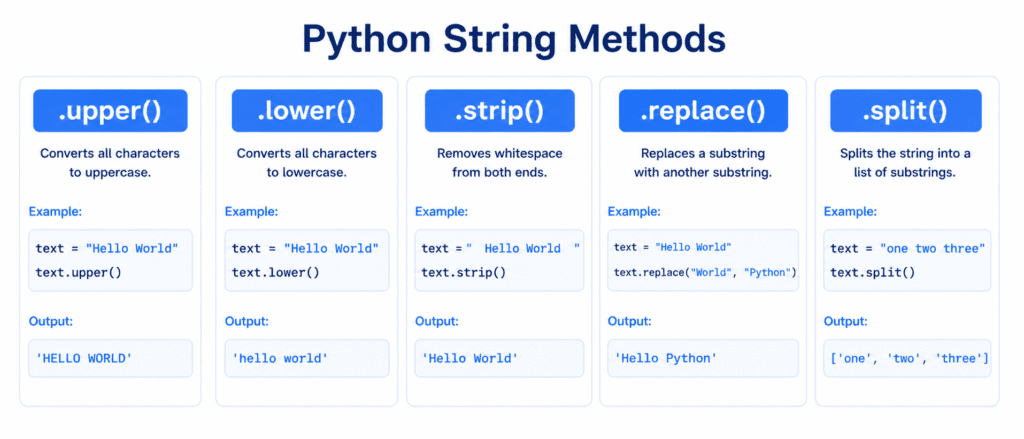
A. Changing Case (.upper(), .lower(), .capitalize())
message = "hi sarim"

print(message.upper())       # Outputs: HI SARIM
print(message.capitalize())  # Outputs: Hi sarim
B. Removing Whitespaces (.strip()) #
This method removes any leading or trailing spaces from the string. It is highly useful when cleaning up user input.
raw_input = "   AI Learner Tech   "
cleaned_input = raw_input.strip()

print(cleaned_input)  # Outputs: AI Learner Tech
C. Replacing Text (.replace()) #
Replaces all occurrences of a specific phrase or character with another.
old_text = "I love Java"
new_text = old_text.replace("Java", "Python")

print(new_text)  # Outputs: I love Python
D. Splitting Strings (.split())
Splits a string into a List of substrings based on a separator (default is a space).
data = "Python,AI,DataScience"
words = data.split(",")

print(words)  # Outputs: ['Python', 'AI', 'DataScience']
Modern String Formatting (f-strings) #
The cleanest and most efficient way to insert variables directly into a string is by using f-strings (formatted string literals). All you need to do is put the letter f before the quotes and place your variables inside curly braces {}.
name = "Sarim"
course = "Python"

# Creating a dynamic message
welcome_message = f"Hello {name}, welcome to our {course} course!"
print(welcome_message)
Output:
Hello Sarim, welcome to our Python course!
Checklist for Advanced Strings #
Review this quick reference to keep these concepts fresh:
| Operation / Method | Syntax Example | Expected Output / Purpose |
| Get Character | name[0] | Returns the first character. |
| Extract Substring | text[0:2] | Returns a portion of text. |
| Reverse String | text[::-1] | Reverses text completely. |
| Replace Word | text.replace("A", "B") | Replaces old characters with new ones. |
| Format Variables | f"Hello {name}" | Inserts variables into text cleanly. |