
ROC Curve and AUC Score #
Reveal how well your model separates positives from negatives. Lower the threshold, and you catch more fraud—but also create more false alarms. ROC shows the trade-off, and AUC helps pick the winner.
The Problem #
Most models don’t just say YES or NO. They give a probability. “90% chance this is fraud.”
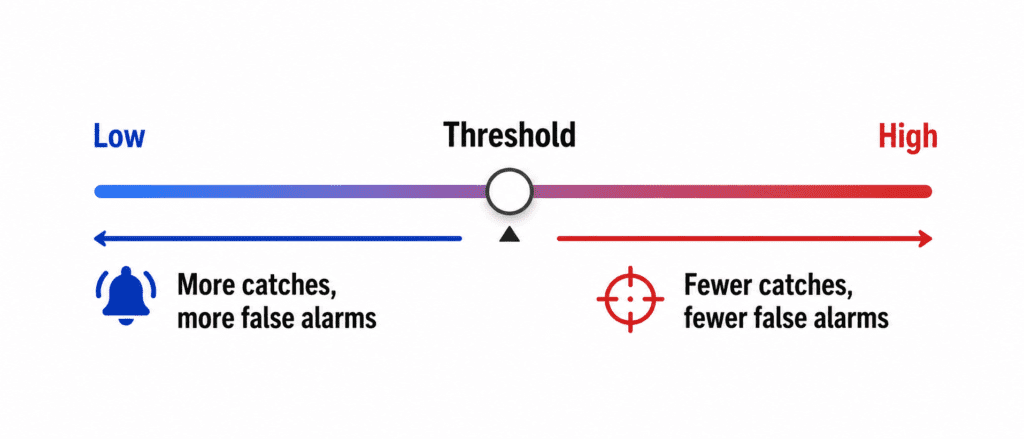
You decide a threshold. Above 50%? Above 70%?
Lower threshold → Catch more fraud (good). More false alarms (bad).
Higher threshold → Fewer false alarms (good). Miss more fraud (bad).
ROC curve visualizes this whole trade-off.
ROC Curve (One Sentence) #
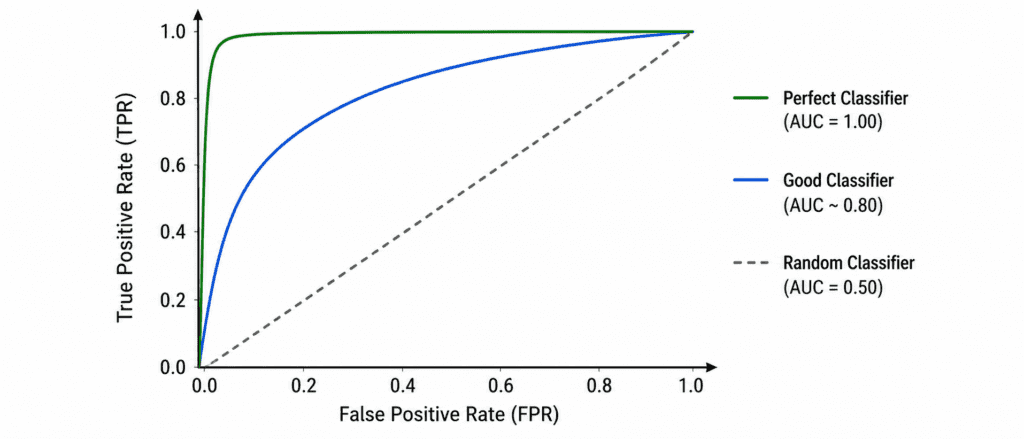
A plot showing how well your model separates YES from NO at every possible threshold.
The two lines:
- X-axis = False Positive Rate (False alarms)
- Y-axis = True Positive Rate (Catches)
Perfect model: Curve goes straight up, then right. Hits top-left corner.
Random model: Diagonal straight line from bottom-left to top-right.
Good model: Curve bends toward top-left.
AUC (Area Under the Curve) #
One number summary of ROC curve.
| AUC Score | Meaning |
|---|---|
| 1.0 | Perfect model |
| 0.9 – 0.99 | Excellent |
| 0.8 – 0.89 | Good |
| 0.7 – 0.79 | Fair |
| 0.6 – 0.69 | Poor |
| 0.5 | Random guessing (useless) |
| < 0.5 | Worse than random (something is wrong) |
Simple rule: Higher AUC = Better model.
One Line of Code #
from sklearn.metrics import roc_auc_score

auc = roc_auc_score(y_true, y_proba)
print(f"AUC: {auc:.3f}")
When to Use #
| Use AUC When | Don’t Use AUC When |
|---|---|
| Comparing two models | Dataset is tiny |
| Class is imbalanced | Need exact threshold, not comparison |
| You don’t know the right threshold yet | Classes are perfectly balanced (accuracy fine) |
Quick Example #
Fraud detection. 99% normal, 1% fraud.
Model A AUC = 0.92
Model B AUC = 0.88
Model A wins. Better at separating fraud from normal at all thresholds.