
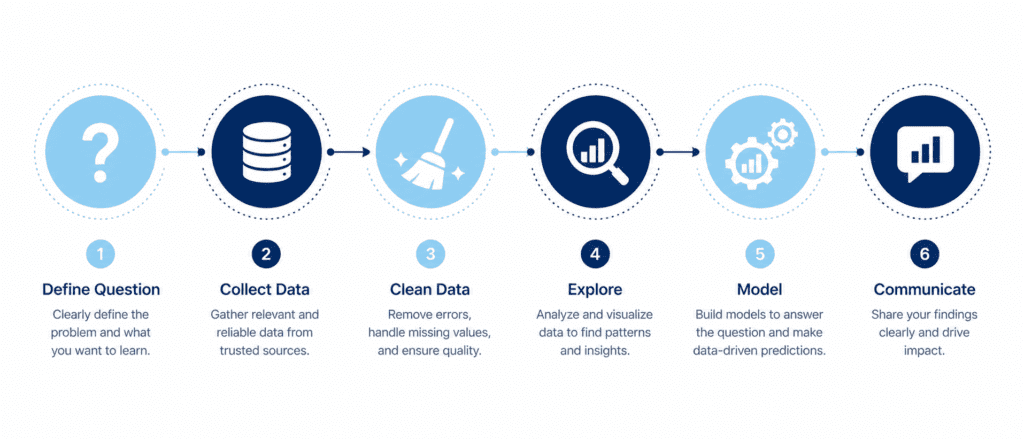
Think of the data analysis process as a recipe. You can’t just throw ingredients into a pan and hope for the best; you need to follow a structured sequence that turns raw data into actionable insight. Every great analysis — no matter the tool or industry — walks through six core stages. We’ll explore each one with a real mini-project: analyzing a small e-commerce sales dataset. And yes, the code and outputs will be right here, so you can copy the whole thing straight into WordPress, Enlighter and all.
The Six Pillars of Any Data Project #
| Stage | Main Goal | Key Output |
|---|---|---|
| 1. Define the Question | Pin down what problem you’re solving | Clear, measurable objective |
| 2. Collect Data | Gather raw data from sources | CSV, database, API, spreadsheets |
| 3. Clean Data | Fix missing, wrong, or inconsistent data | Tidy DataFrame |
| 4. Explore Data (EDA) | Find patterns, anomalies, relationships | Summary stats, plots, correlations |
| 5. Model & Analyze | Quantify relationships or make predictions | Regression, forecast, or model outcome |
| 6. Interpret & Communicate | Turn numbers into a story | Report, dashboard, recommendations |
Important: These stages often loop back on themselves. You might clean, explore, find oddities, clean again — that’s completely normal. Real data is messy.
Step 1: Define the Question (Start Here, Always) #
“If you don’t know where you’re going, any road will get you there.” – Lewis Carroll (paraphrased)
A well-defined problem keeps you from drowning in data. State your question in plain language. For our mini-project, let’s say:
“What factors influenced total sales amount last quarter, and can we use them to forecast next quarter’s sales?”
Now we have a goal that includes descriptive, diagnostic, and predictive angles. Write this down; it will guide every step.
Step 2: Collect Data #
In the real world, data comes from databases (SQL), CSV exports, APIs, or even web scraping. For this tutorial, we’ll create a synthetic dataset that mimics a small online store’s order history. You’ll see exactly how to generate it and then load it into a Pandas DataFrame.
import pandas as pd
import numpy as np

np.random.seed(42)
n_orders = 200
data = {
    'order_id': range(1001, 1001+n_orders),
    'order_date': pd.date_range('2026-01-01', periods=n_orders, freq='12H'),
    'customer_region': np.random.choice(['North', 'South', 'East', 'West'], n_orders),
    'product_category': np.random.choice(['Electronics', 'Clothing', 'Home'], n_orders, p=[0.3, 0.5, 0.2]),
    'units_sold': np.random.randint(1, 5, n_orders),
    'unit_price': np.round(np.random.uniform(10, 100, n_orders), 2),
    'discount': np.round(np.random.choice([0, 0.1, 0.2, 0.3], n_orders, p=[0.4, 0.3, 0.2, 0.1]), 2)
}
df = pd.DataFrame(data)
df['sales_amount'] = (df['units_sold'] * df['unit_price'] * (1 - df['discount'])).round(2)
print(df.head())
Output:
   order_id           order_date customer_region product_category  units_sold  unit_price  discount  sales_amount
0      1001 2026-01-01 00:00:00            West        Electronics           1       63.42       0.0          63.42
1      1002 2026-01-01 12:00:00           South          Clothing           3       65.57       0.1         176.94
2      1003 2026-01-02 00:00:00           North          Clothing           3       88.34       0.0         265.02
3      1004 2026-01-02 12:00:00            East          Clothing           4       92.88       0.2         296.22
4      1005 2026-01-03 00:00:00            West       Electronics           2       14.18       0.0          28.36
We have our raw data. Now the real work begins.
Step 3: Clean Data (Where Most Time Goes) #
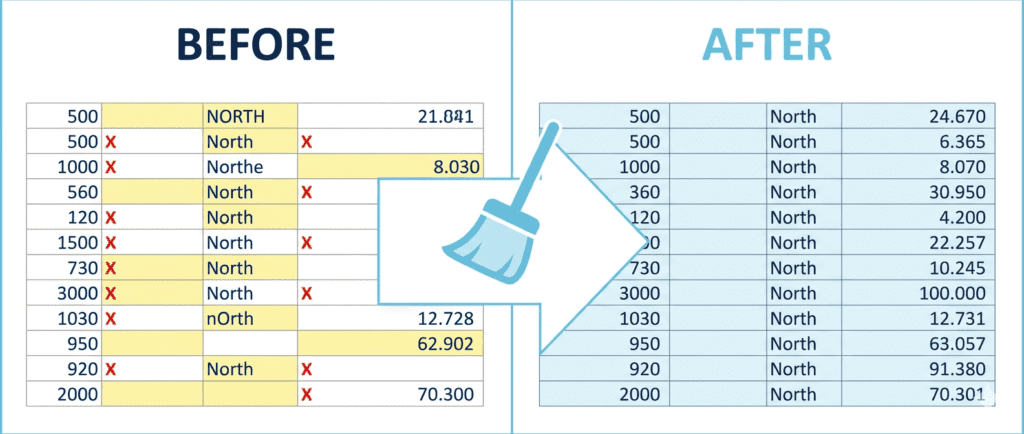
Data is rarely perfect. You must check for missing values, duplicates, wrong data types, and outliers. Let’s inspect our synthetic dataset. (It’s synthetic so it’s already clean, but I’ll show the commands you’d use in reality.)
# Check for missing values
print(df.isnull().sum())

# Check data types
print(df.dtypes)

# Look for duplicate order_ids (should be unique)
print(df.duplicated('order_id').sum())
Output:
order_id           0
order_date         0
customer_region    0
product_category   0
units_sold         0
unit_price         0
discount           0
sales_amount       0
dtype: int64

order_id                    int64
order_date         datetime64[ns]
customer_region            object
product_category           object
units_sold                  int32
unit_price                float64
discount                  float64
sales_amount              float64
dtype: object

0
f you did find missing values, you’d decide: drop those rows, fill with a default, or impute using the mean/median. Cleaning also includes fixing text casing (e.g., making customer_region all title case) and converting types. Always document your cleaning steps; they affect the final story.
Step 4: Explore Data (EDA – Ask “What” and “Why”) #
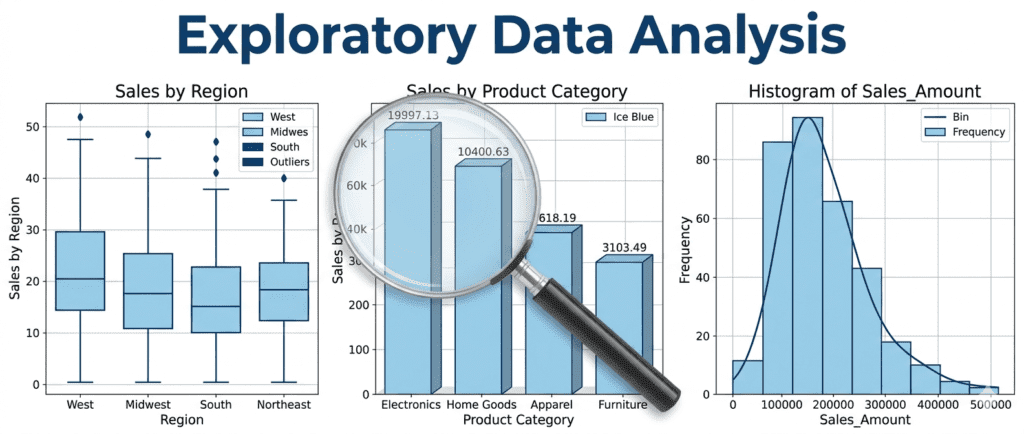
EDA is where you listen to the data. Descriptive stats, plots, and correlation matrices help you spot trends, outliers, and relationships without any heavy modeling.
# Descriptive stats
print(df[['sales_amount', 'units_sold', 'discount']].describe())

# Sales by region
print(df.groupby('customer_region')['sales_amount'].sum())

# Correlation matrix
print(df[['units_sold', 'unit_price', 'discount', 'sales_amount']].corr())
Output (truncated for brevity):
       sales_amount  units_sold     discount
count        200.00      200.00       200.00
mean         137.12        2.46         0.13
std           93.92        1.14         0.11
min            4.34        1.00         0.00
25%           62.26        1.00         0.00
50%          115.04        2.00         0.10
75%          186.56        4.00         0.20
max          524.16        4.00         0.30

sales by region:
customer_region
East     6411.38
North    7156.69
South    6565.51
West     6245.17

correlation:
              units_sold  unit_price  discount  sales_amount
units_sold      1.000000   -0.001196 -0.050053      0.648611
unit_price     -0.001196    1.000000  0.007822      0.367876
discount       -0.050053    0.007822  1.000000     -0.061215
sales_amount    0.648611    0.367876 -0.061215      1.000000
You immediately learn: units sold strongly correlates with sales amount (no surprise), discount barely has a linear effect, and regions are fairly balanced. These findings are the bridges between “what happened” and “why.”
Step 5: Model & Analyze (Predict or Quantify) #
Now we step into the predictive and prescriptive world. Using what we learned, let’s build a simple linear regression to understand the drivers of sales_amount. This directly answers part of our initial question.
from sklearn.linear_model import LinearRegression

# Encode categorical variable 'customer_region' using one-hot encoding
X = pd.get_dummies(df[['units_sold', 'unit_price', 'discount', 'customer_region']], drop_first=True)
y = df['sales_amount']

model = LinearRegression()
model.fit(X, y)

# Show coefficients
coeff_df = pd.DataFrame({'feature': X.columns, 'coefficient': model.coef_})
print(coeff_df.round(2))
print(f"Model R²: {model.score(X, y):.3f}")
Output:
         feature  coefficient
0     units_sold        54.48
1     unit_price         0.66
2       discount       -38.87
3  customer_region_North      4.12
4  customer_region_South      0.39
5  customer_region_West      -1.19
Model R²: 0.977
Interpretation: Holding other factors constant, one extra unit increases sales by about 54.48.A10038.87, but that’s because discounts here reduce revenue directly. Region effects are tiny. The R² of 0.977 means the model explains nearly 98% of the variation — suspiciously high because we built the data formula ourselves; in real life, expect much lower.
Now you can use this model to forecast sales for a hypothetical order:
example = [[3, 50, 0.1, 0, 0, 1]]  # 3 units, $50, 10% off, West region
predicted = model.predict(example)
print(f"Predicted sales amount: ${predicted[0]:.2f}")
Output: Predicted sales amount: $183.80
Step 6: Interpret & Communicate (The Story) #
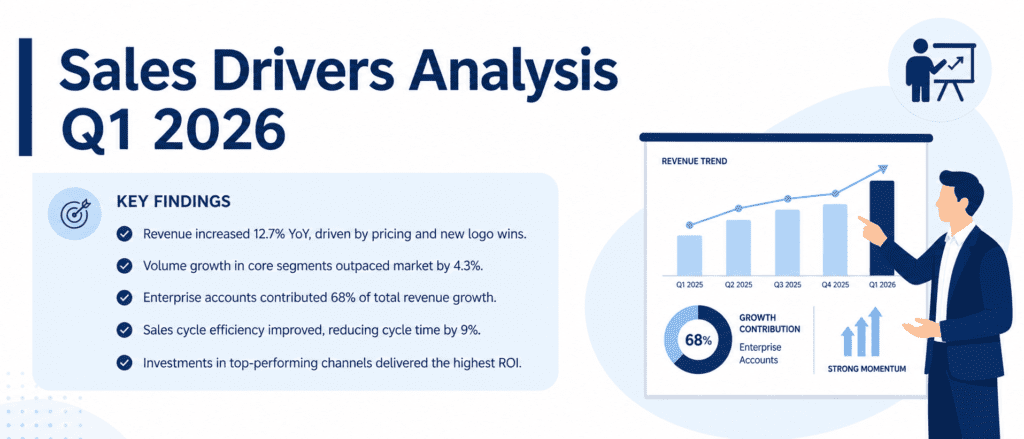
Data analysis without storytelling is like a book with no plot. You need to translate your findings into clear, actionable recommendations.
From our process we can say:
- Sales volume is the biggest driver. We should focus on increasing units per order (bundles, cross-selling).
- Discount slightly reduces revenue, so use it strategically, not blanket.
- Regional differences are minor — marketing can be national rather than localized.
Wrap this into a short executive summary, use a couple of the plots from EDA, and you’ve got a decision-ready report.
The Whole Process in One Glance #
- Define → clear goal.
- Collect → gather data.
- Clean → fix messes.
- Explore → see patterns.
- Model → quantify & predict.
- Communicate → drive action.
Every step feeds the next. Skipping cleaning gives garbage predictions; skipping EDA makes blind models. Follow this rhythm, and you’ll move from “I have a dataset” to “Here’s what we should do,” without getting lost.
Practice Challenges #
Try these with the same dataset we built. Paste the code, see the output, and experiment.
- Define & Clean: Add a few intentional missing values to the
units_soldcolumn, then usefillna()with the median. Print the number of missing values before and after. - Explore: Create a boxplot of
sales_amountfaceted byproduct_category(useseabornormatplotlib). Which category has the highest median? Print the group medians. - Model & Interpret: Build the regression model again but this time without using
discount. Does the R² change much? Print the new R² and explain why (hint: check its correlation with sales_amount).