
Syntax Rules in Python #
When we learn any new language—like English or Urdu—we have to follow certain grammar rules so that others can understand us. Similarly, in programming, syntax is the grammar of Python.
Syntax Rules in Python are the set of rules that tell the Python interpreter how to read, understand, and execute your code. If you break these rules, Python will throw a SyntaxError and stop running.
The Very First Rule: Line-by-Line Execution #
Python reads and executes code from top to bottom, one line at a time. Unlike other programming languages, you do not need to add a semicolon (;) at the end of a line to finish it.
Basic Example: #
print("Company: AI Learner Tech")
print("Field: Artificial Intelligence")
print("Interest: AI & Robotics")
Output:
Company: AI Learner Tech
Field: Artificial Intelligence
Interest: AI & Robotics
Python Comments: Writing Hidden Notes #
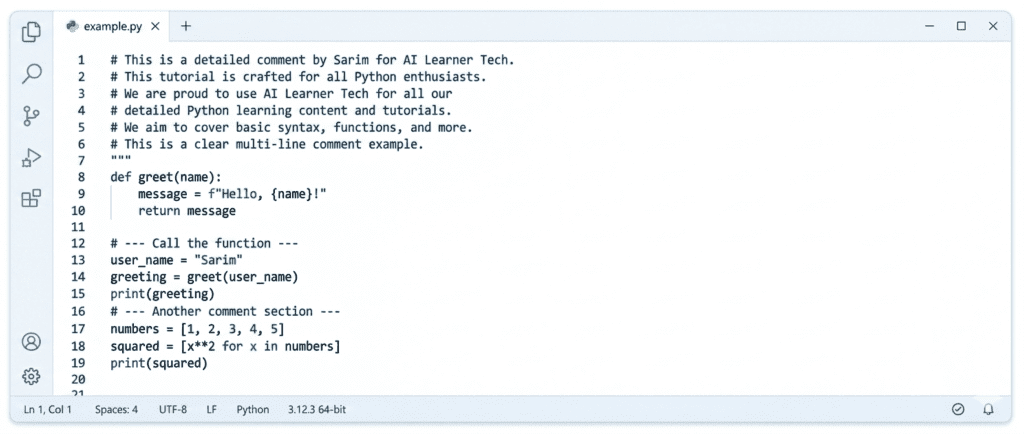
Comments are notes written inside the code for humans to read. Python completely ignores comments; they do not get executed. They are used to explain what the code does so that other developers (or you, in the future) can understand it.
Single-Line Comments #
To write a single-line comment, use the hash symbol (#). Anything you write after the # on that line is ignored by Python.
# This is a comment explaining the print statement
print("Welcome to Python Syntax Guide")  # You can also write comments here
Multi-Line Comments #
If you want to write a long note that spans multiple lines, you can either put # at the start of every line, or use triple quotes (""" or ''').
"""
This is a multi-line comment.
We can use this to explain long scripts,
functions, or complex logic.
"""
print("Multi-line comments are easy!")
Indentation: The Most Important Rule in Python #
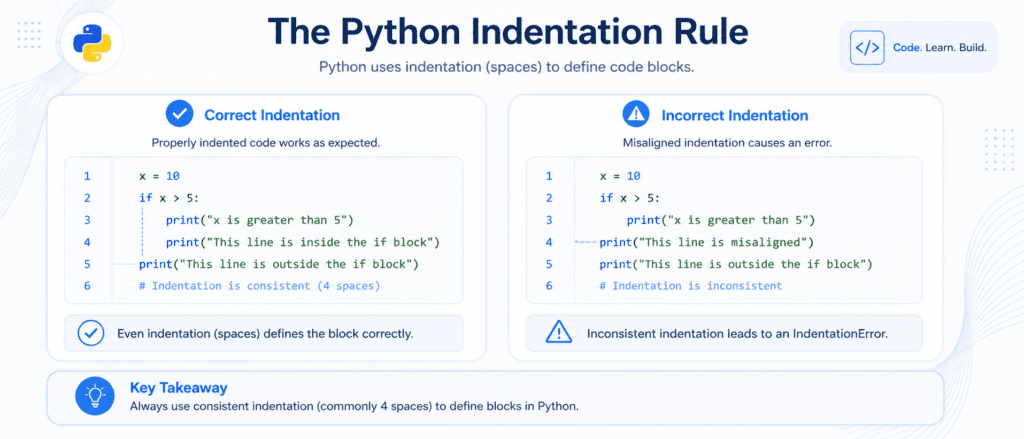
In languages like C, C++, and Java, developers use curly braces {} to define a block of code (like a loop or a function). Python does not use curly braces. Instead, it uses indentation (empty spaces at the beginning of a line).
If your indentation is wrong, Python will stop and show an IndentationError.
Correct Indentation Example:
if 5 > 2:
    print("Five is greater than two!")  # This line has 4 spaces (or 1 Tab)
Incorrect Indentation (Throws an Error):
if 5 > 2:
print("Five is greater than two!")  # ERROR! No indentation space.
Pro Tip: The standard practice in the Python industry is to use 4 spaces for indentation. Most modern text editors (like VS Code) automatically convert a press of the Tab key into 4 spaces for you.
Python Variables: Storing Information #
Variables are like containers used to store data values. Creating a variable in Python is extremely simple because you don’t need to specify what kind of data goes inside it.
# Creating variables
website_name = "AI Learner Tech"  # A string variable
established_year = 2024           # An integer variable
is_active = True                  # A boolean variable

print(website_name)
print(established_year)
Strict Rules for Naming Variables: #
To make sure your variables are valid, you must follow these syntax rules:
- A variable name must start with a letter or the underscore character (
_). - It cannot start with a number (e.g.,
1variableis invalid). - It can only contain alpha-numeric characters and underscores (
A-z,0-9, and_). - Variable names are case-sensitive (
Age,age, andAGEare three different variables).
Case Sensitivity in Python #
Python treats uppercase and lowercase letters differently. This applies to variable names, function names, and built-in keywords.
# These are two completely different variables
user = "Sarim"
User = "Ali"

print(user)  # Outputs: Sarim
print(User)  # Outputs: Ali
Because Python is case-sensitive, built-in keywords like False, None, and True must always start with a capital letter. Writing true or false in lowercase will result in a NameError.
Semicolons and Multi-Line Statements #
As we discussed earlier, Python doesn’t require semicolons to end a line. However, there are two special syntax rules you should know:
Writing Multiple Statements on One Line (Using Semicolons) #
If you want to write multiple commands on a single line, you can separate them with a semicolon:
x = 5; y = 10; print(x + y)
(Note: While this is valid syntax, it is generally avoided because it makes the code harder to read.)
Writing a Single Statement on Multiple Lines (Using Backslash) #
If you have a very long line of code and want to break it up to make it easier to read, you can use a backslash (\) as a line-continuation character:
total_sum = 10 + 20 + 30 + \
            40 + 50 + 60
print(total_sum)
Checklist of Python Syntax Rules:
| Syntax Element | Rule to Remember | Example |
| End of Statement | No semicolons needed; Python uses a new line. | print("Hello") |
| Indentation | Use 4 spaces or 1 Tab to define blocks. | Under if, for, def |
| Comments | Use # for single-line, """ for multi-line. | # My comment |
| Case Sensitivity | Variable is NOT the same as variable. | x = 1 vs X = 1 |
| Quotes for Text | Use single (') or double (") quotes. | "Hello" or 'Hello' |