
In real-world programming, decisions are rarely just black and white; that is why the Python elif statement becomes so essential when you have more than two possibilities to consider. For example, on a learning platform like AI Learner Tech, when calculating user grades, you don’t just say a student either passed or failed. You might want to assign specific grades like an A, B, C, or F based on their exact marks.
Python elif Statement in Python #
If you use simple conditional structures, you can only handle two branches: one path for True and one for False. To solve the problem of testing multiple distinct conditions in a single logical chain, Python provides the elif statement, which is short for “else if”.
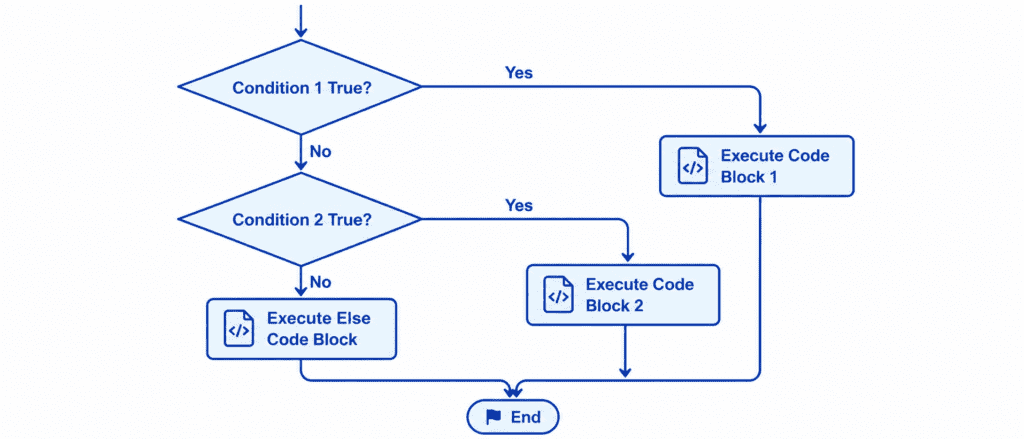
The elif statement sits perfectly between the initial if test and the final else catch-all block. It allows you to say:
“If the first condition is True, run this code. Else, if the second condition is True, run that code instead. If none of these are True, run the final fallback code.”
This creates a smooth, continuous chain where Python checks each condition step-by-step from top to bottom. The moment Python finds a condition that evaluates to True, it executes that specific block of code and immediately exits the entire chain, ignoring all the other tests below it.
Rules of Syntax and Proper Indentation #
When building a multi-condition chain, Python enforces a strict structure to keep the logic clean and error-free.
if score >= 90:
    print("Grade: A")
elif score >= 80:
    print("Grade: B")
elif score >= 70:
    print("Grade: C")
else:
    print("Grade: F")
The sequence always starts with a single if statement at the top. Below the if block, you can include as many elif statements as your program needs. Finally, you can add an optional else block at the very bottom to catch any situations that did not match the conditions above.
Every single keyword—if, elif, and else—must align perfectly on the left margin without any indentation. Only the code blocks that execute under these keywords are indented by four spaces. This tells Python exactly where each branch starts and stops.
Let’s Write Code: Beginner to Advanced #
Let’s explore how this multi-step evaluation works with practical, real-world Python examples.
Example: Basic Traffic Light Simulator #
In this beginner-friendly example, we will check the color of a traffic light and tell the driver exactly what action to take.
light_color = "Yellow"

if light_color == "Red":
    print("Action: Stop immediately.")
elif light_color == "Yellow":
    print("Action: Slow down and prepare to stop.")
elif light_color == "Green":
    print("Action: Go ahead safely.")
else:
    print("Action: Invalid light color detected. Drive with caution.")

print("Traffic control check completed.")
Output: #
Action: Slow down and prepare to stop.
Traffic control check completed.
Example: Student Grading System #
Let’s build a practical grade calculator for a course. This program evaluates a student’s marks and assigns an academic grade based on distinct score brackets.
student_marks = 78

if student_marks >= 90:
    print("Grade: A+")
elif student_marks >= 80:
    print("Grade: A")
elif student_marks >= 70:
    print("Grade: B")
elif student_marks >= 60:
    print("Grade: C")
else:
    print("Grade: F (Needs Improvement)")
Output: #
Grade: B
Example: Website User Discount System #
In this scenario, we will calculate the final price of a course on AI Learner Tech based on a user’s subscription tier. This demonstrates how to update numeric values dynamically using a multi-branch chain.
base_price = 100
membership_tier = "Gold"

if membership_tier == "Platinum":
    discount = 30
    print("Premium Tier Detected: 30% discount applied.")
elif membership_tier == "Gold":
    discount = 20
    print("Value Tier Detected: 20% discount applied.")
elif membership_tier == "Silver":
    discount = 10
    print("Basic Tier Detected: 10% discount applied.")
else:
    discount = 0
    print("Standard Tier: No discount applied.")

final_price = base_price - (base_price * discount / 100)
print(f"Original Price: ${base_price}")
print(f"Your Price after discount: ${final_price}")
Output: #
Value Tier Detected: 20% discount applied.
Original Price: $100
Your Price after discount: $80.0
Example: Combining Advanced Operators in Multi-Branch Chains #
For advanced logic, you can combine membership tests using the in keyword and logical operators like and directly within your elif conditions.
purchased_courses = ["Data Science", "Python Masterclass"]
new_course_request = "AI Deep Dive"
account_balance = 150
course_price = 120

if new_course_request in purchased_courses:
    print("Access Denied: You have already purchased this course.")
elif new_course_request not in purchased_courses and account_balance >= course_price:
    print("Access Approved: Processing your enrollment...")
    account_balance -= course_price
    print(f"Enrollment Successful. Remaining Balance: ${account_balance}")
else:
    print("Access Denied: Insufficient balance to enroll in this course.")
Output: #
Access Approved: Processing your enrollment...
Enrollment Successful. Remaining Balance: $30
Challenge Questions for Practice #
Try to write out solutions for these practical problems on your own:
Challenge 1: Temperature Monitor #
Create a variable temperature = 28. Write an if-elif-else chain that checks the value. If the temperature is above 35, print "It is extremely hot outside". If it is between 20 and 35, print "The weather is pleasant". If it is below 20, print "It is quite cold outside".
Challenge 2: Speed Limit Fine Calculator #
Set a variable vehicle_speed = 85. Write a conditional chain that checks the speed against the limit of 60. If the speed is up to 60, print "No fine". If it is between 61 and 80, print "Standard fine of $50 applied". If it is above 80, print "Severe speeding! Fine of $150 applied".
Challenge 3: Age Category Identifier #
Create a variable person_age = 14. Use an if-elif-else chain to determine their age category. If the age is 60 or above, print "Senior Citizen". If it is between 20 and 59, print "Adult". If it is between 13 and 19, print "Teenager". For any age below 13, print "Child".