
In the previous guide, we mastered the basic if statement, but now we will explore how to handle alternative logic using the Python if-else statement. But what happens if that condition turns out to be False?
In real-world decision-making, we almost always have a backup plan. For instance, on an educational platform like AI Learner Tech:
“If a student passes a test, unlock the certificate. Else (otherwise), show them a review guide.”
In programming, this alternative route is handled by the else statement. It guarantees that no matter what happens, your code will execute one of two possible outcomes.
In this detailed tutorial, we will explore the syntax of the if-else statement, understand its flow, and work through examples from basic to advanced levels.
What is the Python if-else statement? #
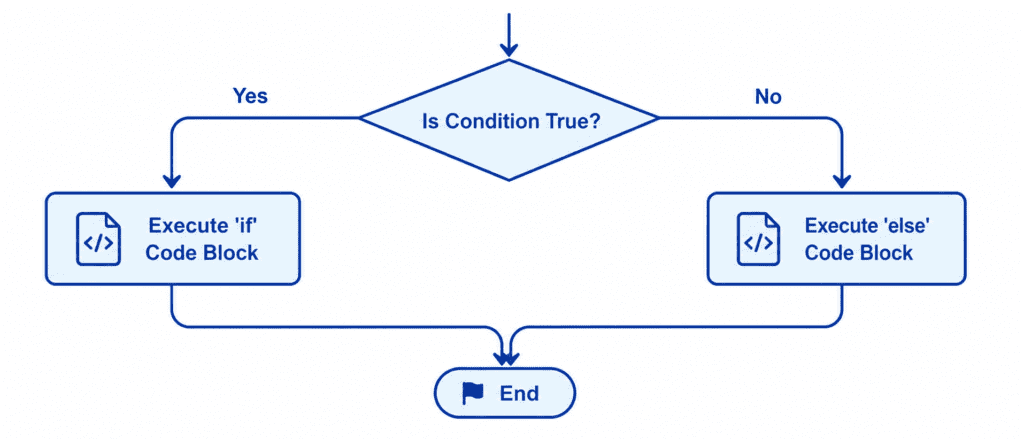
The if-else statement evaluates a condition.
- If the condition is True, Python runs the code block directly under the
ifkeyword and completely ignores theelseblock. - If the condition is False, Python skips the
ifcode block and runs the alternative code inside theelseblock instead.
Rules of Syntax & Proper Indentation #
Python requires a very specific syntax when writing an if-else block. Let’s break down the exact rules to avoid syntax errors:
if condition:
    # Code to run if the condition is True
    # Must be indented (4 spaces)
else:
    # Code to run if the condition is False
    # Must be indented (4 spaces)
The 4 imp Rules: #
- The
ifCondition: Must be placed at the top and end with a colon (:). - First Indented Block: The code directly below the
ifmust be indented by 4 spaces. - The
elseKeyword: Must be aligned perfectly with theifkeyword. It never takes a direct condition. Writingelse x < 5:is a syntax error. - Second Indented Block: The code directly below the
elsekeyword must also be indented by 4 spaces.
Let’s Write Code: Beginner to Advanced #
Let’s look at real-world coding examples that step up in difficulty.
Example 1: Age Checker for Account Creation (Beginner) #
In this entry-level scenario, we will write a program that checks whether a user is old enough to create an account.
user_age = 15
minimum_age = 18

if user_age >= minimum_age:
    print("Access Granted: You are old enough to create an account.")
    print("Welcome to AI Learner Tech!")
else:
    print("Access Denied: You are too young to create an account.")
    print(f"Please try again in {minimum_age - user_age} years.")
Output: #
Access Denied: You are too young to create an account.
Please try again in 3 years.
Example 2: Checking Even or Odd Numbers (Intermediate) #
Let’s build a classic utility. We will check if a given number is Even or Odd using the Modulus Operator (%). The modulus operator returns the remainder of a division. If a number divided by 2 leaves a remainder of 0, it is even; otherwise, it is odd.
number = 27

# Check if the number is divisible by 2
if number % 2 == 0:
    print(f"The number {number} is Even.")
else:
    print(f"The number {number} is Odd.")
Output: #
The number 27 is Odd.
Example 3: String Matching for Premium Content Access (Intermediate) #
We can compare user inputs directly against a set of valid strings to grant access.
subscription_status = "Free"

if subscription_status == "Premium":
    print("Status: Verified.")
    print("Directly downloading Advanced Python notes...")
else:
    print("Status: Restricted access.")
    print("Please upgrade your subscription to access premium notes.")
Output: #
Status: Restricted access.
Please upgrade your subscription to access premium notes.
Example 4: Verifying Student Attendance & Marks (Advanced) #
Let’s write a program that evaluates if a student is eligible to sit for an exam. This requires combining multiple conditions using logical operators like and.
attendance_percentage = 82
completed_assignments = True

# Student must have more than 75% attendance AND all assignments submitted
if attendance_percentage >= 75 and completed_assignments == True:
    print("Exam Eligibility Status: Approved")
    print("You will receive your admit card via email shortly.")
else:
    print("Exam Eligibility Status: Rejected")
    print("Reason: Either your attendance is below 75% or assignments are incomplete.")
Output: #
Exam Eligibility Status: Approved
You will receive your admit card via email shortly.
Summary Cheat Sheet #
Here is a simple syntax and logic breakdown to review when coding:
| Scenario | Code Structure | Outcome Description |
| Numeric Comparison | if age >= 18:else: | Executes the if block if old enough, else executes the else block. |
| String Match | if status == "Active":else: | Matches strings exactly. The else block catches all other inputs. |
| Even/Odd Check | if num % 2 == 0:else: | Checks divisibility. else handles any number with a remainder. |
| Dual Logic Test | if test1 and test2:else: | Both conditions must be met to bypass the else code block. |
Challenge Questions for Practice #
Put your skills to the test by creating solutions for these real-world problems:
Challenge 1: Logged In vs Guest #
Create a Boolean variable is_logged_in = False. Write an if-else statement that prints "Welcome back, Sarim!" if it is True, and prints "Please log in to continue." if it is False.
Challenge 2: Passing Grade Calculator #
Create a variable score = 45. Write an if-else statement that checks if the score is greater than or equal to 50. If it is, print "Congratulations, you passed!". If it is not, print "You need 50 marks to pass. Better luck next time!".
Challenge 3: Website Maintenance Mode #
Set a string variable system_status = "Online". Write an if-else statement that checks if the status matches "Online". If it does, print "Site is fully operational". If it doesn’t, print "The site is undergoing maintenance. We will be back shortly!". Use a value other than "Online" to test the else execution.