
Python if statement is used when you want to make your code intelligent and take decisions based on specific conditions. In the real world, decisions are made based on specific conditions. For example, on AI Learner Tech, a user is only allowed to access advanced lessons if they are logged in, or a student passes a quiz only if their score is above a certain mark.
In programming, this decision-making process is called Conditional Logic, and it starts with the simplest and most powerful tool: the if statement.
In this comprehensive guide, we will explore exactly how the if statement works in Python, the rules of its syntax, and how to write clean code from beginner to advanced levels.
What is the if Statement? #
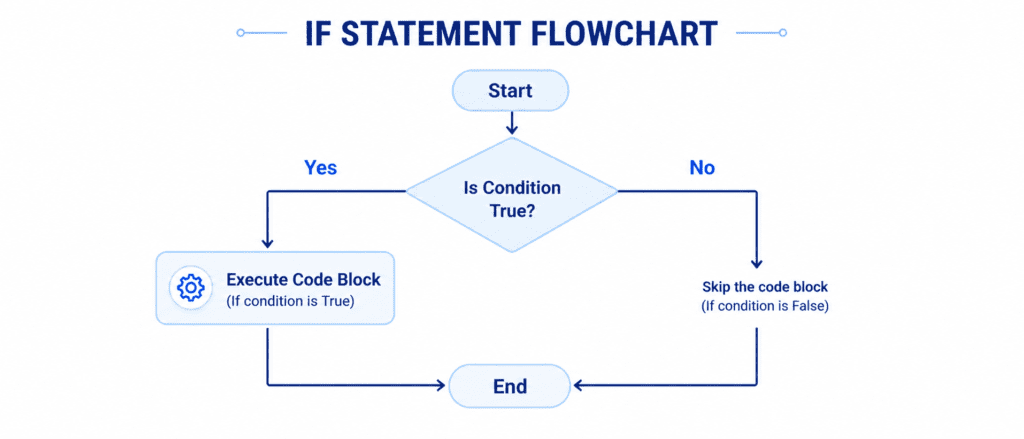
The if statement is used to execute a block of code only if a specific condition is True.
Think of it like a real-life scenario:
“If it rains today, I will bring an umbrella.”
If the condition (“it rains today”) happens to be true, you perform the action (“bring an umbrella”). If the condition is false, you simply ignore the action and continue with your day. This is exactly how Python evaluates code.
Understanding Python Syntax & Indentation #
Python uses a very clean and readable structure for its conditional statements. However, it enforces a strict rule that beginners often find tricky: Indentation.
The Anatomy of an if Statement: #
if condition:
    # Indented block of code
    # This runs only if the condition is True
The if Keyword: Tells Python to prepare for a conditional test.
The Condition: A test that must evaluate to either True or False (usually using comparison operators).
The Colon (:): Marks the end of the conditional test and introduces the code block.
Indentation (Spacing): The lines of code immediately below the if statement must be indented (usually by 4 spaces). This tells Python exactly which lines belong to the if block.
Example of Correct vs. Incorrect Indentation:
# CORRECT WAY
score = 85
if score > 80:
    print("Congratulations!") # 4 spaces of indentation

# INCORRECT WAY (This will crash your program)
score = 85
if score > 80:
print("Congratulations!") # No indentation!
Output for Correct Code: #
Congratulations!
Output for Incorrect Code: #
  File "main.py", line 8
    print("Congratulations!")
    ^
IndentationError: expected an indented block after 'if' statement on line 7
Comparison Operators Used in Conditions #
To write conditions, you need to use Comparison Operators. These operators evaluate two variables or values and return a Boolean value (True or False).
Here is a breakdown of the standard operators you will use:
| Operator | Meaning | Example | Evaluates To |
== | Equal to | 5 == 5 | True |
!= | Not equal to | 5 != 3 | True |
> | Greater than | 10 > 20 | False |
< | Less than | 10 < 20 | True |
>= | Greater than or equal to | 15 >= 15 | True |
<= | Less than or equal to | 12 <= 10 | False |
Let’s Write Code: Basic to Advanced #
Let’s look at practical examples that progress from simple evaluations to advanced logic.
Example 1: Basic Grade Checker #
In this beginner example, we will check if a student has scored enough marks to pass a course.
student_marks = 75
passing_marks = 50

# Check if the student passed
if student_marks >= passing_marks:
    print("Status: Passed")
    print("Good job! You can now access the next topic.")

print("Program execution completed.")
Output: #
Status: Passed
Good job! You can now access the next topic.
Program execution completed.
Example 2: String Comparison (Checking System Roles) #
You can compare strings just as easily as numbers. Let’s verify if a user has administrative privileges.
user_role = "Admin"

# Check if the user is an admin
if user_role == "Admin":
    print("Access Granted: Welcome to the backend console.")
    print("You have the power to modify database records.")
Output: #
Access Granted: Welcome to the backend console.
You have the power to modify database records.
Example 3: Combining Multiple Conditions (and, or) #
Advanced logic often requires checking more than one condition at the same time. You can use Logical Operators to link tests together:
and: ReturnsTrueonly if both conditions are true.or: ReturnsTrueif at least one condition is true.
# A premium student who has paid for an advanced track
is_logged_in = True
has_premium_subscription = True

# Check both criteria before unlocking advanced Python modules
if is_logged_in and has_premium_subscription:
    print("Validation Successful.")
    print("Unlocking Advanced Machine Learning Modules...")
Output: #
Validation Successful.
Unlocking Advanced Machine Learning Modules...
Example 4: Advanced Use Cases (Membership Testing with Lists) #
In more complex programming, you might want to check if an item exists inside a collection (like a list or a set) using the in keyword inside your if condition.
enrolled_courses = ["Python Basics", "Data Science", "Web Development"]
required_course = "Python Basics"

# Check if the required course is in the student's active list
if required_course in enrolled_courses:
    print(f"Prerequisite Met: You are already enrolled in {required_course}.")
    print("You are eligible to enroll in our Advanced AI Track.")
Output: #
Prerequisite Met: You are already enrolled in Python Basics.
You are eligible to enroll in our Advanced AI Track.
Summary Cheat Sheet #
Review this quick table to keep the core rules of the if statement fresh in your memory:
| Logic Type | Code Syntax Example | Explanation |
| Simple Test | if x > 10: | Checks if x is greater than 10. |
| String Match | if role == "User": | Checks if the text matches exactly. |
Both True (and) | if x > 5 and y < 10: | Executes code only if both tests pass. |
Either True (or) | if x == 1 or y == 1: | Executes if at least one test is true. |
List Check (in) | if "AI" in skills: | Checks if the item exists inside a collection. |
Challenge Questions for Practice #
Try to solve these practice challenges on your own to test your learning:
Challenge 1: The Discount Validator #
Create a program where the original cart_total = 120. Write an if statement that checks if the total is greater than 100. If it is true, print "You qualify for a 10% discount!".
Challenge 2: Course Access Guard #
Store a variable has_completed_basics = True and another variable has_paid = False. Write an if statement using the and operator to print "Welcome to the Masterclass" only if both variables are True. Run the code and observe if the print statement executes.
Challenge 3: Password Length Checker #
Create a string variable user_password = "my_secure_pass". Use the len() function to check if the password contains more than 8 characters. If it does, print "Password strength: Valid".