
When writing code, you often need to perform a specific action multiple times using Python for loop. This helps you automate repetitive tasks easily in programming. For example, if you are calculating the total progress of students on AI Learner Tech, printing out a list of course names, or reading thousands of data entries from a database, writing the same code over and over again is inefficient.
To solve this problem, programming languages use Loops. Loops allow you to execute a block of code repeatedly without writing duplicate lines. In Python, the most commonly used loop for iterating over a sequence of items is the for loop.
Python for loop: Easy Guide for Beginners with Practical Examples #
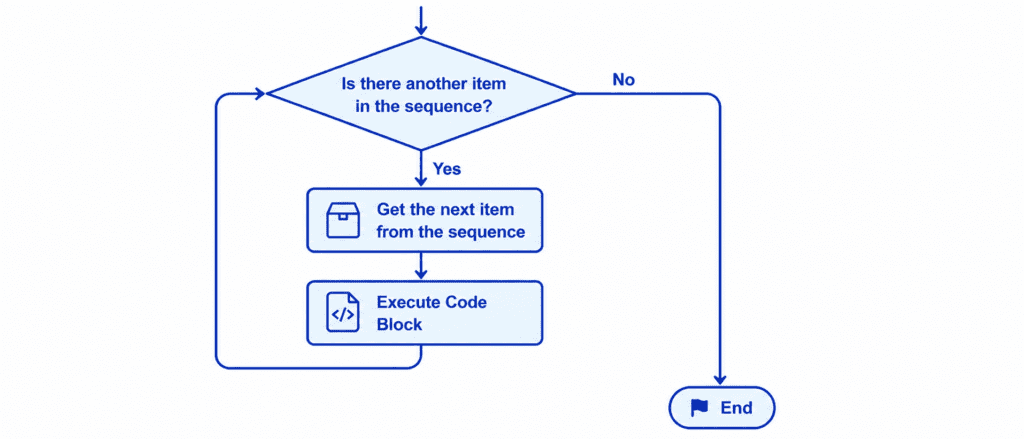
The for loop is specifically designed to iterate over a sequence. A sequence can be a List, a Tuple, a Set, a Dictionary, or even a simple text string.
Instead of writing a manual instruction for every single item, you can tell the for loop:
“For every item inside this collection, run this code block once.”
This eliminates the need to know exactly how many items are in your collection beforehand. Python automatically moves to the next item in the sequence after completing each run of the code block, and it stops looping entirely when it reaches the end of the collection.
Rules of Syntax and Proper Indentation #
Python uses a highly readable, English-like syntax for its loops. However, just like conditional statements, it relies heavily on correct indentation to understand where the loop’s actions begin and end.
for item in sequence:
    # Indented block of code
    # This runs for every item in the sequence
The sequence always begins with the keyword for, followed by a temporary iterator variable name that you pick. Next comes the keyword in, followed by the name of the collection or sequence you want to step through. The line ends with a colon (:).
Every line of code that runs inside the loop must be indented by exactly four spaces. This clear margin tells Python exactly which instructions are part of the loop and which instructions are meant to run after the loop has completely finished its job.
Let’s Write Code: Beginner to Advanced #
Let’s explore how to use the for loop effectively across different data types and real-world scenarios.
Example: Iterating Over a List of Strings #
In this beginner-friendly scenario, we will use a loop to print out every active course available on the learning platform.
courses = ["Python Basics", "Advanced Strings", "Lists", "Tuples", "Sets"]

for course in courses:
    print(f"Course Available: {course}")

print("All courses have been listed successfully.")
Output: #
Course Available: Python Basics
Course Available: Advanced Strings
Course Available: Lists
Course Available: Tuples
Course Available: Sets
All courses have been listed successfully.
Example: Using the range() Function #
The range() function is a built-in Python tool that generates a sequence of numbers. It is incredibly useful when you want to run a specific block of code a certain number of times.
The basic structure is range(start, stop, step), where start is inclusive, stop is exclusive, and step determines the increment.
# Printing numbers from 1 up to 5
for number in range(1, 6):
    print(f"Processing item number {number}")
Output: #
Processing item number 1
Processing item number 2
Processing item number 3
Processing item number 4
Processing item number 5
Example: Accumulating Values Dynamically #
In this intermediate scenario, we will use a loop to calculate the total sum of a series of student exam scores and find the average score.
student_scores = [85, 90, 78, 92, 88]
total_marks = 0

for score in student_scores:
    total_marks += score

average_score = total_marks / len(student_scores)

print(f"Total Combined Marks: {total_marks}")
print(f"Average Class Score: {average_score}")
Output: #
Total Combined Marks: 433
Average Class Score: 86.6
Example: Iterating Through Dictionaries #
For advanced tasks, you can loop through complex data structures like dictionaries. You can use the .items() method to unpack both the key and its corresponding value simultaneously.
student_records = {
    "Sarim": "Python Basics",
    "Ali": "Data Science",
    "Hamza": "Machine Learning"
}

for name, course in student_records.items():
    print(f"Student: {name} | Enrolled In: {course}")
Output: #
Student: Sarim | Enrolled In: Python Basics
Student: Ali | Enrolled In: Data Science
Student: Hamza | Enrolled In: Machine Learning
Challenge Questions for Practice #
Use these challenges to test your understanding of how the for loop works:
Challenge 1: Even Numbers Generator #
Write a program that uses a for loop and the range() function to find and print all the even numbers between 1 and 20. (Hint: Set your step value in range to 2 or use the modulus operator %).
Challenge 2: Total Order Calculator #
Create a list of item prices: prices = [12.5, 45.0, 100.0, 5.5, 32.0]. Use a for loop to calculate the total cost of all the items combined and print the final total.
Challenge 3: Word Character Counter #
Create a list of words: words = ["Python", "AI", "Code", "Data"]. Use a for loop to iterate over the list. For each word, print out the word along with its character length using the len() function.