
The Python While Loop handles unpredictable repetitions that a fixed for loop cannot manage. Master the Python While Loop to build dynamic scripts and secure systems with our guide. However, in programming, there are many situations where we do not know in advance how many times a code block needs to run.
For example, on AI Learner Tech, you might want to keep running a login prompt until the user enters the correct password, or keep downloading data from a server as long as the connection remains active.
To handle these scenarios where repetitions depend entirely on a condition rather than a fixed sequence, Python provides the While loop.
Mastering the Python While Loop #
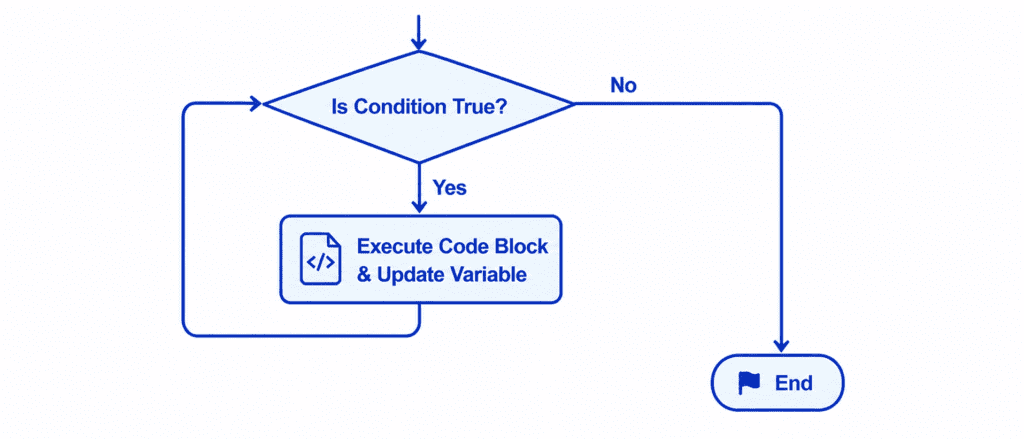
The while loop behaves very similarly to a continuous if statement. While an if statement checks a condition once and moves on, a while loop checks a condition, runs the code block inside it, and then circles back to test the condition again.
As long as the condition remains True, the loop keeps running. The moment the condition evaluates to False, the loop stops immediately, and Python moves down to the next part of your script.
Rules of Syntax and the Threat of Infinite Loops #
A while loop requires a very specific setup to prevent it from crashing your computer.
count = 1
while count <= 5:
    print(count)
    count += 1
To create a safe while loop, you need three core elements:
- An Initialization Variable: A variable created before the loop starts to act as a counter or state tracker (e.g.,
count = 1). - The
whileKeyword and Condition: The logical test that determines if the loop continues, ending with a colon (:). - An Update Step (Increment/Decrement): A line inside the loop’s indented block that changes the variable’s value on each run (e.g.,
count += 1).
If you forget the update step, the variable remains the same forever. This creates the most common beginner mistake: an Infinite Loop. Because the condition never becomes False, the loop repeats endlessly, consuming all available system memory until the program crashes.
The Power of Control Statements: Break and Continue #
To give you maximum control over your while loops, Python provides two keywords that let you modify how the loop runs on the fly: break and continue.
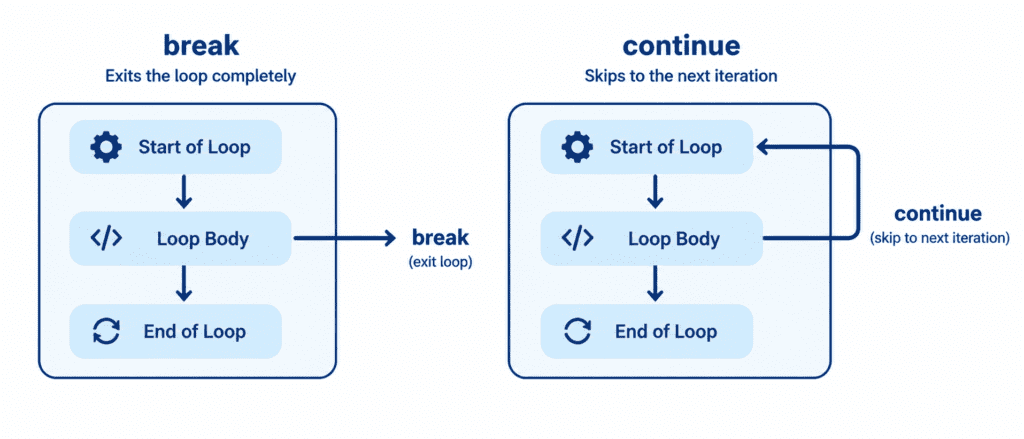
The break keyword instantly stops the execution of a loop, regardless of whether the main loop condition is still true. It is useful for emergency exits or stopping a process once a goal is met.
counter = 1

while counter <= 10:
    if counter == 5:
        print("Break triggered: Stopping early at number 5.")
        break
    print(f"Counting: {counter}")
    counter += 1
Output: #
Counting: 1
Counting: 2
Counting: 3
Counting: 4
Break triggered: Stopping early at number 5.
Using continue to Skip Steps #
The continue keyword skips the remaining code inside the loop for the current iteration only, and immediately jumps back up to check the condition again for the next run.
number = 0

while number < 5:
    number += 1
    if number == 3:
        # Skip printing number 3
        continue
    print(f"Processing item: {number}")
Output: #
Processing item: 1
Processing item: 2
Processing item: 4
Processing item: 5
Let’s Write Code: Beginner to Advanced #
Let’s explore how to use the while loop safely across different real-world scenarios.
Example: Countdown Timer (Beginner) #
In this beginner-friendly example, we will simulate a simple countdown that decreases its initial value step by step.
countdown = 5

while countdown > 0:
    print(f"Time remaining: {countdown} seconds")
    countdown -= 1

print("Blast off! Your code has launched successfully.")
Output: #
Time remaining: 5 seconds
Time remaining: 4 seconds
Time remaining: 3 seconds
Time remaining: 2 seconds
Time remaining: 1 seconds
Blast off! Your code has launched successfully.
Example: Simulating a Secure Login Attempt (Intermediate) #
Let’s build a practical security system. The program will keep asking for a password until the user enters the correct one, but will lock them out after 3 failed attempts.
correct_password = "python_master"
attempts_allowed = 3
attempts_used = 0

while attempts_used < attempts_allowed:
    # Simulating input from the user
    entered_password = "wrong_password"

    # We change the simulated password on attempt 3 to test success
    if attempts_used == 2:
        entered_password = "python_master"

    if entered_password == correct_password:
        print("Access Granted: Welcome back, Sarim.")
        break
    else:
        attempts_used += 1
        print(f"Access Denied. Attempts remaining: {attempts_allowed - attempts_used}")

if attempts_used == attempts_allowed:
    print("Security Alert: Your account is locked due to too many failed attempts.")
Output: #
Access Denied. Attempts remaining: 2
Access Denied. Attempts remaining: 1
Access Granted: Welcome back, Sarim.
Example: Running a Continuous Menu Interface (Advanced) #
Advanced applications use while True to keep a script running indefinitely until the user selects an explicit exit command.
is_running = True
active_users = 150

while is_running:
    # Simulated menu selection
    user_choice = "View Stats"

    if user_choice == "View Stats":
        print(f"Active Students online: {active_users}")
        # Update user_choice to simulate the next loop iteration exiting
        user_choice = "Exit"

    if user_choice == "Exit":
        print("Shutting down the server administration panel safely.")
        is_running = False
Output: #
Active Students online: 150
Shutting down the server administration panel safely.
Challenge Questions for Practice #
Use these challenges to test your understanding of how the while loop operates:
Challenge 1: Custom Math Multiplying Table #
Set a variable number = 5 and a counter i = 1. Use a while loop to print the multiplication table of 5 from 1 up to 10. (Output format: 5 x 1 = 5).
Challenge 2: Dynamic Accumulator #
Create a variable total = 0 and add_value = 1. Write a while loop that keeps adding add_value to total and increments add_value by 1. Stop the loop as soon as the total crosses 50. Print the final value of the total.
Challenge 3: Password Verification Retry #
Set a variable is_verified = False and pin_code = 1234. Write a while loop that runs as long as is_verified is False. Inside the loop, check if a test variable entered_pin = 1234 matches the pin code. If it matches, set is_verified = True to exit the loop and print "PIN approved".