
Syntax & Variables in Python #
Is known as one of the most important topics for beginners because Python’s syntax (writing style) is very close to human English. When you are building a platform like AI Learner Tech, your first step is to understand how Python reads commands and how it remembers information using variables.
Python Syntax: The Rules of the Road #
Syntax refers to the set of rules that define how a Python program is written. Python focuses on being “clean” and easy to read.
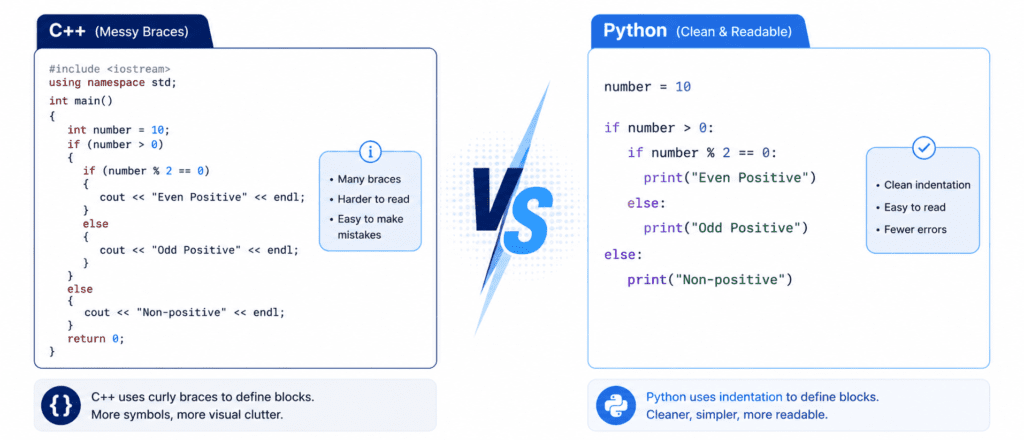
- Indentation: Most languages use curly brackets
{}to group code. Python uses whitespace (spaces). This makes the code look organized. - Case Sensitivity: Python is very picky. The variable
nameis not the same asName. - Comments: Use the
#symbol to write notes that the computer should ignore.
Variables: Containers for Your Data #
A Variable is a reserved memory location to store values. Think of a variable as a labeled box: the label is the name, and the item inside is the data.
Rules for Naming Variables: #
- Must start with a letter or an underscore
_. - Cannot contain spaces (use
user_scoreinstead ofuser score). - Cannot use “reserved keywords” like
printorifas names.
Let’s Write Code: Basic to Advanced #
Python is “dynamically typed,” meaning it automatically identifies the type of data you store in a variable.
Beginner (Storing Basic Info) #
Start by assigning simple values to variables to learn how Python remembers them.
# Creating variables
student_name = "Sarim"     # Text (String)
student_age = 22           # Whole Number (Integer)
is_active = True           # Logical (Boolean)

# Printing the values to the screen
print(student_name)
print(student_age)
Output:
Sarim
22
Intermediate (Dynamic Updates) #
In Python, variables can change their values or data types as the program moves down the page.
# Initial score
score = 50
print(f"Current Score: {score}")

# Updating the value through math
score = score + 25
print(f"Updated Score: {score}")

# Checking what kind of data is inside
print(type(score))  # Shows <class 'int'>
Advanced (Calculations and Logic) #
In real applications, we combine multiple variables to create complex reports or dashboards.
# Assigning multiple values in one line
python_marks, ai_marks, logic_marks = 95, 88, 92

# Performing math with variables
total = python_marks + ai_marks + logic_marks
average = total / 3

# Combining variables into a report string
status_report = "Student: Sarim | Average: " + str(average) + "%"

print("--- DASHBOARD REPORT ---")
print(status_report)
Output:
--- DASHBOARD REPORT ---
Student: Sarim | Average: 91.66%
4. Practice Challenges #
Challenge 1: Personal Bio #
Create four variables: my_name, my_age, favorite_color, and hobby. Use a print statement to combine them into a sentence: “My name is Sarim, I am 22 years old, and my favorite hobby is Coding.”
Challenge 2: Currency Converter #
Create a variable usd_amount = 10 and conversion_rate = 278. Multiply them to calculate the PKR amount, store it in a variable called total_pkr, and print the result.
Challenge 3: The Swap Trick #
Create two variables x = "Water" and y = "Juice". Without re-typing the words, try to swap their values so that x becomes "Juice" and y becomes "Water". (Hint: Use a third variable called temp to hold one value while you switch).