
Python Operators Tutorial 2026 #
When writing programs, we often need to manipulate data, perform calculations, or make logical decisions. This is where operators come into play.
In simple terms, operators are special symbols in Python that carry out arithmetic or logical computations. The values that the operator acts upon are called operands.
# Here, '+' is the operator, and 5 and 10 are the operands
result = 5 + 10
Types of Operators in Python #
Python divides its operators into 7 distinct categories based on their functionality:
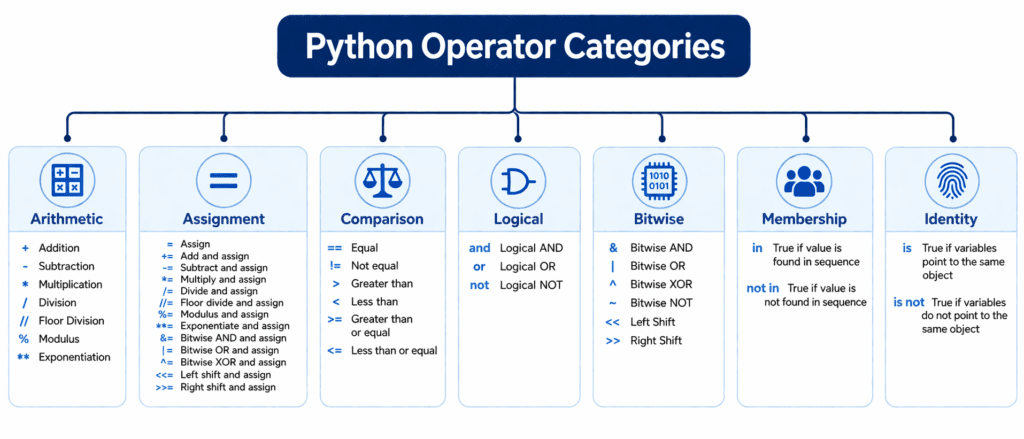
Here is a quick reference table before we dive deep into each category:
| Operator Category | Purpose | Example |
| Arithmetic Operators | To perform basic mathematical operations. | a + b |
| Assignment Operators | To assign and update values in variables. | x += 5 |
| Comparison Operators | To compare two values (returns True/False). | x > y |
| Logical Operators | To combine conditional statements. | x and y |
| Membership Operators | To check if a value exists in a sequence. | item in list |
| Identity Operators | To check if two variables point to the same memory. | a is b |
Arithmetic Operators #
These operators are used to perform mathematical operations like addition, subtraction, multiplication, and more.
a = 15
b = 4

print(a + b)   # Addition -> 19
print(a - b)   # Subtraction -> 11
print(a * b)   # Multiplication -> 60
print(a / b)   # Division -> 3.75
print(a // b)  # Floor Division (removes decimals) -> 3
print(a % b)   # Modulus (returns the remainder) -> 3
print(a ** b)  # Exponentiation (15 to the power of 4) -> 50625
Comparison Operators #
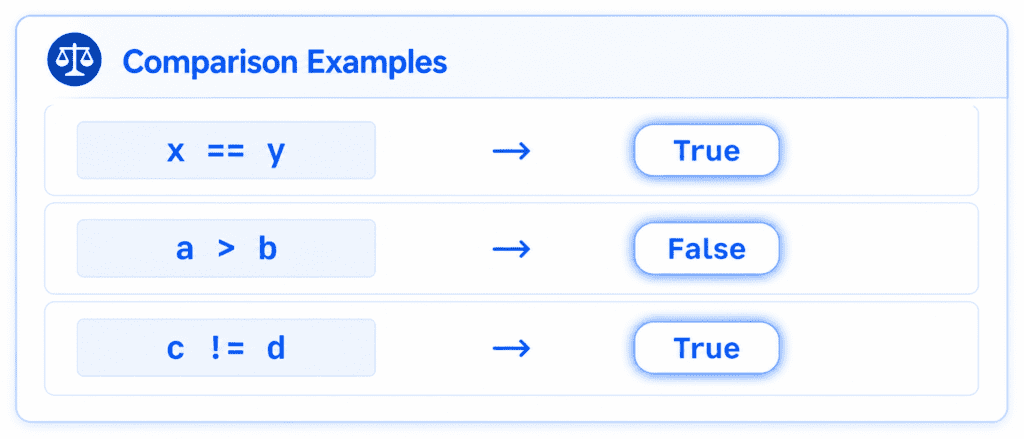
Comparison operators evaluate whether a condition is true or false. They always return a Boolean value (True or False).
x = 25
y = 10

print(x == y)  # Equal to -> False
print(x != y)  # Not equal to -> True
print(x > y)   # Greater than -> True
print(x < y)   # Less than -> False
print(x >= 25) # Greater than or equal to -> True
print(x <= 10) # Less than or equal to -> True
Logical Operators #
Logical operators are used to combine conditional statements. They are heavily used in decision-making algorithms.
and: ReturnsTrueonly if both conditions are true.or: ReturnsTrueif at least one condition is true.not: Reverses the result (returnsFalseif the result is true).
# Example for Sarim's AI Learner Tech students
has_completed_python = True
has_passed_exam = False

# Logical AND
print(has_completed_python and has_passed_exam) # False

# Logical OR
print(has_completed_python or has_passed_exam)  # True

# Logical NOT
print(not has_completed_python)                 # False
Membership Operators #
Membership operators check if a specific value is present within a sequence (like a string, list, or tuple).
in: ReturnsTrueif the value is found.not in: ReturnsTrueif the value is not found.
# Search list
enrolled_students = ["Sarim", "Ali", "Hamza"]

# Checking existence
print("Sarim" in enrolled_students)     # True
print("John" not in enrolled_students)  # True
Identity Operators #
Identity operators compare the memory locations of two objects, not just their values.
is: ReturnsTrueif both variables point to the exact same object in memory.is not: ReturnsTrueif the variables point to different objects in memory.
# Let's see how memory works in Python
list_1 = [1, 2, 3]
list_2 = [1, 2, 3]
list_3 = list_1

# Value Comparison (==) checks if data is same
print(list_1 == list_2)  # True

# Identity Comparison (is) checks if memory location is same
print(list_1 is list_2)  # False (different places in memory)
print(list_1 is list_3)  # True (points to the same memory location)
Operator Precedence (The Order of Operations) #
When multiple operators appear in a single line of code, Python needs to know which one to execute first. This is called Operator Precedence, similar to the BODMAS/PEMDAS rule in mathematics.
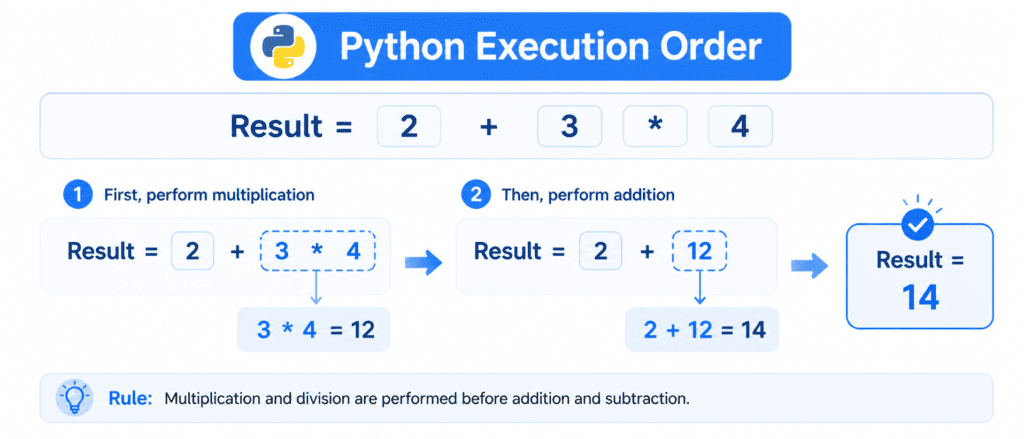
Here is the priority list from highest to lowest:
| Priority | Operator Type | Symbols |
| 1 (Highest) | Parentheses (Brackets) | () |
| 2 | Exponentiation | ** |
| 3 | Multiplication, Division, Modulus, Floor Div | *, /, %, // |
| 4 | Addition, Subtraction | +, - |
| 5 (Lowest) | Comparison & Logical | ==, >, and, or |
Example of Precedence in Action:
# Without parentheses: Multiplication happens first
calculation_1 = 10 + 5 * 2
print(calculation_1)  # 10 + 10 -> 20

# With parentheses: Addition happens first
calculation_2 = (10 + 5) * 2
print(calculation_2)  # 15 * 2 -> 30