
Strings Basics Core Concepts in Python #
What is a String in Python? #
A String is simply a sequence of characters enclosed inside quotation marks. These characters can be letters, numbers, symbols, or even empty spaces.
In Python, strings are classified as a built-in data type called str.
The Quote Rules: Single, Double, and Triple Quotes #
Python gives you the flexibility to define strings using three different types of quotation marks:
# 1. Single Quotes
message_1 = 'Hello from Sarim!'

# 2. Double Quotes
message_2 = "Welcome to AI Learner Tech"

# 3. Triple Quotes (For Multiline Strings)
message_3 = """This is a string that
spans across multiple lines
without any errors."""
Which quotes should you use? #
- Single or Double Quotes: Both work exactly the same way. However, double quotes are preferred if your text contains a single quote or an apostrophe inside it.
- Triple Quotes: Use these when you want to write paragraphs or code documentation (docstrings).
# Correct use of double quotes containing an apostrophe
quote = "It's a great day to learn Python!"
print(quote)
Creating and Assigning Strings #
Creating a string in Python is incredibly easy because Python is dynamically typed. You do not need to tell Python that a variable will hold text; it detects the data type automatically when you wrap your text in quotes.
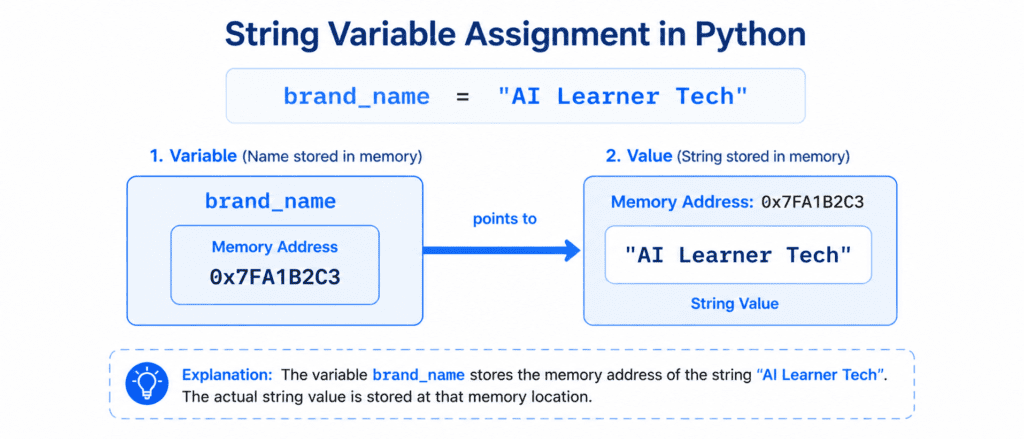
Let’s look at a clean example:
# String assignment for Sarim's project
platform_name = "AI Learner Tech"
course_topic = "Python Programming Basics"

print(platform_name)
print(course_topic)
Output:
AI Learner Tech
Python Programming Basics
Basic String Operations #
Python makes it very easy to manipulate strings without writing long, complex code. Here are the most fundamental operations you can perform on strings:
A. String Concatenation (Joining Strings) #
Concatenation means joining two or more strings together to create a new one. In Python, you do this using the plus (+) operator.
first_name = "Sarim"
last_name = "Developer"

# Combining strings with a space in between
full_name = first_name + " " + last_name
print(full_name)
Output:
Sarim Developer
Warning: You can only concatenate a string with another string. Trying to add a string to a number (e.g., "Age: " + 25) will throw a TypeError.
String Repetition (Multiplying Strings) #
You can repeat a string multiple times using the asterisk (*) operator. This is highly useful when you need to create visual separators or repeating patterns.
# Repeat a symbol 10 times
divider = "-" * 10
print(divider)
Output:
----------
Finding the Length of a String #
To find out how many characters are present inside a string (including spaces and special characters), Python provides a built-in function called len().
brand = "AI Learner Tech"

# Calculate total characters
total_characters = len(brand)
print(total_characters)
Output:
15
Multiline Strings: The Right Way #
Sometimes you need to store long strings that span multiple lines, such as a paragraph, a poem, or a complex dynamic message. If you try to break a string across lines using single or double quotes, Python will display a syntax error.
To solve this, use triple quotes (""" or ''').
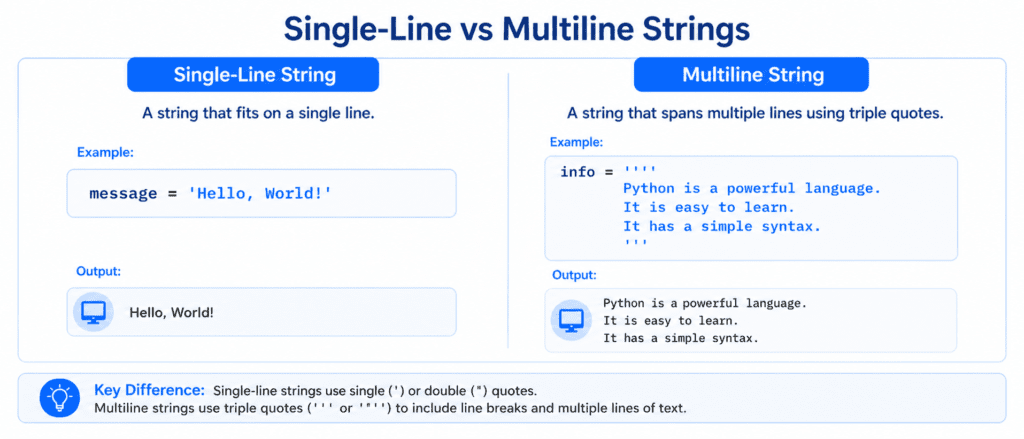
Correct Multiline Example:
about_site = """AI Learner Tech is an educational platform.
It is designed to help students learn Python, AI,
and Data Science in the easiest way possible."""

print(about_site)
Output:
AI Learner Tech is an educational platform.
It is designed to help students learn Python, AI,
and Data Science in the easiest way possible.
| Rule / Feature | How It Works | Example |
| String Data Type | Text data is represented as the str type. | type("Hello") |
| Quotes Rule | Single, double, or triple quotes are all valid. | 'Hi', "Hi", """Hi""" |
| Joining Strings | Use the + operator to combine text. | "Hi " + "Sarim" |
| Repeating Strings | Use the * operator to repeat text. | "A" * 3 -> "AAA" |
| Get Length | Use the len() function to count characters. | len("AI") -> 2 |