
Machine Learning Workflow #
“Building a machine learning model is not just about writing code. It is a complete journey. You start with a business problem. You end with a system running in production, making real decisions, and affecting real people. This is the roadmap for that journey.”
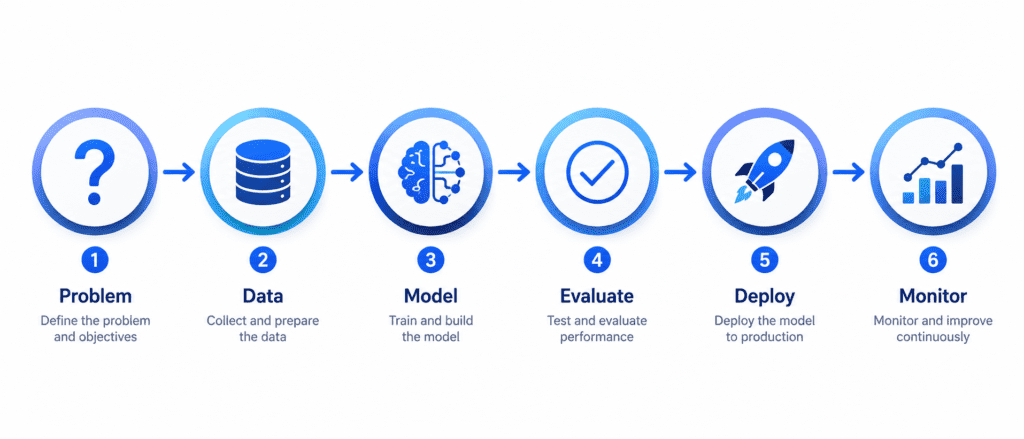
Why Do We Need a Workflow? #
Machine learning projects fail all the time. Not because the math is too hard, but because people skip steps. They jump straight to training a model without understanding the problem. Or they train a perfect model but cannot deploy it. Or they deploy it and forget to monitor it until it breaks.
The workflow protects you from these mistakes. Each step has a purpose. Each step prepares you for the next step. Follow the workflow, and you will save months of wasted effort.
Step 1: Problem (Frame the Problem) #
The Core Question: What exactly are we trying to achieve? Not in technical terms. In business terms.
What Happens in This Step: #
Before you write a single line of code, you must answer these questions:
| Question | Why It Matters |
|---|---|
| What is the business objective? | If you do not know the goal, you cannot measure success |
| How will the model be used? | Different uses require different approaches |
| What is the current solution? | This gives you a baseline to beat |
| What are the assumptions? | Wrong assumptions kill projects |
| Is this supervised or unsupervised? | This determines the entire approach |
| What performance measure matters? | Accuracy? Speed? Profit? |
Real-World Example: #
Imagine you work for a real estate company. The business objective is not “build a neural network.” The business objective is “help our agents price houses correctly so we sell faster and make more profit.”
The current solution: Human experts estimate prices based on experience. They are often wrong by 30%.
Your goal: Beat that 30% error rate. If your model achieves 25% error, you have succeeded. If it achieves 35% error, you have failed, even if the model technically “works.”
Key Deliverables of This Step: #
- A clear problem statement written in plain English
- A defined success metric (RMSE, Accuracy, Profit, etc.)
- A list of assumptions (will be checked later)
- A go/no-go decision (should we even build this?)

Step 2: Data (Get and Prepare the Data) #
The Core Question: Do we have the right data to solve this problem? Is it clean? Is it enough?
What Happens in This Step: #
This is often the longest step in any ML project. Data is messy. Data is never ready to use.
| Sub-step | What You Do |
|---|---|
| Get the data | Download from databases, APIs, files, or web scraping |
| Explore the data | Understand what each column means, check distributions |
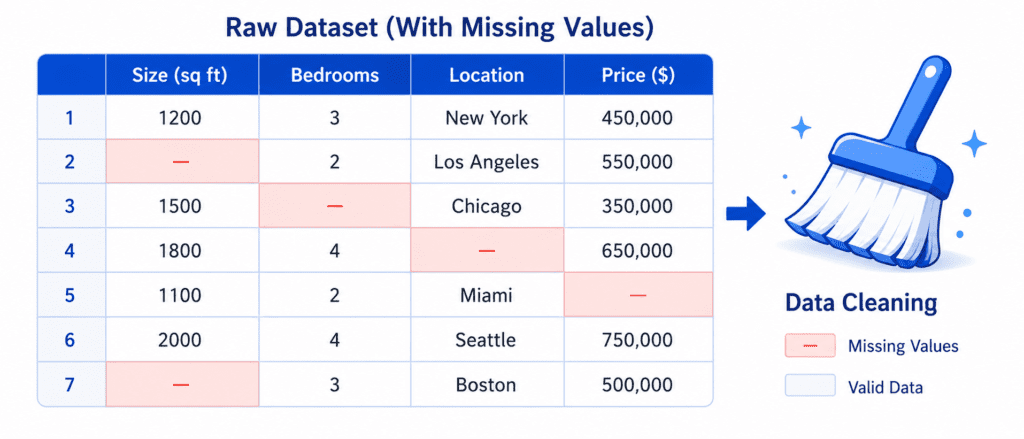
| Clean the data | Fix missing values, remove duplicates, handle outliers |
| Split the data | Create training, validation, and test sets |
| Prepare the data | Scale numbers, encode categories, create new features |
Real-World Example (Continuing the Housing Price Prediction): #
You get data from the city records. It has 20,000 districts. Each district has features like:
- Median income
- Population
- Number of rooms
- Latitude and longitude
- Ocean proximity (near ocean, inland, etc.)
But there are problems:
- Some districts have missing values for “number of bedrooms” (you must fill these)
- The “median income” column has been capped at $15 (you need to understand why)
- The “ocean proximity” column contains text, but models need numbers (you must convert it)
- Features have different scales (population ranges from 0 to 50,000, but income ranges from 0 to 15)
The Most Important Rule: #
Never look at the test set until the very end. The test set is like the final exam. If you peek at the answers while studying, you will cheat yourself. You will think your model is better than it actually is.
Important Steps: #
- A clean training set
- A validation set (for tuning)
- A test set (locked away for final evaluation)
- A data preparation pipeline (automated so you can reuse it)
Step 3: Model (Select and Train the Model) #
The Core Question: Which algorithm works best for our data and problem?
What Happens in This Step: #
You finally start writing code. But you do not start with complex models. You start simple.
| Sub-step | What You Do |
|---|---|
| Start simple | Train a linear model first (baseline) |
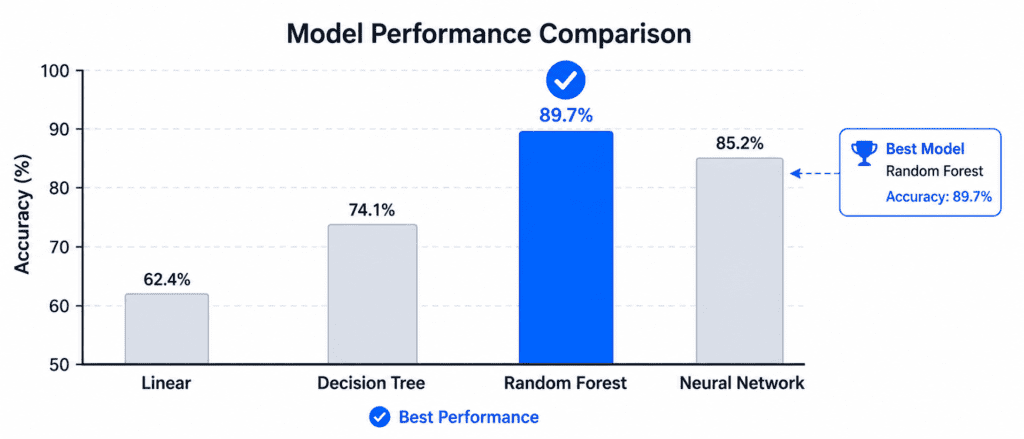
| Try multiple algorithms | Decision trees, random forests, SVMs, neural networks |
| Compare performance | Use cross-validation to get honest scores |
| Shortlist promising models | Keep the top 3-5 models |
| Train on full training set | Once you have a shortlist, train each on all available data |
Real-World Example (Continuing): #
You start with Linear Regression. The error is about $68,000. That is better than nothing, but not great (baseline).
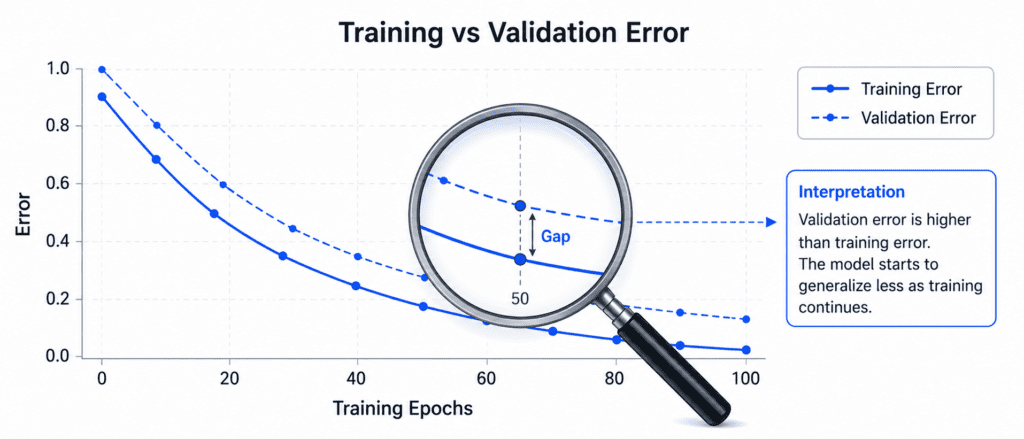
You try a Decision Tree. The error is 0ontrainingdata!Butwait.Thatisaredflag.Themodelismemorizing,notlearning.Whenyoutestitproperly(usingcross−validation),theerrorjumpsto66,000.
You try a Random Forest. The error drops to $47,000. Much better. This is promising.
You have found a good candidate. Now you will fine-tune it.
The Most Common Mistake: #
People jump straight to deep learning without trying simple models. A random forest or gradient boosting model often performs just as well as a neural network on tabular data. And it trains in minutes, not hours.
Important Steps: #
- A baseline model (simple, to beat)
- A shortlist of 3-5 promising models
- Performance metrics for each model (using cross-validation)
- Understanding of which features matter most
Step 4: Evaluate (Fine-tune and Validate the Model) #
The Core Question: Is this model good enough for production? How well will it perform on completely new data?
What Happens in This Step: #
You have promising models. Now you squeeze every drop of performance out of them.
| Sub-step | What You Do |
|---|---|
| Fine-tune hyperparameters | Use grid search or random search to find optimal settings |
| Try ensemble methods | Combine multiple models for better results |
| Analyze errors | Look at where the model fails and why |
| Validate on test set | Once you are confident, evaluate on the locked test set |
| Estimate confidence | Calculate the range of expected performance |
Real-World Example (Continuing): #
Your random forest has hyperparameters like:
- Number of trees (100, 200, 500?)
- Maximum depth (10, 20, 30, unlimited?)
- Minimum samples per leaf (1, 2, 5, 10?)
You try 15 different combinations. The best combination gives you an RMSE of $44,000. Better than before.
You combine the random forest with a support vector machine (ensemble). The error drops to $42,000.
You analyze the errors. You notice the model performs poorly on districts near the ocean. You add a new feature: “distance to ocean.” The error drops to $41,500.
Now you are ready. You take the locked test set (which you have never looked at). You evaluate your final model. The error is 41,400.Youalsocalculatea9539,500 and $43,800.
Critical Warning: #
If you tune hyperparameters using the test set, you are cheating. The test set must remain untouched until the very end. Use a validation set for tuning. Only evaluate on the test set once, at the end.
Important Steps: #
- A final trained model
- Hyperparameters for that model
- Test set performance (honest estimate)
- Confidence interval for that performance
- Error analysis (where does the model fail?)
Step 5: Deploy (Launch the Model to Production) #
The Core Question: How do we make this model available to users or other systems?
What Happens in This Step: #
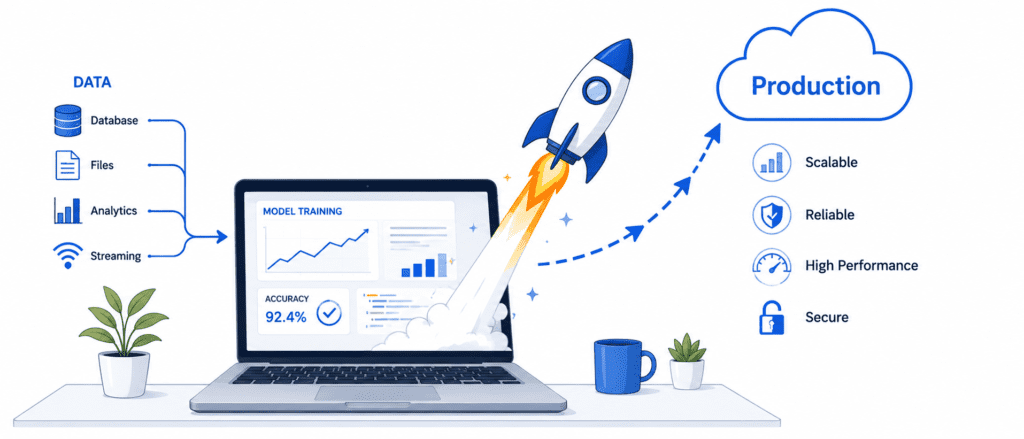
A model on your laptop is useless. It must be deployed. Deployment looks different depending on your use case.
| Deployment Type | What It Means | Example |
|---|---|---|
| Batch Prediction | Model runs on a schedule (nightly, weekly) | Monthly sales forecast, fraud detection overnight |
| Real-time API | Model sits behind a web service, responds instantly | Product recommendations, spam filtering |
| Edge Deployment | Model runs on device (phone, car, sensor) | Face unlock on phone, self-driving car |
| Embedded | Model runs on tiny hardware | Smart thermostat, fitness tracker |
Real-World Example (Continuing): #
Your real estate company wants agents to use your model. They type in a district’s features, and the model predicts the price instantly.
You save your trained model to a file using joblib or SavedModel format. You upload it to a cloud server. You wrap it in a REST API (using Flask, FastAPI, or TensorFlow Serving). Now any agent can send a POST request with the district data and get back a price prediction in milliseconds.
What You Must Also Deploy: #
- Preprocessing pipeline: If you scaled features during training, you must apply the same scaling during inference. Never skip this.
- Versioning: Keep track of which model version is running. Be able to roll back to the previous version if something breaks.
- Documentation: Write down how to use the API, what inputs it expects, what outputs it returns.
Deployment Options: #
| Option | Best For | Complexity |
|---|---|---|
| Local script | Personal use, research | Low |
| REST API (Flask/FastAPI) | Internal tools, low traffic | Medium |
| TensorFlow Serving | High traffic, production | Medium-High |
| Cloud (AWS, GCP, Azure) | Scalable, managed | Medium |
| Edge (TensorFlow Lite) | Mobile, embedded | High |
Important Steps: #
- A deployed model accessible to users
- An API or batch job for inference
- Version tracking and rollback capability
- Documentation for users and maintainers
Step 6: Monitor (Track and Maintain the Model) #
The Core Question: Is the model still performing well in production? Has the world changed?
What Happens in This Step: #
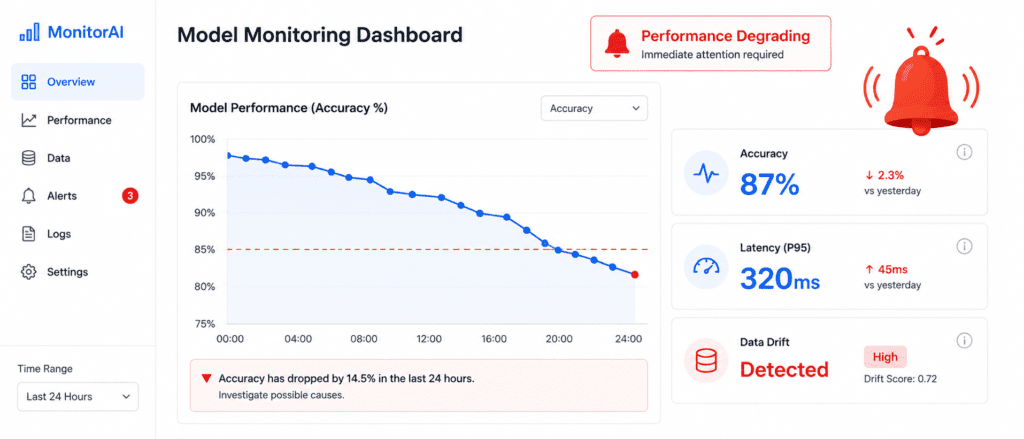
Deployment is not the end. It is the beginning of a new phase: maintenance. Models rot over time.
| Monitor | What to Track | Warning Signs |
|---|---|---|
| Model Performance | Accuracy, error rate, profit impact | Performance drops below threshold |
| Data Quality | Missing values, outliers, new categories | Sensor malfunctions, format changes |
| Data Drift | Distribution of input features changes | Users behave differently than before |
| Concept Drift | Relationship between inputs and outputs changes | What worked last year no longer works |
| System Health | Latency, uptime, memory usage | API slow or crashing |
Real-World Example (Continuing): #
Six months after deployment, you notice prediction errors are increasing. The average error has gone from 41,000to55,000.
You investigate. You discover that the city has built a new train station. Districts near the train station have become more expensive. The model does not know about the train station because it was trained on data from before the station was built.
This is data drift. The world changed. The model did not.
Your Options When Performance Drops: #
| Option | Action | When to Use |
|---|---|---|
| Retrain | Train a new model on fresh data | Once a week or once a month |
| Retrain with more data | Add the new data to the training set | When drift is gradual |
| Adjust threshold | Change decision boundary | When precision/recall trade-off shifts |
| Rollback | Revert to previous model version | When new model is worse |
| Retire | Shut down the model | When it cannot be fixed |
The Forgotten Step: Human in the Loop #
Some predictions are too important to trust automatically. For example, a medical diagnosis model might flag a case as “high risk.” That prediction should be reviewed by a doctor before any action is taken.
Design your system so that low-confidence predictions go to humans for review. This is called a human-in-the-loop system.
Important Steps: #
- Monitoring dashboard (showing performance over time)
- Alerts when performance drops
- Automated retraining pipeline (if needed)
- Rollback capability
- Logs of all predictions (for debugging)
Complete Workflow Summary (Cheatsheet) #
| Step | Name | Core Question | Key Output |
|---|---|---|---|
| 1 | Problem | What business problem are we solving? | Problem statement, success metric |
| 2 | Data | Do we have the right clean data? | Clean datasets, train/val/test split |
| 3 | Model | Which algorithm works best? | Shortlist of promising models |
| 4 | Evaluate | Is it good enough for production? | Final model, test performance |
| 5 | Deploy | How do we make it available? | Live API or batch job |
| 6 | Monitor | Is it still performing well? | Dashboard, alerts, retraining pipeline |
The Iterative Nature of the Workflow #
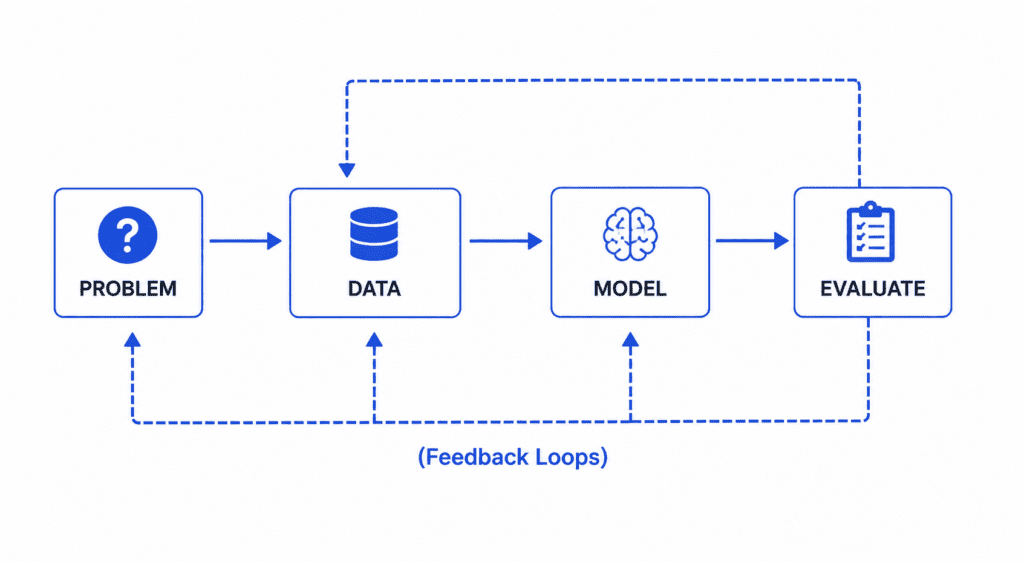
The workflow is not a straight line. You will go back and forth.
Common Loops:
- After exploring data, you realize you need more data → Go back to Step 2
- After evaluating the model, you see poor performance → Go back to Step 3 and try new models
- After deploying, you notice data drift → Go back to Step 2 and retrain on fresh data
This is normal. Do not expect to get it right the first time. Build, measure, learn, repeat.
Real-World Case Study: Complete Workflow in Action #
Problem: A logistics company wants to predict delivery delays. If a package will be late, they want to notify the customer proactively.
Step 1 – Problem:
- Business objective: Reduce customer complaints about late deliveries
- Success metric: F1 score (balance of catching real delays without too many false alarms)
- Baseline: Current system catches 20% of delays
Step 2 – Data:
- Collect 2 years of delivery records: 5 million deliveries
- Features: distance, weather, traffic, day of week, carrier, package size
- Problem: 15% missing values for weather data (filled with averages)
- Create train/val/test split: 70/15/15
Step 3 – Model:
- Baseline: Logistic regression → F1 score 0.45
- Random forest → F1 score 0.62
- Gradient boosting → F1 score 0.68 (winner)
- Neural network → F1 score 0.67 (similar, but slower)
Step 4 – Evaluate:
- Fine-tune gradient boosting: learning rate 0.05, 500 trees, max depth 6
- Test set performance: F1 score 0.69 (baseline was 0.20, human experts were 0.50)
- Error analysis: Model struggles with extremely long distances (>1000 miles)
- Decision: Good enough to deploy
Step 5 – Deploy:
- Save model to file
- Create REST API using FastAPI
- Deploy to AWS Lambda (serverless, scales automatically)
- Integrate with company’s tracking system