
In our previous guide, we learned how to define a function to group code instructions together. However, those basic functions were static—they performed the exact same task every time you called them.
To make your functions dynamic and truly versatile, you need a way to pass information into them. For example, if you are building an educational portal like AI Learner Tech, you don’t want a function that only prints a greeting for one specific name. You want a single function that can greet any student by using whatever name is passed into it.
This is where Arguments and Parameters come in. They allow your functions to accept data, process it, and generate highly customized results.
The Difference Between Parameters and Arguments #
While people often use these two terms interchangeably, they refer to two different phases of a function’s life cycle.
- Parameters: These are the temporary variables listed inside the parentheses when you define the function. Think of them as empty placeholders or slots waiting to receive data.
- Arguments: This is the actual data or values you pass into those slots when you call the function.
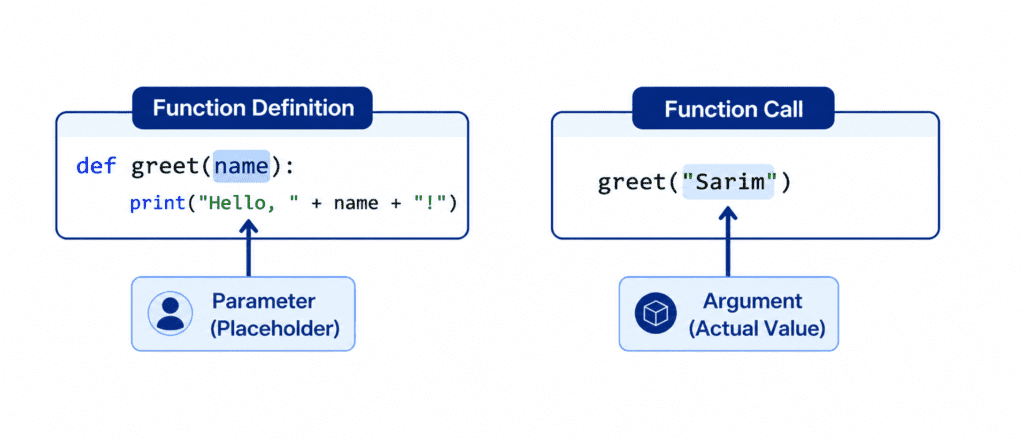
When you call the function, Python takes the arguments you provide and maps them directly to the parameters. The function then uses those values to execute its code block.
Rules of Syntax and Positional Arguments #
The simplest and most common way to pass information into a function is through Positional Arguments. In this method, the order in which you pass the arguments must exactly match the order in which the parameters were defined.
def display_student_info(student_name, course_name):
    print(f"Student Name: {student_name}")
    print(f"Enrolled Course: {course_name}")

# Calling the function with exact positions
display_student_info("Sarim", "Python Basics")
Output: #
Student Name: Sarim
Enrolled Course: Python Basics
If you switch the order of the arguments during the function call, the output will change in ways you might not expect:
# Swapping the arguments changes the meaning entirely
display_student_info("Python Basics", "Sarim")
Output: #
Student Name: Python Basics
Enrolled Course: Sarim
Using Keyword Arguments #
To avoid errors caused by the order of your arguments, Python allows you to use Keyword Arguments. With this method, you explicitly mention the parameter name and assign its value directly when calling the function.
This allows you to pass arguments in any order you like, making your code highly readable and self-explanatory.
def configure_course(title, duration, level):
    print(f"Course: {title} | Duration: {duration} | Level: {level}")

# Calling the function using explicit parameter names
configure_course(level="Beginner", title="Python Essentials", duration="4 Weeks")
Output: #
Course: Python Essentials | Duration: 4 Weeks | Level: Beginner
Default Parameters for Fallback Values #
Sometimes, you want a parameter to have a fallback or standard value in case the user forgets to pass an argument for it. You can achieve this by assigning a Default Parameter directly inside the function definition.
- If you pass an argument, Python uses your provided value.
- If you leave it blank, Python automatically uses the default value.
def calculate_price(course_name, discount=10):
    print(f"Enrolling in: {course_name}")
    print(f"Standard discount applied: {discount}%")

# Case 1: Calling without the second argument (uses default)
calculate_price("Data Science")
print("---")

# Case 2: Calling with the second argument (overwrites default)
calculate_price("AI Deep Dive", 25)
Output: #
Enrolling in: Data Science
Standard discount applied: 10%
---
Enrolling in: AI Deep Dive
Standard discount applied: 25%
Important Rule: When defining functions, non-default parameters must always come first, followed by default parameters at the end. Writing
def test(a=10, b):will result in a syntax error.
Handling Unlimited Inputs: *args and kwargs #
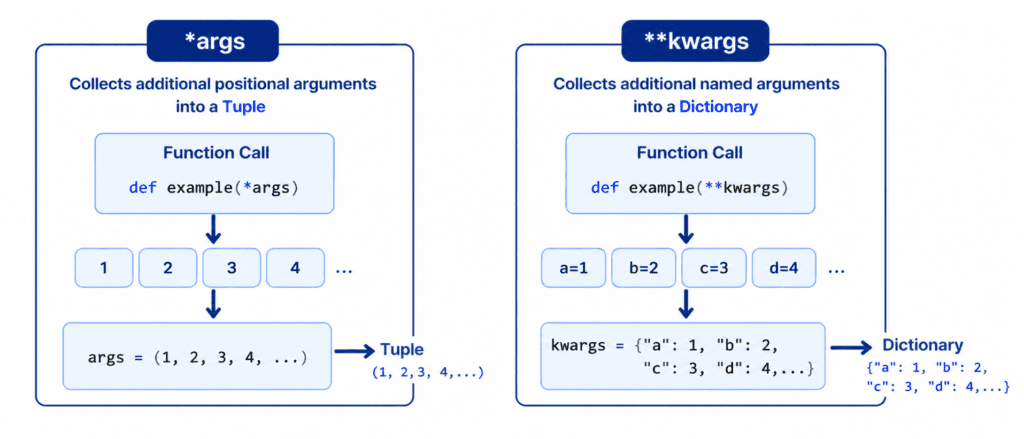
As your coding skills grow, you will encounter situations where you do not know in advance how many arguments a user might pass. Python provides two special symbols to handle this: *args and kwargs.
1. Unlimited Positional Arguments (*args) #
When you place an asterisk (*) before a parameter name, it collects all the extra positional arguments into a single Tuple. You can then use a loop to iterate through them.
def print_enrolled_courses(*courses):
    print("Listing all registered courses:")
    for course in courses:
        print(f" - {course}")

# Passing any number of courses dynamically
print_enrolled_courses("Python Basics", "Data Science", "Machine Learning", "Web Dev")
Output: #
Listing all registered courses:
 - Python Basics
 - Data Science
 - Machine Learning
 - Web Dev
2. Unlimited Keyword Arguments (kwargs) #
When you place two asterisks () before a parameter name, it collects all extra keyword arguments into a single Dictionary. This allows you to handle complex key-value inputs.
def register_user(**user_details):
    print("User Registration Successful. Details saved:")
    for key, value in user_details.items():
        print(f" * {key.capitalize()}: {value}")

# Passing dynamic metadata about a student
register_user(name="Sarim", role="Admin", platform="AI Learner Tech", batch=2026)
Output: #
User Registration Successful. Details saved:
 * Name: Sarim
 * Role: Admin
 * Platform: AI Learner Tech
 * Batch: 2026
Challenge Questions for Practice #
Test your understanding of arguments and parameters with these hands-on exercises:
Challenge 1: Simple Calculator Function #
Create a function called multiply_numbers(num1, num2). It should accept two numbers as arguments, multiply them, and print out the formatted result (e.g., "Result: 15"). Call it using both positional and keyword arguments.
Challenge 2: Email Generator with Defaults #
Write a function called generate_email(username, domain="ailearnertech.com"). The function should combine these two parameters to print a full email address like sarim@ailearnertech.com. Call the function once with just a name, and once with a custom domain to see how the default parameter behaves.
Challenge 3: Advanced Course Batch Adder #
Create a function called add_to_batch(batch_name, *students). The function should print out the batch name once, and then use a loop to list down every student name provided in the arguments. Test your function by passing 3 different student names at once.