
Creating and Calling Functions in Python #
In our programming journey so far, we have used conditional statements to make decisions and loops to repeat tasks, but the real power of modular code lies in Creating and Calling Functions. However, as your programs grow larger—whether you are building a data analysis script or developing an educational platform like AI Learner Tech—writing the same logic multiple times makes your code messy, hard to read, and difficult to maintain.
To keep your code clean and organized, Python introduces one of its most essential building blocks: the Function.
A function is a reusable block of organized code that is used to perform a single, related action. Instead of writing the same instructions again and again, you can group them together inside a function and execute them whenever you need with just one simple command.
Moving Beyond Repetitive Code #
To understand why functions are so valuable, think about a real-world scenario. Suppose you want to print a personalized welcome message for a user who logs into your application. Without functions, you would have to write multiple lines of print statements every time a user logs in.
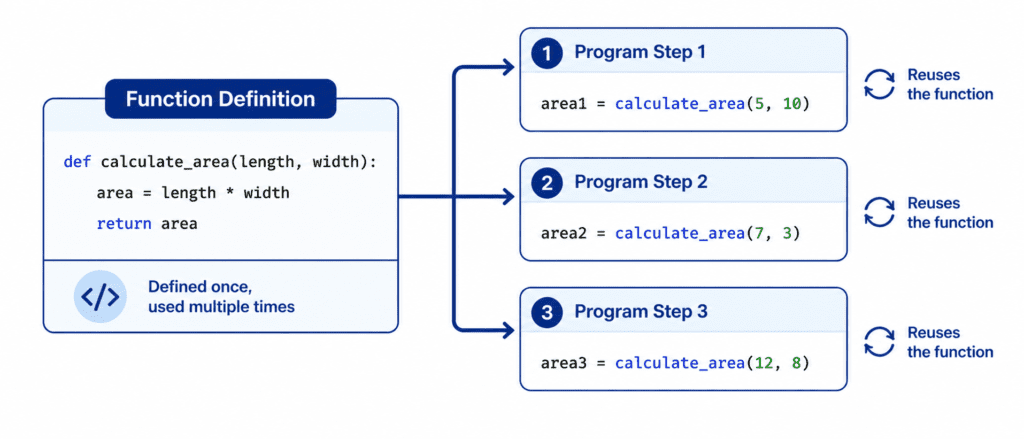
With a function, you write the welcome instructions exactly once. You give that block of instructions a name, and whenever a user signs in, you simply tell Python to run that specific name. This concept is the foundation of the DRY principle in software development: Don’t Repeat Yourself.
Rules of Syntax and Defining a Function #
When creating a function in Python, you must follow a specific structure so that the interpreter understands where your reusable block starts and ends.
To define a function, you start with the keyword def, which is short for “define”. This keyword is followed by the name you choose for your function, a set of parentheses (), and a colon : to mark the end of the line.
def greet_user():
    print("Welcome to AI Learner Tech!")
    print("Happy learning and coding.")
The function name should always be descriptive and written in lowercase, with words separated by underscores if necessary (known as snake_case).
Every line of code that belongs to your function must be indented by exactly four spaces. If you forget to indent the code, Python will not recognize it as part of the function, causing an error.
By writing the code above, you have created a function, but Python will not run those print statements yet. To make the function actually execute its instructions, you must call it.
The Two Steps: Definition vs Execution #
It is highly important to understand that defining a function and calling a function are two completely separate actions.
When you define a function using the def keyword, you are simply teaching Python a new command. You are storing those specific instructions in your computer’s memory for later use.
Calling a function is the action of actually executing that stored command. To call a function, you simply type its name followed by the parentheses ().
# Step 1: Defining the function (teaching Python what to do)
def show_motivational_quote():
    print("We are here to express, not to impress.")

# Step 2: Calling the function (telling Python to execute the code)
show_motivational_quote()
Output: #
We are here to express, not to impress.
If you define a function but never call it, the code inside that function will never run. Conversely, if you try to call a function before you have defined it, Python will throw a NameError because it doesn’t recognize the command yet.
Let’s Write Code: #
Let’s explore how to create and call functions in different practical scenarios, ranging from simple greetings to managing data workflows.
Example: Basic System Status Checker #
In this beginner example, we create a function that prints a standard status update for a server. This is useful for running quick diagnostics without rewriting the same status text.
def check_server_status():
    print("System Check: All services are running optimally.")
    print("Database connection status: Secure.")
    print("No errors detected in the error log.")

# Activating our function
check_server_status()
Output: #
System Check: All services are running optimally.
Database connection status: Secure.
No errors detected in the error log.
Example: Repeated Execution Flow #
One of the greatest benefits of functions is that once they are defined, you can call them as many times as you like within your script.
def draw_separator_line():
    print("================================")

# Printing a layout for a report
print("AI Learner Tech: Student Report")
draw_separator_line()

print("Topic 1: Variables - Completed")
print("Topic 2: Loops - In Progress")
draw_separator_line()
Output: #
AI Learner Tech: Student Report
================================
Topic 1: Variables - Completed
Topic 2: Loops - In Progress
================================
Example: Combining Functions with Conditional Logic #
We can make our functions much more dynamic by placing conditional statements like if-else blocks inside them. This allows the function to behave differently based on the variables it has access to.
user_is_enrolled = True

def access_python_course():
    if user_is_enrolled:
        print("Verification Successful.")
        print("Welcome to the Python Masterclass! Enjoy the notes.")
    else:
        print("Enrollment Missing.")
        print("Please visit the main page to unlock access to these notes.")

# Calling the function to test enrollment
access_python_course()
Output: #
Verification Successful.
Welcome to the Python Masterclass! Enjoy the notes.
Example: Managing Execution Flow with Loops #
For advanced logic, you can combine functions with loops. This allows your function to process collections of data smoothly.
active_course_modules = ["Syntax", "Conditionals", "Loops", "Functions"]

def display_course_syllabus():
    print("Current Course Syllabus:")

    for module in active_course_modules:
        print(f" * Module Name: {module}")

    print("End of list. Keep practicing to master Python.")

# Running our dynamic syllabus viewer
display_course_syllabus()
Output: #
Current Course Syllabus:
 * Module Name: Syntax
 * Module Name: Conditionals
 * Module Name: Loops
 * Module Name: Functions
End of list. Keep practicing to master Python.
Challenge Questions for Practice #
Put your skills to the test by writing solutions for these practice problems:
Challenge 1: Custom Profile Printer #
Write a function named show_my_profile that prints out three lines of personal information: your name, your primary programming language, and the name of your educational platform. Call the function twice to test its output.
Challenge 2: Course Access Guard #
Create a variable has_valid_license = False. Write a function called verify_license that contains an if-else statement. If the license is True, print "Access fully unlocked". If it is False, print "Invalid license key detected". Call the function once to see the output.
Challenge 3: Batch Execution Counter #
Define a simple function called print_success_alert that prints "Operation completed successfully!". Then, write a for loop that runs exactly 3 times, and inside that loop, call the print_success_alert function. Ensure that the alert message prints out 3 times consecutively.