
7 Powerful Organizing Multiple Modules #
As your software grows, having dozens of separate module files sitting in a single folder can make your project cluttered and disorganized. For example, if you are scaling a learning platform like AI Learner Tech, you might have ten different modules just for handling user accounts, another five for course delivery, and several more for processing payments.
To keep your files organized and structured, Python uses Packages.
A package is simply a directory (a folder) that contains multiple modules grouped together. By converting a folder into a package, you can import tools using a clean, hierarchical dot notation—allowing you to scale large applications smoothly.
Moving From Modules to Packages #
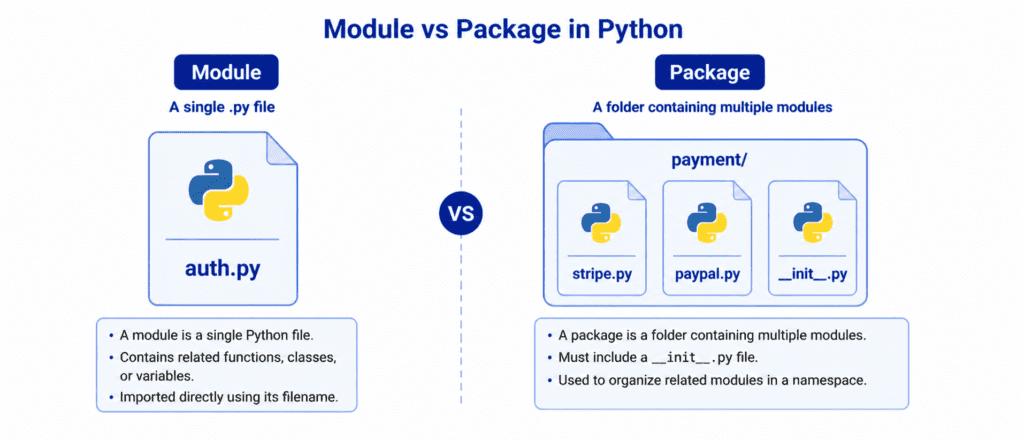
To understand the difference clearly, consider this simple comparison:
- A Module is a single Python file containing code. It is like a single document or sheet of information.
- A Package is a folder containing multiple modules. It is like a filing cabinet or a specific folder on your desktop that keeps related documents neatly categorized.
When you use packages, you can import modules from specific sub-folders using the syntax import folder_name.module_name. This keeps your project clean and prevents naming conflicts between files in different parts of your application.
Rules of Syntax: Creating Your First Package #
Creating a Python package involves organizing your files into a directory and including a special initialization file.
Let’s look at the correct folder structure and steps to build a package.
Step 1: Set Up the Folder Structure #
To create a package named ecommerce, create a folder with that name. Inside that folder, add your module files along with a special empty file named __init__.py.
my_project/
│
├── main.py
└── ecommerce/
    ├── __init__.py
    ├── inventory.py
    └── pricing.py
The Role of __init__.py #
The __init__.py file tells Python that the folder it resides in should be treated as an importable package. In modern Python (version 3.3 and above), this file is technically optional, but creating it is still considered a best practice because it:
- Explicitly marks the folder as a package for other developers.
- Executes initialization code whenever the package is imported.
- Controls which modules are exposed when someone imports your package.
Let’s Write Code: Creating and Using Packages #
Let’s write the code for our files and import them into our main program to see how the syntax works.
Step 2: Write the Module Code #
Let’s add some basic code inside our package files to handle product calculations.
# ecommerce/inventory.py
def check_stock(item_id):
    # Returns True if item is available
    return f"Item {item_id} is in stock."
# ecommerce/pricing.py
def apply_tax(price):
    return price + (price * 0.16) # Adds a 16% standard tax
Step 3: Import from the Package #
Now, from your main script (main.py) located outside the package folder, you can import and use these modules in three different ways:
Option A: Importing the Specific Module #
import ecommerce.inventory

status = ecommerce.inventory.check_stock(101)
print(status)
Option B: Importing with an Alias #
import ecommerce.pricing as price_tool

total_cost = price_tool.apply_tax(100)
print(f"Total price with tax: ${total_cost}")
Option C: Importing Features Directly (Recommended) #
from ecommerce.inventory import check_stock
from ecommerce.pricing import apply_tax

print(check_stock(202))
print(f"Tax adjusted: ${apply_tax(50)}")
Output: #
Item 101 is in stock.
Total price with tax: $116.0
Item 202 is in stock.
Tax adjusted: $58.0
Let’s Write Code: Real-World Scenarios #
Let’s explore how packages help organize and run code across more complex, multi-layered environments.
Example: Website Content Management System (Intermediate) #
Let’s create a package called cms that handles user roles and course enrollment mechanics for an e-learning application.
my_app/
│
├── index.py
└── cms/
    ├── __init__.py
    ├── courses.py
    └── users.py
Here is the code inside our two modules:
# cms/users.py
def get_user_role(username):
    if username == "Sarim":
        return "Admin"
    return "Student"
# cms/courses.py
def register_course(student_name, course_name):
    return f"Student {student_name} successfully enrolled in {course_name}."
Now we pull these package tools together inside our main application file:
# index.py
from cms.users import get_user_role
from cms.courses import register_course

current_user = "Sarim"
role = get_user_role(current_user)

print(f"User identified: {current_user} | Role: {role}")

if role == "Admin":
    # Admin accesses and enrolls a student
    print(register_course("Ali", "Advanced Python"))
Output: #
User identified: Sarim | Role: Admin
Student Ali successfully enrolled in Advanced Python.
Challenge Questions for Practice #
Test your package-building skills by setting up this folder structure and writing the code:
Challenge 1: The Calculations Package #
Create a folder named math_tools. Inside it, create an empty __init__.py file and a module named basic.py containing a function called multiply(a, b) that returns the product. In your main file outside the folder, import the function directly and calculate 8 * 7.
Challenge 2: Geometric Shapes Utility #
Create a package folder named shapes. Inside it, place a module named square.py with a function called perimeter(side) that returns $\text{side} \times 4$. Import the module into your main file using an alias sq and print the perimeter of a square with a side of length 5.
Challenge 3: Blog System Check #
Create a package folder named blog. Inside it, create a module named post.py with a variable MAX_CHARS = 280 and a function called validate_length(content) that returns True if the character length is less than or equal to MAX_CHARS. Import the function in your main file and test it with the input text "Learning Python Packages on AI Learner Tech!".