
When you download and install Python, it comes bundled with a massive collection of pre-written code known as the Standard Library. This library contains hundreds of built-in modules that are ready to use immediately, without downloading anything from the internet.
Whether you are building a simple calculator or working on advanced projects for AI Learner Tech, the standard library saves you from reinventing the wheel. Instead of writing complex logic from scratch to generate random numbers, handle dates, or perform advanced math calculations, you can simply import Python’s built-in tools.
The Concept of “Batteries Included” #
Python’s creators often describe the language as having a “Batteries Included” philosophy. This means that the core language is designed with practical tools to handle everyday programming problems right out of the box.
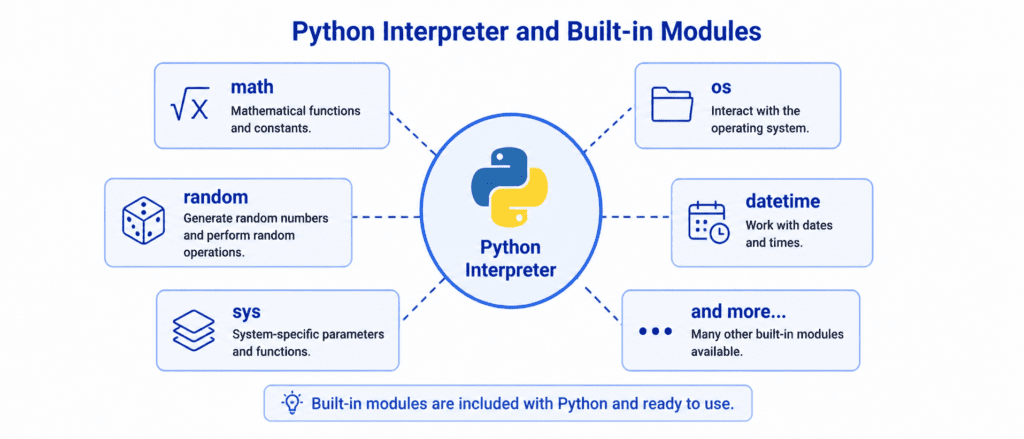
When you use a built-in module, you do not need to worry about installation errors or file paths. Python already knows exactly where these tools are stored in your system’s memory. You only need to use the import keyword to unlock their capabilities.
Exploring Core Built-in Modules #
Let’s look at the most frequently used built-in modules in Python, exploring how they work with practical, direct examples.
1. Generating Random Choices: The random Module #
The random module is used to generate random numbers, pick random elements from a list, or shuffle data sequences. This is incredibly useful for games, simulations, or testing.
import random

# Generate a random decimal number between 0.0 and 1.0
print(f"Random decimal: {random.random()}")

# Generate a random integer between a specific range (inclusive)
random_roll = random.randint(1, 6)
print(f"Dice roll result: {random_roll}")

# Pick a random item from a list
topics = ["Variables", "Loops", "Functions", "Modules"]
picked_topic = random.choice(topics)
print(f"Randomly picked topic for revision: {picked_topic}")
Output: #
Random decimal: 0.7328194510293841
Dice roll result: 5
Randomly picked topic for revision: Functions
2. Performing Advanced Math: The math Module #
While Python can easily handle addition and multiplication, it doesn’t have native symbols for advanced calculations like square roots, trigonometry, or rounding numbers. The math module fills this gap perfectly.
import math

# Calculate the square root of a number
print(f"Square root of 64: {math.sqrt(64)}")

# Round a decimal number UP to the nearest whole number
print(f"Ceiling of 4.1: {math.ceil(4.1)}")

# Round a decimal number DOWN to the nearest whole number
print(f"Floor of 4.9: {math.floor(4.9)}")

# Accessing math constants
print(f"Value of Pi: {math.pi}")
Output: #
Square root of 64: 8.0
Ceiling of 4.1: 5
Floor of 4.9: 4
Value of Pi: 3.141592653589793
3. Handling Time and Dates: The datetime Module #
Programs often need to record when a user logs in, calculate the duration of a subscription, or format a timestamp. The datetime module provides all the tools required to track calendars and clocks.
import datetime

# Fetch the current date and time
current_moment = datetime.datetime.now()
print(f"Exact timestamp: {current_moment}")

# Extract just the current date without the time
today = datetime.date.today()
print(f"Today's date: {today}")

# Formatting date into a custom readable string (Day, Month, Year)
formatted_date = today.strftime("%A, %B %d, %Y")
print(f"Formatted date: {formatted_date}")
Output: #
Exact timestamp: 2026-05-04 14:22:34.123456
Today's date: 2026-05-04
Formatted date: Monday, May 04, 2026
4. Interacting with the Operating System: The os Module #
The os module allows your Python code to interact directly with your computer’s operating system. You can use it to create folders, delete files, find out your current directory, and list available files.
import os

# Check your current working directory path
current_dir = os.getcwd()
print(f"Working in directory: {current_dir}")

# List all files and folders inside the current path
all_files = os.listdir(".")
print(f"Contents of the current folder: {all_files}")
Output: #
Working in directory: /home/user/projects
Contents of the current folder: ['main.py', 'data.txt', 'ecommerce', 'cms']
Let’s Write Code: Practical Combinations #
Let’s see how these built-in tools can be combined inside an application to automate real-world tasks.
Example: Automated Log File Creator #
In this intermediate scenario, we combine the datetime and os modules to check if a logs directory exists, create it if it doesn’t, and generate a text log file named with today’s date.
import os
import datetime

# Define the directory name where we want to save our log
folder_name = "application_logs"

# Check if the folder exists, create it if missing
if not os.path.exists(folder_name):
    os.mkdir(folder_name)
    print(f"Created a new folder: {folder_name}")
else:
    print(f"Directory '{folder_name}' already exists. Skipping folder creation.")

# Generate a log file name based on today's exact date
today_str = datetime.date.today().strftime("%Y-%m-%d")
log_filename = f"{folder_name}/log_{today_str}.txt"

print(f"Writing log data into: {log_filename}")
Output: #
Created a new folder: application_logs
Writing log data into: application_logs/log_2026-05-04.txt
Challenge Questions for Practice #
Use these challenges to master Python’s built-in tools:
Challenge 1: Number Guessing Tool #
Write a script using the random module that picks a random number between 1 and 10 and prints it out. Then, set a variable user_guess = 5. Write an if-else statement to compare if the user guessed the correct random number.
Challenge 2: Geometric Sphere Calculator #
Use the math module to calculate the volume of a sphere with a radius of 7. The formula for the volume of a sphere is $V = \frac{4}{3} \pi r^3$. Print out the final volume rounded down to the nearest integer using math.floor().
Challenge 3: Deadline Estimator #
Use the datetime module to display the current date. Then, calculate exactly what the date will be 30 days from now and print it out. (Hint: Research the datetime.timedelta class in Python’s documentation).