
Python Return Statement Explained #
In our programming journey, we have learned how to define functions, pass dynamic parameters into them, and print values to the console. However, if you look closely at our previous examples, the functions only displayed text using the print() statement. They didn’t pass any data back to the rest of the program.
In real-world applications—whether you are building a calculator or managing an online platform like AI Learner Tech—you often need a function to process data and hand the final result back to you so you can save it, modify it, or use it in another part of your code.
To send data back from a function to the place where it was called, Python provides the return statement.
Just Printing Data #
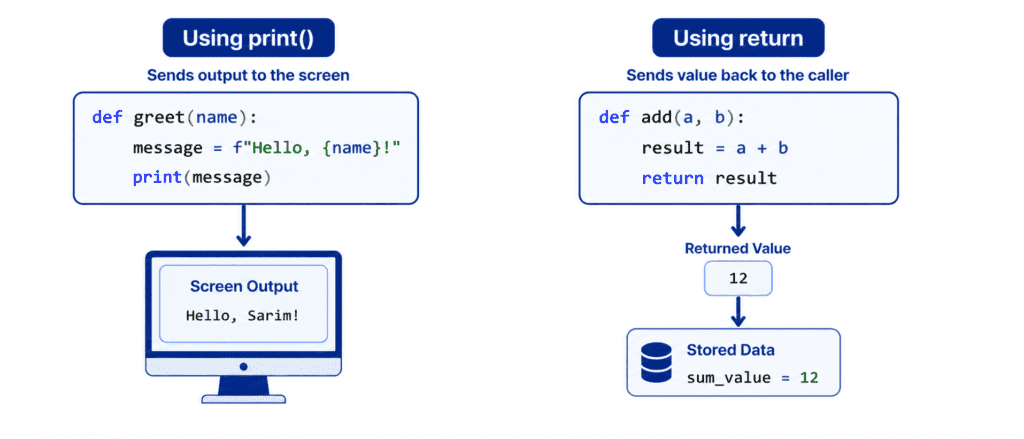
To understand the true power of the return statement, it is critical to understand the difference between printing a value and returning a value.
print()simply displays information on your screen. It is like showing a receipt to a customer; once it is shown, the program cannot use the numbers on that receipt for anything else.returnsends the calculated data back to the main program. It is like handing the customer actual cash. The program can take that returned cash, store it in a variable, and use it later.
Rules of Syntax and Saving Returned Data #
The syntax for returning data is simple. You place the keyword return inside your function, followed by the value or variable you want to send back.
def add_numbers(a, b):
    return a + b

# Calling the function and storing the result in a variable
sum_result = add_numbers(5, 10)

print(f"The stored sum is: {sum_result}")
Output: #
The stored sum is: 15
The Invisible None #
If you do not include a return statement in your function, Python automatically returns a special value called None behind the scenes.
def simple_print():
    print("Just printing...")

# Attempting to save the output of a function that doesn't use return
output = simple_print()
print(f"Captured output: {output}")
Output: #
Just printing...
Captured output: None
Exiting the Function Immediately #
An important rule to remember is that the return statement acts as an immediate exit point for your function. The moment Python hits a return line, it hands over the value and stops running the rest of the code inside that function completely. Any lines written directly below the return statement are ignored.
def check_execution():
    print("This line will execute.")
    return "Function successfully completed."
    print("This line will NEVER execute!") # Unreachable code

result = check_execution()
print(result)
Output: #
This line will execute.
Function successfully completed.
Returning Multiple Values at Once #
Python has a very powerful and unique feature: a single function can return multiple distinct values at the exact same time.
To do this, you list the values separated by commas after the return keyword. Behind the scenes, Python bundles these values together into a single Tuple. You can then unpack these values into separate variables when you call the function.
def calculate_dimensions():
    width = 10
    height = 20
    return width, height # Returns both as a tuple

# Unpacking the tuple into two separate variables
w, h = calculate_dimensions()

print(f"Width: {w}")
print(f"Height: {h}")
Output: #
Width: 10
Height: 20
Code: Beginner to Advanced #
Let’s explore practical, real-world examples showing how to capture and manipulate returned data.
Example: Basic Square Root Calculator #
In this beginner-friendly scenario, we calculate the square of a number and pass the result back so it can be reused in math equations.
def square(number):
    return number * number

# Using the returned value immediately inside a math operation
total_area = square(5) + 50
print(f"Total Area: {total_area}")
Output: #
Total Area: 75
Example: Using Returned Values in Decisions #
We can take the output of a function and immediately pass it into a conditional if-else statement to drive application logic.
def get_pass_percentage(score, total_marks):
    return (score / total_marks) * 100

# Capturing the student's result
student_percentage = get_pass_percentage(78, 100)

if student_percentage >= 50:
    print(f"Passed with {student_percentage}%. Good job!")
else:
    print(f"Failed with {student_percentage}%. Please review the topic again.")
Output: #
Passed with 78.0%. Good job!
Example: Dynamic Discount Calculator #
Let’s build a practical checkout system for AI Learner Tech. This function evaluates the base price of a course and returns the updated cost after applying a specific discount percentage.
def apply_discount(original_price, discount_rate):
    if discount_rate < 0 or discount_rate > 100:
        return "Error: Invalid discount rate"

    savings = original_price * (discount_rate / 100)
    return original_price - savings

# Test case 1: Correct discount applied
final_price = apply_discount(200, 15)
print(f"Your Price: ${final_price}")

# Test case 2: Handling invalid discount rate
error_message = apply_discount(200, 150)
print(error_message)
Output: #
Your Price: $170.0
Error: Invalid discount rate
Example: Processing Collections of Data #
For advanced workflows, you can build a function that processes a list of raw data and returns a completely new, filtered collection.
def filter_high_scores(score_list):
    passing_scores = []

    for score in score_list:
        if score >= 75:
            passing_scores.append(score)

    return passing_scores

raw_marks = [55, 82, 90, 64, 78, 95]

# Filtering the marks dynamically
filtered_marks = filter_high_scores(raw_marks)

print(f"Original Marks: {raw_marks}")
print(f"High Performance Marks: {filtered_marks}")
Output: #
Original Marks: [55, 82, 90, 64, 78, 95]
High Performance Marks: [82, 90, 78, 95]
Challenge Questions for Practice #
Put your skills to the test with these practical exercises:
Challenge 1: Currency Converter #
Create a function called convert_to_pkr(usd_amount). Assume that 1 USD = 278 PKR. The function should multiply the input amount by 278 and return the result. Call the function, store its output in a variable called pkr_balance, and print it.
Challenge 2: Grade Descriptor #
Write a function called get_grade_description(grade). Use an if-elif-else statement inside the function. If the grade is "A", return "Excellent". If it’s "B", return "Good". For any other grade, return "Needs Improvement". Test the function by passing "B" and printing the returned string.
Challenge 3: Min Max Extractor #
Write a function called get_bounds(numbers_list). It should accept a list of numbers and use Python’s built-in min() and max() functions to return both the lowest and the highest numbers at the same time. Call the function with the list [12, 4, 56, 32, 89] and unpack the returned values into variables called lowest and highest.