
7 Creating Importing and Using Modules #
As you build larger applications—whether you are creating a data processing script or managing an educational platform like AI Learner Tech—keeping all your code in a single file becomes highly impractical. The file becomes thousands of lines long, making it incredibly difficult to navigate, test, and debug.
To solve this problem, Python uses a system of code organization called Modules.
A module is simply a Python file containing variables, functions, and classes that you want to include in your application. By breaking your program into multiple modules, you can separate different tasks into distinct files and reuse that code across multiple projects effortlessly.
Moving Beyond Single File Scripts #
To understand the value of modules, think of a large book. If a book had no chapters, headings, or index, finding a specific piece of information would be exhausting.
In the same way, modules act as the individual chapters of your program.
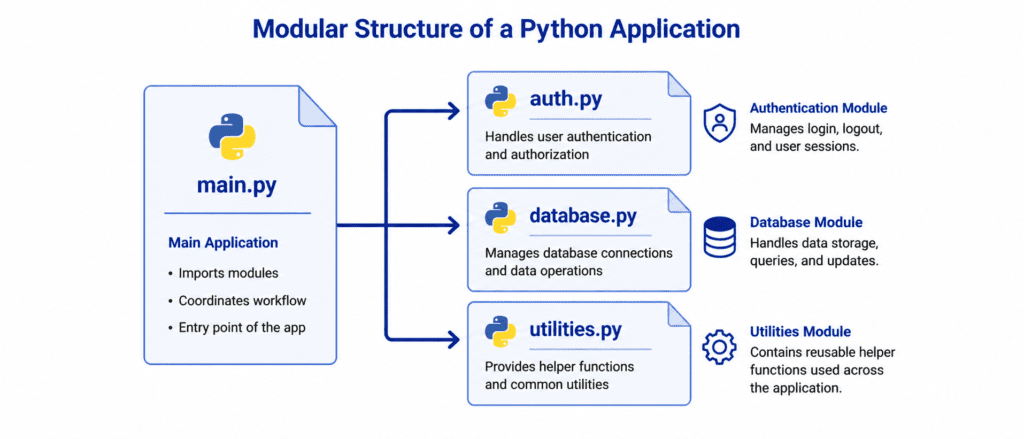
For example, you can write all your security authentication code in one file, your database queries in another file, and your math calculations in a third file. Your main application script can then pull in only the specific modules it needs to execute a task.
Rules of Syntax: Creating Your First Module #
Creating a module in Python requires no special setup or extra tools. Any regular Python file with a .py extension is automatically a module.
Let’s look at the correct steps to create and use your own custom module.
Step 1: Create the Module File #
First, create a new file named calculations.py. Inside this file, write a few clean functions that perform basic math operations:
# Save this file as calculations.py

def add(x, y):
    return x + y

def subtract(x, y):
    return x - y

pi_value = 3.14159
Step 2: Use the Module File #
Now, create a second file in the exact same folder or directory and name it main.py. To use the functions from calculations.py, use the import keyword followed by the file name without the .py extension.
# Save this file as main.py
import calculations

# Accessing functions using the dot (.) operator
sum_result = calculations.add(10, 5)
pi_constant = calculations.pi_value

print(f"Result from the module: {sum_result}")
print(f"Constant from the module: {pi_constant}")
Output: #
Result from the module: 15
Constant from the module: 3.14159
Different Ways to Import Modules #
Python provides several flexible keywords that allow you to customize exactly how you import tools into your files.
1. Importing the Entire Module (import) #
As shown above, importing the whole module makes all its contents available to you. To use anything inside it, you must use the module name as a prefix, followed by a dot (.).
import calculations

print(calculations.subtract(20, 8))
2. Importing Specific Features (from ... import ...) #
If your module contains dozens of functions but you only need to use one or two, you can pick them out directly. When using this syntax, you no longer need to use the module name as a prefix when calling the functions.
from calculations import add

# Calling the function directly
print(add(15, 25))
3. Renaming Imports Using Aliases (import ... as ...) #
If a module has a very long file name, or if you want to avoid conflicts with existing function names in your current script, you can rename the module locally using the as keyword.
import calculations as calc

# Using the short alias name to call a function
print(calc.add(50, 50))
Let’s Write Code: Basic to Advanced #
Let’s see how modules help organize code dynamically across different real-world scenarios.
Example: Custom User Greeting System (Beginner) #
Let’s build a clean greeting module for a login script on AI Learner Tech. We will split the files logically to handle personalized messages.
# Module File: greetings.py
def welcome_student(name):
    return f"Welcome back, {name}! Enjoy your Python notes today."

def show_platform_motto():
    return "We are here to express, not to impress."
Now we pull these functions into our main script to execute the logic:
# Main File: app.py
from greetings import welcome_student, show_platform_motto

print(welcome_student("Sarim"))
print(show_platform_motto())
Output: #
Welcome back, Sarim! Enjoy your Python notes today.
We are here to express, not to impress.
Example: Simulating a Data Conversion Utility (Intermediate) #
In this scenario, we create a module to process temperature measurements and call it within our main program.
# Module File: converters.py
def celsius_to_fahrenheit(celsius):
    return (celsius * 9/5) + 32

def fahrenheit_to_celsius(fahrenheit):
    return (fahrenheit - 32) * 5/9
Let’s use the converter inside our processing system using an alias:
# Main File: weather_station.py
import converters as conv

temp_c = 25
temp_f = conv.celsius_to_fahrenheit(temp_c)

print(f"Current Temperature: {temp_c}°C converts to {temp_f}°F.")
Output: #
Current Temperature: 25°C converts to 77.0°F.
Example: Secure API URL Generator (Advanced) #
Let’s create a specialized module to construct website endpoints for an application dynamically.
# Module File: api_config.py
BASE_URL = "https://ailearnertech.com/api"

def generate_endpoint(category, item_id):
    # Combines parameters into a secure API string
    return f"{BASE_URL}/{category}/v1/{item_id}"
Let’s test the endpoint generator inside the main code:
# Main File: network_tester.py
from api_config import generate_endpoint

user_profile_link = generate_endpoint("users", 1024)
course_details_link = generate_endpoint("courses", "python-basics")

print(f"Fetching profile data from: {user_profile_link}")
print(f"Fetching course data from: {course_details_link}")
Output: #
Fetching profile data from: https://ailearnertech.com/api/users/v1/1024
Fetching course data from: https://ailearnertech.com/api/courses/v1/python-basics
Challenge Questions for Practice #
Test your understanding of importing and creating modules with these exercises:
Challenge 1: Custom String Helper Module #
Create a file named string_helpers.py. Inside it, write a function called capitalize_all(text) that returns the input string converted to uppercase. Create a second file named test_strings.py, import your helper function directly using the from keyword, and test it with the input string "python".
Challenge 2: Currency Rate Module #
Create a module file named forex.py. Inside it, create a variable pkr_rate = 278 and a function called usd_to_pkr(usd). The function should multiply the USD amount by the pkr_rate variable and return the total. In your main file, import forex with the alias fx and convert $100 to PKR.
Challenge 3: Geometric Area Calculator #
Write a module called geometry.py containing two functions: circle_area(radius) which returns $3.14159 \times \text{radius}^2$, and square_area(side) which returns $\text{side} \times \text{side}$. In your main file, import both functions directly and print the area of a circle with a radius of 5 and a square with a side length of 4.