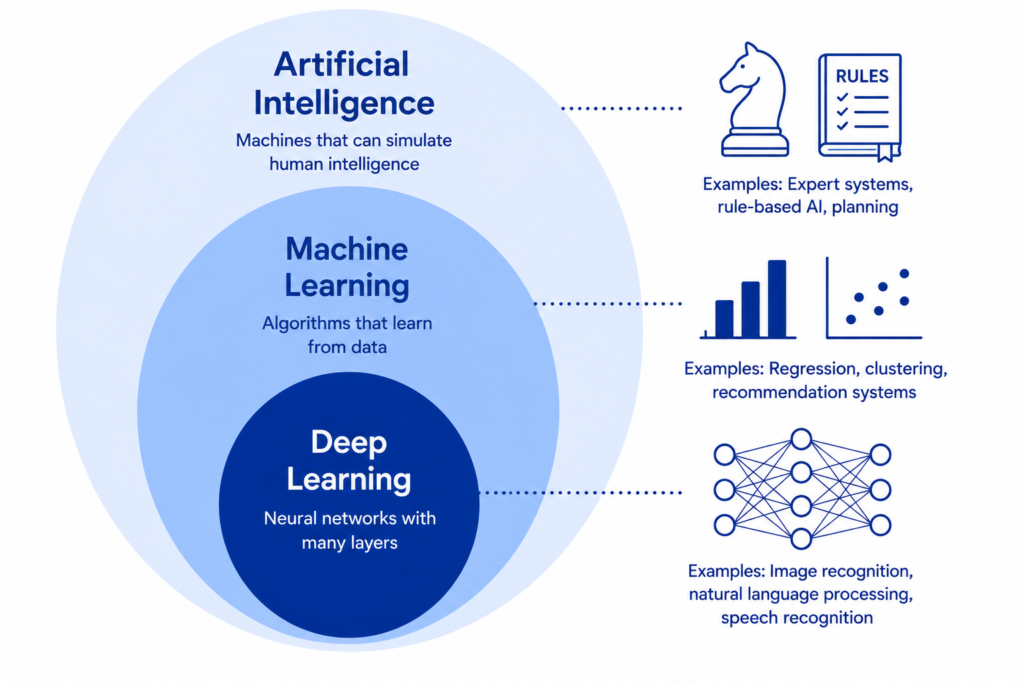
Millions of People Use It Every Day — Most Have No Idea What’s Actually Happening
There’s something quietly strange about ChatGPT’s success. It’s one of the most widely used software products in human history — 100 million users in its first two months, faster adoption than any consumer technology ever recorded. People use it to write emails, plan trips, debug code, understand medical reports, tutor their children, and draft legal letters.
And almost none of them know how it works.
That’s not a criticism. Most people don’t know how a microwave heats food or how a vaccine trains an immune system either, and they use those things every day without trouble. But ChatGPT is different in one important way: understanding how it works changes how you use it. It explains why it sometimes gives you confidently wrong answers. It explains why the way you phrase a question dramatically affects the quality of the response. It explains what it can genuinely help with and where it will quietly let you down.
This article is the explanation I give to smart non-technical people who want to actually understand ChatGPT — not a surface-level “it’s AI that reads text” summary, but the real mechanics, explained without a single piece of jargon that isn’t immediately decoded. By the end, you’ll understand it better than most people who use it daily, and you’ll use it significantly more effectively as a result.
READ MORE: What Is Artificial Intelligence? Updated Ultimate Beginner’s Guide for 2026
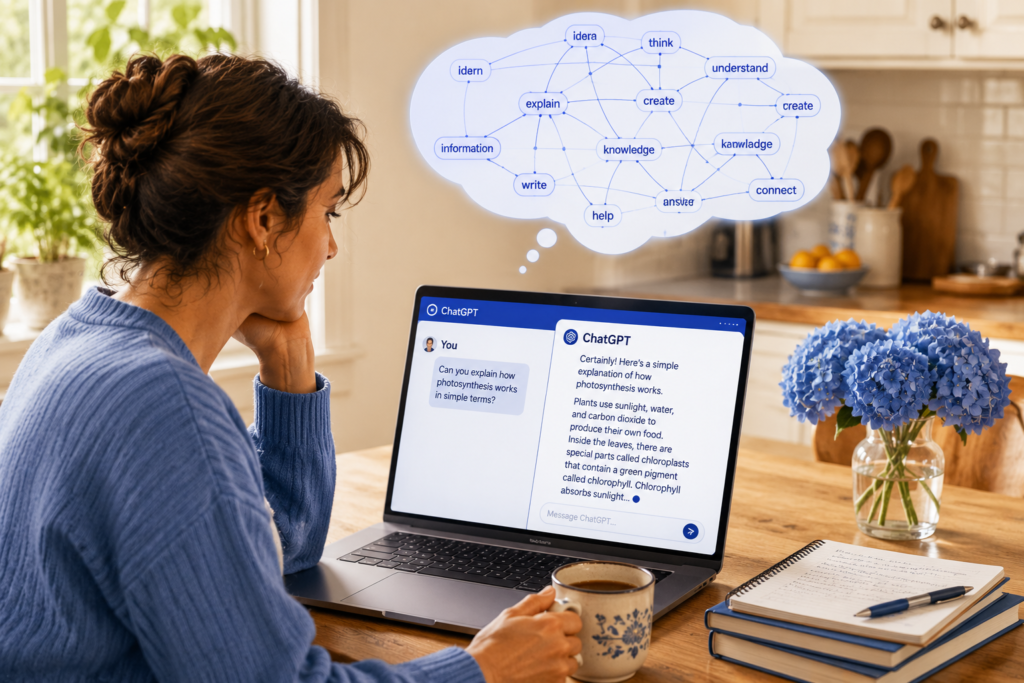
Start Here: What ChatGPT Is Actually Doing When You Talk to It
Before any technical explanation, here is the single most important thing to understand about ChatGPT:
ChatGPT is not looking up answers. It is generating them, word by word, based on patterns it learned from reading an enormous amount of text.
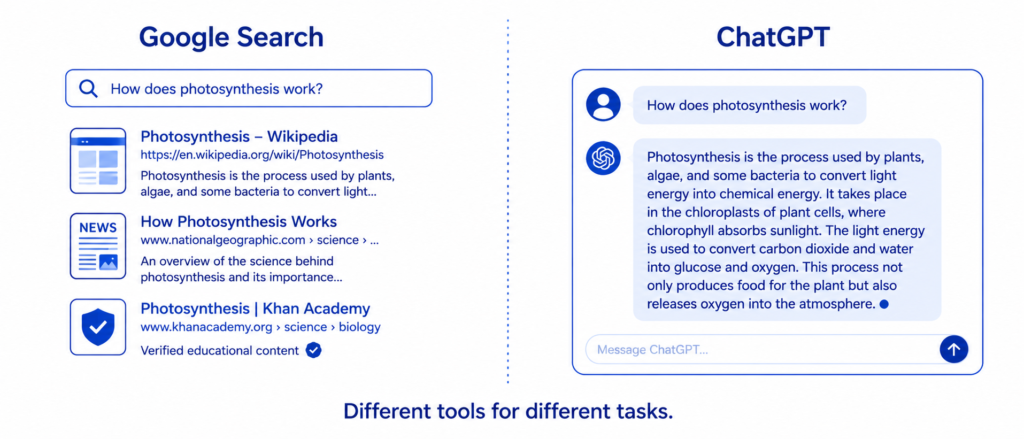
This distinction matters enormously. When you ask Google a question, Google searches through existing web pages and shows you ones that seem relevant. ChatGPT does not search. It does not look anything up. It does not have a database of correct answers it retrieves from.
Instead, it generates a response from scratch — predicting, one word at a time, what words would make the most sensible, coherent response to your input. It is, in a deep sense, a very sophisticated prediction machine.
Think of it this way. If I ask you to finish this sentence: “The capital of France is ___” — your brain doesn’t search a filing cabinet for that fact. It retrieves it from the patterns of language and facts you have absorbed over your lifetime. You have seen that phrase, or connected phrases, enough times that the completion comes naturally.
ChatGPT does something structurally similar — except the “lifetime” it learned from was essentially the entire public internet, millions of books, and billions of documents. And instead of a human brain making the prediction, it’s a mathematical model with hundreds of billions of numerical parameters.
KEY FACT: GPT stands for Generative Pre-trained Transformer. Each word matters. “Generative” — it generates new text, rather than retrieving stored text. “Pre-trained” — it learned from a massive dataset before you ever typed a single word to it. “Transformer” — the specific type of neural network architecture it uses, invented by Google researchers in 2017. The “Chat” prefix was added by OpenAI to describe the conversational interface built on top of the underlying GPT model.
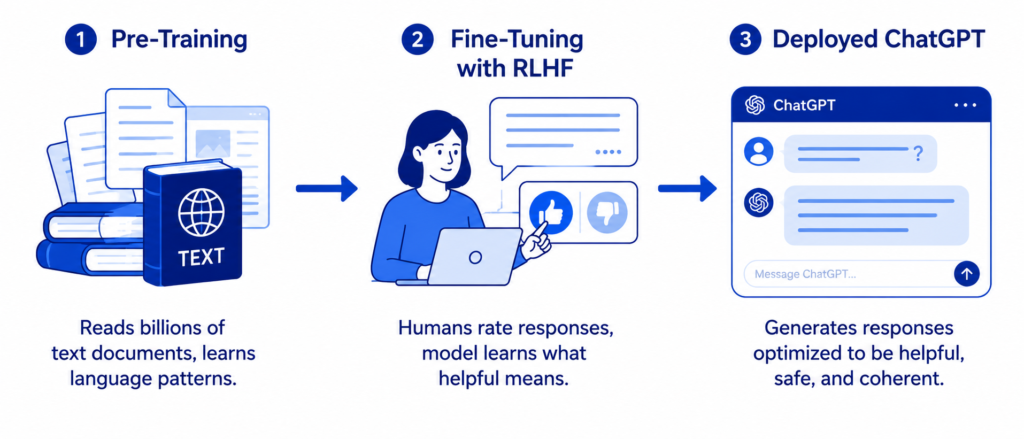
Phase One: The Reading Phase (Pre-training)
ChatGPT’s story begins long before you open the chat window. It begins with a process called pre-training — where the model reads and learns from an almost incomprehensible amount of text.
Imagine a person who spent the first 20 years of their life doing nothing but reading. Not just books — everything. Every Wikipedia article. Every published book they could find. Billions of web pages. Academic papers. News archives. Code repositories. Forums. Social media posts. Legal documents. Medical literature. Recipes. Instruction manuals. Poetry. Song lyrics.
And while reading, they are doing something very specific: constantly trying to predict the next word in every sentence they read. When they get it right, they reinforce that pattern. When they get it wrong, they adjust.
“The sun rises in the ___” — east. That’s easy after the first few hundred times you’ve seen the pattern.
“The patient presented with symptoms of ___” — this requires having read enough medical text to know that this phrase is followed by medical terminology, and which terminology fits based on context.
“The quarterly earnings report showed ___” — this requires having absorbed the patterns of financial writing to know that numbers, percentages, and directional language typically follow.
ChatGPT went through this process — on an enormous, parallel computational scale — processing hundreds of billions of words and adjusting its internal mathematical weights billions of times until it became extraordinarily good at predicting what word or phrase should come next in any given context.
This is not memorization. ChatGPT did not store all those documents. It compressed the patterns from all those documents into 175 billion numbers (in GPT-3) or an even larger set of numbers in subsequent versions. Those numbers — called parameters or weights — are the distilled pattern of language that emerged from reading the equivalent of millions of libraries.
PRO TIP: Understanding pre-training explains one of ChatGPT’s most useful but also most dangerous properties. Because it learned from text written by humans across all domains, it sounds authoritative about almost everything — medicine, history, science, law. But sounding authoritative and being accurate are different things. ChatGPT absorbed both correct information and incorrect information from the internet. It has no mechanism for distinguishing them except patterns of how information is typically expressed.
Phase Two: Learning to Have Conversations (Fine-Tuning)
After pre-training, the raw GPT model is excellent at predicting text but not particularly good at being helpful in conversation. It might continue your prompt in unexpected ways, produce content that violates safety standards, or give responses that technically fit the pattern but miss what you actually needed.
This is where fine-tuning comes in — specifically a technique called Reinforcement Learning from Human Feedback (RLHF).
Here’s how it worked for ChatGPT:
OpenAI employed a team of human contractors — people hired specifically for this task — and showed them examples of the model’s outputs. The humans rated these outputs: this response is helpful, this one is harmful, this one is accurate, this one is misleading, this one is appropriately cautious, this one is unnecessarily restrictive.
Those human ratings were used to train a separate AI model called a reward model — essentially a system that learned to predict how human evaluators would rate any given response. Then the main ChatGPT model was further trained by optimizing its responses to get higher scores from the reward model.
In plain language: humans taught it what “good” responses look like by example, and then the model was adjusted to produce more of those good responses.
This is why ChatGPT behaves differently from a raw text predictor. It is not just completing text — it is trying to produce responses that a human evaluator would rate as helpful, harmless, and honest. The fine-tuning process is what makes it feel like it’s trying to help you rather than just generating plausible-sounding text.
READ MORE: Reinforcement Learning From Human Feedback (RLHF): How AI Learns From Us
The Transformer: The Architecture That Changed Everything
You don’t need to understand the full mathematics of transformers to understand ChatGPT. But one concept at the heart of the transformer architecture is so important that skipping it would leave a significant gap in your understanding.
That concept is attention.
When you read a sentence, your brain doesn’t treat every word with equal importance. Reading “The bank by the river flooded after the storm,” your brain automatically connects “bank” to “river” and “flooded” — understanding that “bank” here means riverbank, not a financial institution. Your brain pays attention to the right words to resolve ambiguity.
The transformer does something mathematically similar. For every word it processes, it calculates relationships to every other word in the context — a score for how much each word should “attend to” every other word when generating the next prediction. These scores determine how much each word’s meaning influences the interpretation of every other word.
Let’s see this with a simple example:
Sentence: “Sarah gave her dog the bone because it was hungry.”
What does “it” refer to? The dog, not the bone. Your brain resolved this instantly. The transformer’s attention mechanism computes higher attention scores between “it” and “dog” than between “it” and “bone” — correctly resolving the reference and producing coherent continuations.
This ability to track relationships between words across long distances — not just adjacent words but words separated by entire paragraphs — is what makes the transformer fundamentally more powerful than previous language models. It can maintain context, track references, and handle complex reasoning across much longer passages.
A simplified view of how attention scores work:

Sentence: "The trophy didn't fit in the suitcase because IT was too large."

What does IT refer to? The trophy.

Attention mechanism computes (simplified):
IT → trophy:   0.78  ← high score (strong relationship)
IT → suitcase: 0.12  ← low score
IT → fit:      0.06  ← low score
IT → large:    0.04  ← low score

Because the attention score to "trophy" is highest,
the model correctly understands IT = the trophy,
not the suitcase, and generates coherent continuations:
"...the trophy was too large, not the suitcase."

This happens for EVERY word, attending to EVERY other word,
simultaneously, across the entire context window.
At GPT-4 scale: hundreds of billions of such calculations
per single response generation.
This is why ChatGPT can follow a long conversation, remember what you said at the beginning, and maintain consistent context through complex multi-turn discussions — the attention mechanism is tracking those relationships throughout.
How ChatGPT Generates Text: One Word at a Time
Now we come to the part that most people find surprising when they first understand it: ChatGPT generates its response one token at a time, each token chosen based on what’s most likely given everything that came before.
First, a quick clarification on tokens. ChatGPT doesn’t work with individual letters or always with individual words — it works with tokens, which are roughly pieces of words. “Understanding” might be one token. “Un-der-stand-ing” could be four. Common short words are typically single tokens. Long or unusual words get broken into pieces. On average, one token is about 0.75 words.
When generating a response, here’s what actually happens:
- Your input is converted into a sequence of tokens
- The model processes all those tokens through its layers of attention calculations
- The model outputs a probability distribution over all possible next tokens — essentially a ranked list of every word or word-piece in its vocabulary with a probability assigned to each
- A token is selected from this distribution (usually the highest probability one, with some controlled randomness added to avoid robotic repetition)
- That token is added to the sequence, and the whole process repeats for the next token
- This continues until the model generates a special end-of-sequence token or reaches the length limit
This is why you can see ChatGPT’s responses appearing word by word when it’s generating — because it literally is generating word by word (token by token), with each word depending on all the words before it.
KEY FACT: The “temperature” setting you might have seen in ChatGPT’s API controls how much randomness is added to the token selection. Temperature 0 = always pick the highest probability token (deterministic, repetitive). Temperature 1 = sample proportionally from the probability distribution (more creative, more variable). Temperature above 1 = increasingly random, eventually incoherent. This is why ChatGPT can feel different on different days — there’s controlled randomness baked into how it generates responses.
Why ChatGPT Gets Things Wrong — And Why It Sounds So Confident Anyway
This is the section that will change how you use ChatGPT. Understanding why it makes mistakes makes the mistakes predictable and therefore manageable.
The Hallucination Problem
Hallucination is the term AI researchers use for when a language model generates false information with apparent confidence. ChatGPT does this. It is a structural feature of how the technology works, not a bug that will be fully fixed.
Here’s why it happens. ChatGPT generates text by predicting what words should come next based on patterns. When it encounters a topic where the correct answer is “I don’t know” or “this information doesn’t exist,” it doesn’t have a reliable mechanism to stop and say so. Instead, it generates what sounds like the kind of confident, specific response that such questions typically receive — complete with plausible-sounding but entirely fabricated details.
Ask ChatGPT to cite specific academic papers and it will sometimes generate paper titles, authors, and journal names that sound completely real — and don’t exist. Ask it about a minor historical figure and it may invent biographical details. Ask it about a legal case in an obscure jurisdiction and it may cite precedents that were never decided.
The reason it sounds confident is that it has learned from text in which confident-sounding answers are the norm. It has absorbed the style of authority without always having the underlying facts that justify that authority.
The Knowledge Cutoff Problem
ChatGPT was trained on data up to a specific date. After that date, it knows nothing — not because it forgot, but because those events weren’t in its training data. It’s like asking someone who has been on a remote expedition for two years about current events: they have no information, but they might fill the gap with plausible-sounding guesses if they’re not careful about the limits of their knowledge.
WARNING: Never use ChatGPT as your only source for: medical decisions, legal advice, financial decisions, current events, specific citations or references, or any claim where being wrong has consequences. Use it as a starting point, a thinking partner, or a drafting tool — then verify anything that matters through authoritative sources. This is not excessive caution. It is an appropriate response to a system that generates plausible-sounding text, not verified facts.
The Training Data Bias Problem
ChatGPT absorbed patterns from human-generated text — and human-generated text reflects human biases, cultural assumptions, historical inequalities, and perspective distortions. Text on the internet over-represents certain languages (primarily English), certain demographics, certain viewpoints, and certain cultures. ChatGPT’s worldview is shaped by whose text was most represented in its training data.
This is not a reason to avoid using ChatGPT. It is a reason to think critically about its outputs — especially on topics involving different cultures, perspectives, or populations than the ones most represented in its training.
The Context Window: ChatGPT’s Working Memory
Here’s a concept that directly affects how you should use ChatGPT: the context window.
Think of the context window as ChatGPT’s working memory for a single conversation. Everything in the current conversation — your messages, its responses, any documents you’ve shared — exists within this window. The model can see and use all of it when generating each response.
The context window has a size limit measured in tokens. Earlier versions of ChatGPT had windows of around 4,000 tokens (roughly 3,000 words). GPT-4 extended this significantly. Modern versions handle 128,000 tokens or more — roughly the length of a full novel.
This matters in several practical ways:
- When you start a new conversation, ChatGPT has no memory of your previous conversations. Each conversation starts completely fresh. This is why you sometimes need to re-explain context at the start of a new session.
- Within a very long conversation, if you exceed the context window, the earliest parts of the conversation effectively drop out — the model can no longer see them, which can cause it to forget things you said earlier.
- When you share a document for ChatGPT to analyze, the document uses up part of your context window — leaving less room for the conversation itself.
PRO TIP: For complex projects that require ChatGPT to maintain consistent context across multiple sessions, start each new session by providing a brief summary of what you’ve already established together. Something like: “We’re writing a business plan for a bakery. We’ve decided on three product lines and a target location of Chicago. Here’s what we have so far…” This manually recreates the context that ChatGPT can’t carry between sessions.
What ChatGPT Can Genuinely Do Well
Understanding the mechanism helps you see clearly where ChatGPT genuinely excels — and there is a lot it does very well.
Writing assistance: Drafting, editing, rewriting, adjusting tone, expanding bullet points into paragraphs, making formal text more conversational or vice versa. This is where the pattern-based generation is pure strength — it has absorbed the patterns of virtually every writing style imaginable.
Explaining concepts: Breaking down complex ideas into simpler language, using different analogies for different audiences, answering “explain this like I’m a beginner” requests. This article is essentially an example of what ChatGPT can be prompted to help produce.
Brainstorming and ideation: Generating lists of options, suggesting approaches to problems, coming up with names, headlines, or creative directions. The breadth of its training data means it can draw unexpected connections.
Code assistance: Writing, explaining, debugging, and translating code across programming languages. This is one of its strongest areas because code has unusually clear right and wrong patterns, and its training data included enormous quantities of code with corresponding explanations.
Summarization: Condensing long documents, extracting key points, producing executive summaries. As long as you provide the source document, this is highly reliable.
Language translation: Handling multiple languages with reasonable accuracy for common language pairs, though specialized translation services often perform better for professional or sensitive contexts.
| Task | ChatGPT Performance | Key Caveat |
|---|---|---|
| Writing drafts and editing | Excellent | Style, not facts |
| Explaining concepts clearly | Excellent | Verify technical accuracy |
| Code writing and debugging | Very good | Test all code before using |
| Brainstorming ideas | Very good | Starting point, not final answer |
| Summarizing documents you provide | Very good | Provide the document yourself |
| Answering factual questions | Mixed | Always verify important facts |
| Current events and recent news | Poor | Knowledge cutoff limitation |
| Legal/medical specific advice | Unreliable | Use licensed professionals |
| Precise citations and references | Unreliable | Hallucination risk is high |
ChatGPT vs Google: When to Use Which
One of the most practical questions people ask once they understand how ChatGPT works: when should I use ChatGPT versus just Googling?
The answer follows directly from the mechanism.
Use Google when:
- You need current, up-to-date information — news, prices, recent events
- You need to verify a specific fact — a date, a statistic, a quote
- You need authoritative sources you can check and cite
- You’re looking for a specific website, product, or person
- You want to see the range of perspectives different sources present
Use ChatGPT when:
- You need something drafted, written, or rewritten
- You want a concept explained in plain language tailored to your level
- You need help thinking through a problem or decision
- You want to process and analyze a document you provide
- You need code written or explained
- You want to brainstorm options, names, or approaches
- You want a conversation rather than a list of links
The best approach, often, is to use both. Search for reliable sources on a topic, then use ChatGPT to help you understand, synthesize, or work with what you found. Google for the facts, ChatGPT for the thinking.
The People and Companies Behind ChatGPT
ChatGPT was built by OpenAI — a company founded in San Francisco in 2015 by a group that included Elon Musk, Sam Altman, and several prominent AI researchers. The original mission was to develop AI “for the benefit of all humanity” as a nonprofit. OpenAI has since evolved into a “capped profit” company with significant investment from Microsoft, which has incorporated ChatGPT capabilities across its products including Bing, Office, and Azure.
The GPT series of models — GPT-1, GPT-2, GPT-3, GPT-3.5 (the foundation of the original ChatGPT), GPT-4, and subsequent versions — represents OpenAI’s progression of underlying language models. ChatGPT is essentially a user interface and conversation layer built on top of these models, with the fine-tuning process described earlier making them conversational and helpful.
OpenAI is not alone in this space. Google has Gemini. Anthropic (founded by former OpenAI researchers with a focus on AI safety) has Claude. Meta has Llama. Mistral and dozens of other companies have their own models. The underlying technology — the transformer architecture trained on large text datasets — is similar across all of them, though each company has made different choices about training data, fine-tuning approaches, and safety measures.
Seven Practical Tips for Using ChatGPT Better
Understanding how ChatGPT works translates directly into using it better. Here are seven practices that actually make a difference:
1. Be specific about what you want. “Write an email” produces generic results. “Write a professional but warm email to my team announcing a Monday meeting about Q3 planning, keeping it under 150 words” produces something useful. The more context and constraints you provide, the closer the first response will be to what you actually need.
2. Tell it who it’s writing for. “Explain this to a 10-year-old” and “explain this to a medical professional” produce dramatically different responses from the same underlying information. The model is good at calibrating level and vocabulary — use this.
3. Ask it to show its reasoning. Adding “think through this step by step” or “explain your reasoning” to a question significantly improves accuracy on complex problems. This isn’t magic — it works because generating reasoning text forces the model to process the problem more carefully before producing a conclusion.
4. Provide your own sources for factual work. Instead of asking “what are the latest statistics on X,” paste in a report or article and ask “based on this document, what are the key statistics on X?” This turns ChatGPT from an unreliable fact-generator into a reliable document-processor.
5. Push back when something feels wrong. ChatGPT is responsive to correction and follow-up. “That doesn’t seem right — can you check that figure?” or “I need this in a different tone” works well. It doesn’t have an ego and won’t dig in defensively.
6. Break complex tasks into steps. Instead of “write me a complete marketing strategy,” try building it piece by piece: audience first, then positioning, then channels, then messaging. Each step builds on the last and produces better outputs than asking for everything at once.
7. Verify anything consequential. Not skeptically, not paranoidly — but routinely. If ChatGPT gives you a statistic, a legal requirement, a medical fact, or a historical date that matters to your decision or your work, check it. This takes seconds and saves significant embarrassment or harm.
PRO TIP: The single highest-leverage habit for getting more from ChatGPT is iteration. Your first prompt is almost never the optimal prompt. Read the response, identify what’s missing or wrong, and refine. Two or three rounds of refinement almost always produce something dramatically better than the first draft. Treat it as a collaborative editing process, not a vending machine.
FAQ: How ChatGPT Works
Q1: Does ChatGPT actually understand what I’m saying?
The honest answer depends on what you mean by “understand.” ChatGPT processes your input through its attention mechanisms and generates a response based on learned patterns — and the results can look remarkably like understanding. But it doesn’t have subjective experience, genuine comprehension, or beliefs about what is true. It has a very sophisticated model of how language about different topics tends to be structured. Whether that constitutes “understanding” is a philosophical question without a clean answer. What is practically important is that it behaves as if it understands in many situations, and fails in specific predictable ways that differ from how a human would fail.
Q2: Is ChatGPT reading my conversations to improve itself?
OpenAI’s policies have changed over time on this. By default, conversations in the free tier have historically been used to improve OpenAI’s models, though users can opt out in settings. ChatGPT Plus subscribers have more control. For sensitive or confidential information, you should check OpenAI’s current privacy policy, use the opt-out settings, or avoid inputting information you wouldn’t be comfortable with being potentially used for training. Enterprise versions of ChatGPT have stronger privacy commitments.
Q3: Why does ChatGPT sometimes give different answers to the same question?
Because there’s controlled randomness (temperature) in how it selects tokens during generation. The same question doesn’t always produce the identical token sequence, which means responses vary. The underlying probabilities are the same, but different tokens get sampled from those probabilities in different runs. This variability is a feature, not a bug — it’s what prevents responses from being mechanical and identical every time. For tasks requiring consistency (like code generation), you can reduce this by using more specific prompts or using API settings to lower temperature.
Q4: Can ChatGPT learn from our conversation and remember it next time?
Within a conversation, ChatGPT maintains full context through its context window. Across separate conversations, the base model does not update or learn — each conversation starts fresh with the same model weights. OpenAI has added a “Memory” feature that stores user preferences and information across sessions, but this is a separate system storing notes that are then provided to the model, not the model itself learning. The core model weights are static between training runs.
Q5: How is ChatGPT different from older chatbots like Siri or Alexa?
Older voice assistants like Siri and Alexa were primarily designed for specific task completion — setting timers, playing music, answering factual queries — using a combination of intent recognition and lookup from databases. They match what you say to a predefined list of commands and responses. ChatGPT generates responses from scratch using a large language model, allowing it to handle open-ended conversation, write creatively, reason through problems, and handle requests it was never specifically programmed for. The difference in conversational flexibility and depth is substantial.
Q6: What is the difference between ChatGPT and GPT-4?
GPT-4 is the underlying language model — the core technology. ChatGPT is the product that OpenAI built using GPT models — specifically the conversational interface, the fine-tuning for helpfulness, the safety systems, and the user experience layer. It’s similar to how Chrome is a product built on the Chromium rendering engine. When OpenAI releases a new GPT model, ChatGPT typically upgrades to use it, but they are technically distinct things. The current ChatGPT uses GPT-4 and newer variants of it.
You Now Understand Something Most Daily Users Don’t
Here’s what you know now that you didn’t know when you started reading:
ChatGPT is not a search engine. It does not look things up. It generates responses word by word, based on patterns compressed from reading an enormous amount of text. It was fine-tuned by humans to be helpful and safe. It tracks relationships between words using attention mechanisms that allow it to maintain context. It generates responses probabilistically — the same question can produce different answers. It can hallucinate — generating false information with apparent confidence — because it has no reliable mechanism for knowing what it doesn’t know.
That understanding changes how you use it. You give it more context. You verify factual claims. You treat it as a drafting partner rather than an oracle. You use it for the things it’s genuinely excellent at and reach for other tools when it isn’t.
If this article made the technology click for you, share it with someone who uses ChatGPT every day without really knowing what’s happening.

Author: AI Learner Tech
AI Learner Tech is a premier research and educational hub dedicated to mastering Artificial Intelligence, Machine Learning, and Computer Vision. We bridge the gap between complex academic theories and real-world industrial applications. Join our community to access high-quality tutorials, open-source projects, and expert insights. Website: ailearner.tech