
Welcome to the second part of our Python Sets module! In the previous guide, we learned that a Set is an unordered collection of strictly unique elements.
But what makes sets truly powerful is that they are mutable. This means that while you cannot change the items already inside a set, you can dynamically add new elements and remove unwanted ones. This makes sets perfect for tracking real-time data, like logged-in users on AI Learner Tech or active course categories.
In this guide, we will explore exactly how to add, remove, and clean up elements from your Python sets with clear examples and complete outputs.
Adding Items to a Set #
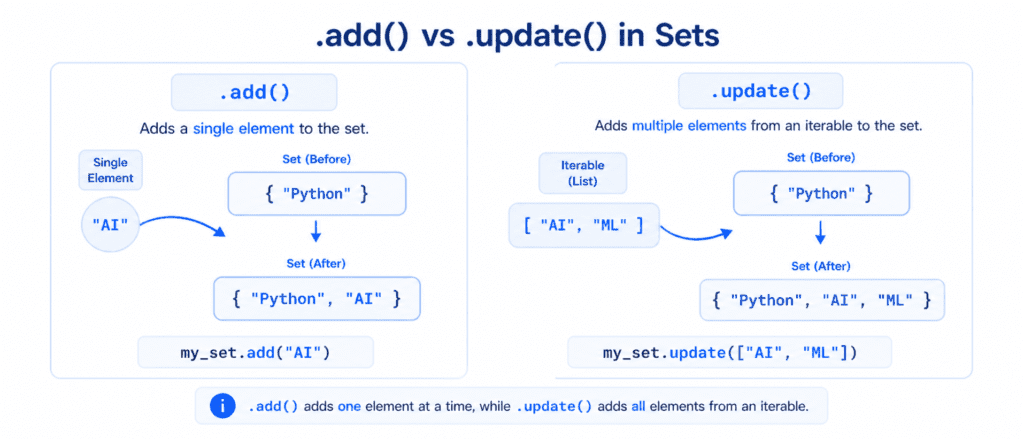
In Python, you cannot use .append() or .insert() on a set because there are no index positions. Instead, Python provides two distinct methods to insert data: .add() and .update().
A. Adding a Single Item (.add()) #
If you want to insert exactly one item into a set, use the .add() method.
# Initial set of active courses
active_courses = {"Python Basics", "Advanced Strings"}

# Add a single new course
active_courses.add("Lists Basics")

print(active_courses)
Output:
{'Advanced Strings', 'Lists Basics', 'Python Basics'}Remember: Because sets are unordered, the position of your newly added item in the printed output is completely random.
Adding Multiple Items (.update()) #
If you want to add multiple items from another collection (like a list, a tuple, or another set), use the .update() method. This merges all the unique elements together.
current_topics = {"Variables", "Operators"}
new_topics = ["Loops", "Functions", "Variables"] # Notice the duplicate "Variables"

# Merge new_topics into current_topics
current_topics.update(new_topics)

print(current_topics)
Output:
{'Variables', 'Functions', 'Loops', 'Operators'}Notice: The .update() method instantly filters out any duplicates. Even though "Variables" was present in both collections, it was added only once.
Removing Items from a Set #
To remove elements from a set, Python provides four different tools: .remove(), .discard(), .pop(), and .clear(). Each behaves differently, so picking the right one is crucial.
.remove() vs. .discard() (The Safety Difference) #
Both methods are used to delete a specific item by its name. However, their behavior changes entirely when the item you are trying to remove does not exist in the set.
1. Using .remove() #
If you try to remove an item that is not present in the set, Python will raise a KeyError. This is useful if you want your program to flag an error immediately when a specific item is missing.
students = {"Sarim", "Ali", "Hamza"}

# Removing an item that exists
students.remove("Ali")
print(students)

# Trying to remove an item that does not exist
students.remove("John")
Output:
{'Sarim', 'Hamza'}
Traceback (most recent call last):
  File "main.py", line 7, in <module>
    students.remove("John")
KeyError: 'John'
2. Using .discard() #
If you try to remove an item that is not present in the set using .discard(), Python will not throw an error. It silently leaves the set unchanged. This is highly useful when deleting items where missing data is not a critical issue.
students = {"Sarim", "Ali", "Hamza"}

# Discarding an item that does not exist
students.discard("John")

print(students)
Output:
{'Sarim', 'Ali', 'Hamza'}Removing a Random Item (.pop()) #
The .pop() method removes and returns an item from the set. Since sets are unordered, you cannot predict which item will be deleted.
tech_stack = {"Python", "AI", "Data Science", "SQL"}

# Remove a random item
removed_item = tech_stack.pop()

print(f"Removed item: {removed_item}")
print(f"Remaining set: {tech_stack}")
Output:
Removed item: Data Science
Remaining set: {'AI', 'Python', 'SQL'}
Warning: Running .pop() on an empty set will raise a KeyError.
Emptying the Set (.clear()) #
If you want to strip all items from a set but keep the set structure ready for future data, use the .clear() method.
cart_items = {"Laptop", "Mouse", "Keyboard"}

# Empty the set
cart_items.clear()

print(cart_items)
Output:
set()
Reference Table #
Here is a quick-reference guide to help you choose the correct method when modifying sets:
| Method Name | Code Example | Output / Purpose | Error Risk |
.add(x) | my_set.add("A") | Inserts a single item into the set. | None |
.update(iter) | my_set.update(["B", "C"]) | Merges multiple items into the set. | None |
.remove(x) | my_set.remove("A") | Deletes item "A" from the set. | Raises KeyError if missing. |
.discard(x) | my_set.discard("A") | Deletes item "A" silently. | None |
.pop() | my_set.pop() | Removes and returns a random item. | Raises KeyError if empty. |
.clear() | my_set.clear() | Removes all items, leaving set(). | None |
Direct Practice Questions for Students #
As you write down these notes, make sure you can answer these important practice questions:
- Why is
.discard()generally safer to use in production code than.remove()? - What happens to duplicate items when you add them using
.update()? - How can you clear a set completely without deleting the variable itself?