
What truly sets Sets apart from other Python data structures is their direct connection to mathematical set theory. If you have ever used a Venn Diagram in school, you already know the logic behind advanced set methods. These operations allow you to join sets, extract common elements, find unique differences, and compare multiple collections in a single step.
In this guide, we will master the mathematical side of sets, using clear examples, practical outputs, and code shortcuts to make you a more efficient developer.
Joining Sets: Union (.union() or |) #
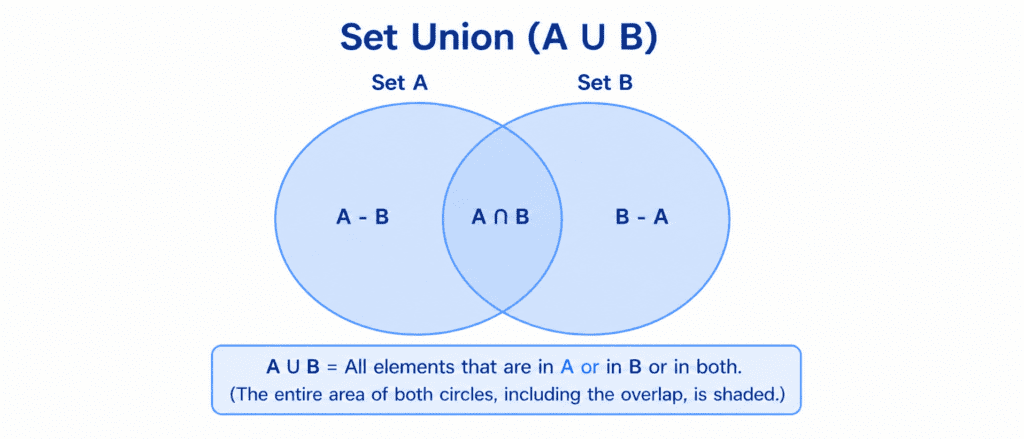
The Union operation combines all unique elements from both sets into a brand-new set. If there are items present in both collections, they will only be included once.
In Python, you can perform a union in two ways:
- Using the
.union()method. - Using the pipe operator (
|) shortcut.
# Students enrolled in different batches on AI Learner Tech
python_students = {"Sarim", "Ali", "Hamza"}
ai_students = {"Hamza", "Zia", "Haseeb"}

# Method 1: Using the .union() method
all_students_1 = python_students.union(ai_students)

# Method 2: Using the pipe operator shortcut
all_students_2 = python_students | ai_students

print(all_students_1)
print(all_students_2)
Output:
{'Sarim', 'Ali', 'Hamza', 'Zia', 'Haseeb'}
{'Sarim', 'Ali', 'Hamza', 'Zia', 'Haseeb'}
Notice: Even though "Hamza" was enrolled in both batches, he is listed only once in the merged set.
Finding Common Elements: Intersection (.intersection() or &) #
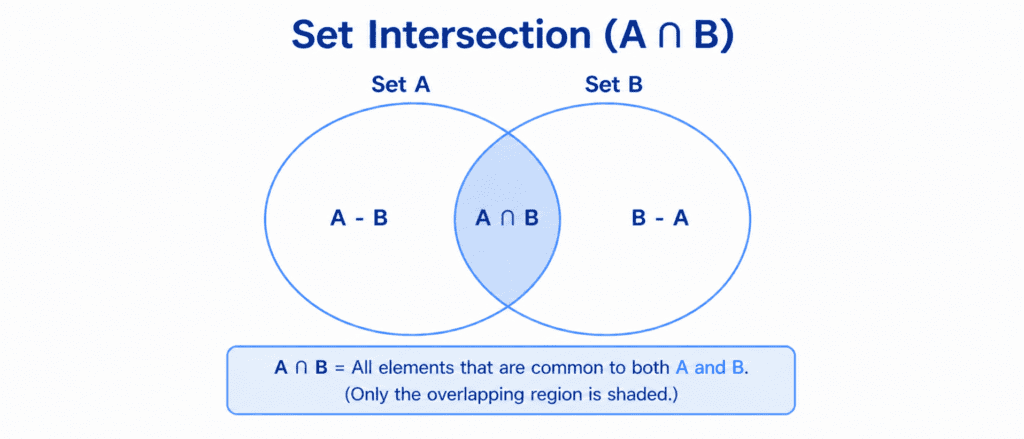
The Intersection operation extracts only the items that are present in both sets. Any item that is unique to just one set is discarded.
In Python, you can perform an intersection in two ways:
- Using the
.intersection()method. - Using the ampersand operator (
&) shortcut.
python_students = {"Sarim", "Ali", "Hamza"}
ai_students = {"Hamza", "Zia", "John"}

# Method 1: Using the .intersection() method
common_students_1 = python_students.intersection(ai_students)

# Method 2: Using the ampersand operator shortcut
common_students_2 = python_students & ai_students

print(common_students_1)
print(common_students_2)
Output:
{'Hamza'}
{'Hamza'}
Finding What’s Unique: Difference (.difference() or -) #
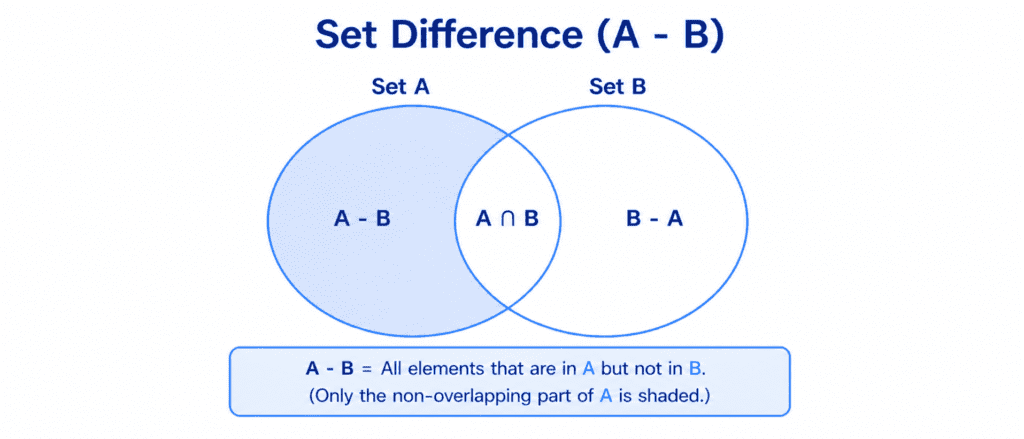
The Difference operation returns a new set containing elements that exist in the first set but not in the second set.
In Python, you can perform a difference in two ways:
- Using the
.difference()method. - Using the minus operator (
-) shortcut.
python_students = {"Sarim", "Ali", "Hamza"}
ai_students = {"Hamza", "Zia", "John"}

# Get students who are ONLY in the Python batch (Not in AI)
only_python_1 = python_students.difference(ai_students)
only_python_2 = python_students - ai_students

print(only_python_1)
print(only_python_2)
Output:
{'Sarim', 'Ali'}
{'Sarim', 'Ali'}
Warning: The order matters! Writing ai_students - python_students would give you the students who are exclusively in the AI batch ({'Zia', 'John'}).
Excluding the Middle: Symmetric Difference (.symmetric_difference() or ^) #
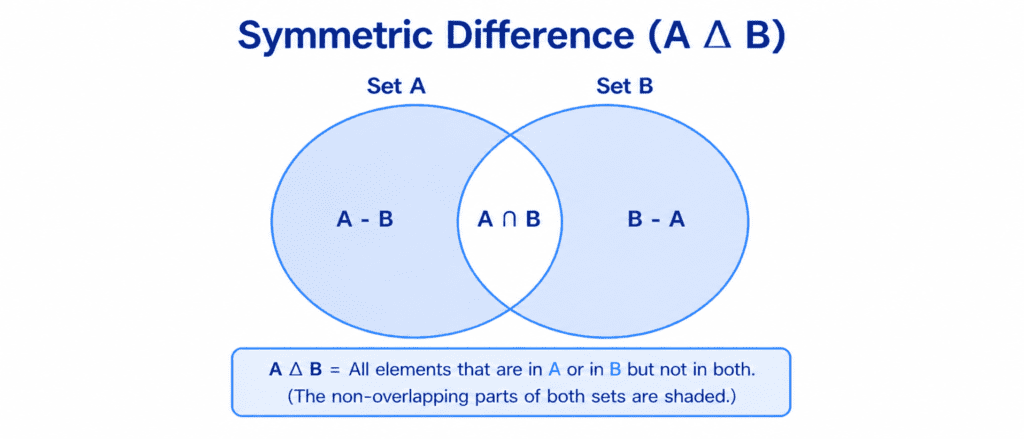
The Symmetric Difference operation returns a new set containing elements that are unique to each set. In other words, it keeps everything except the common items.
In Python, you can perform this in two ways:
- Using the
.symmetric_difference()method. - Using the caret operator (
^) shortcut.
python_students = {"Sarim", "Ali", "Hamza"}
ai_students = {"Hamza", "Zia", "John"}

# Extract students who are in only one course, but not both
unique_to_each_1 = python_students.symmetric_difference(ai_students)
unique_to_each_2 = python_students ^ ai_students

print(unique_to_each_1)
print(unique_to_each_2)
Output:
{'Sarim', 'Ali', 'Zia', 'John'}
{'Sarim', 'Ali', 'Zia', 'John'}
Reference Table #
To make these advanced mathematical operations easy to review, here is your direct reference cheat sheet:
| Math Operation | Method Name | Operator | Meaning / Visual Logic |
| Union | set1.union(set2) | | | Combines everything from both sets. |
| Intersection | set1.intersection(set2) | & | Extracts only the shared items. |
| Difference | set1.difference(set2) | - | Keeps items unique to the first set. |
| Symmetric Diff. | set1.symmetric_difference(set2) | ^ | Keeps everything except shared items. |