
When managing collections of data in programming, you frequently run into situations where you need to store items but must ensure that no duplicates exist. For example, if you are tracking unique visitors on AI Learner Tech, saving distinct student IDs, or collecting email addresses for a newsletter, you do not want the same entry recorded multiple times.
While Lists and Tuples allow duplicate values and maintain a strict order, Python offers a completely different data structure for handling unique, unordered items: the Set.
In this guide, we will explore the core logic of Python sets, their unique characteristics, how to create them properly, and how to verify if an item exists inside them.
Why Do We Need Sets? #
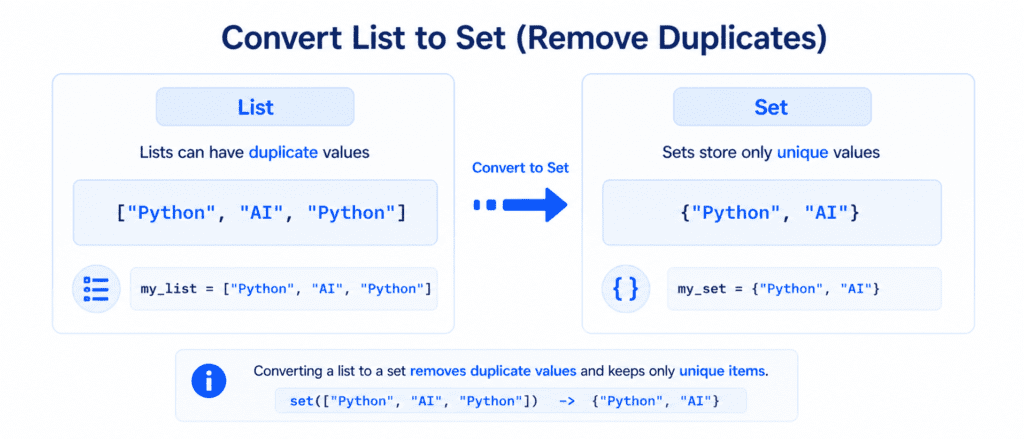
To understand why sets are so valuable, let’s look at a real-world scenario. Suppose you have a list of course categories available on your learning platform, but some categories are accidentally repeated:
# A list with duplicate values
categories = ["Python", "Data Science", "Python", "AI", "Data Science"]
If you only want to display the distinct categories to your users, cleaning this list manually takes extra steps. A Set solves this problem automatically. By converting the list to a set, Python instantly discards all duplicate entries, leaving you with only unique items.
The 3 Core Rules of Python Sets #
Every data structure in Python has specific behaviors. Sets are defined by three strict rules that distinguish them from lists and tuples:
Rule 1: Unordered #
Items in a set do not have a defined order. This means that every time you print or loop through a set, the items may appear in a different sequence. You cannot rely on a set to keep your items in the exact order you wrote them.
Rule 2: Unindexed #
Because sets are unordered, their items do not have index numbers.
- You cannot use square brackets like
my_set[0]to access the first item. - You cannot slice a set using
my_set[1:4].
Rule 3: Strictly No Duplicates #
A set cannot contain two items with the exact same value. If you try to add a duplicate item to a set, Python silently ignores the second item.
Creating a Set in Python #
In Python, you define a set by placing your items inside curly braces {}, with each item separated by a comma.
# A set containing unique topics
topics = {"Python Basics", "Advanced Strings", "Lists", "Tuples"}

# A set with duplicate values entered intentionally
unique_ids = {101, 102, 101, 103, 102}

print(topics)
print(unique_ids)
Output:
{'Lists', 'Python Basics', 'Tuples', 'Advanced Strings'}
{101, 102, 103}
Notice: The output of topics does not match the order we typed it in, and the output of unique_ids completely removed the duplicate numbers 101 and 102.
The True vs. False and 1 vs. 0 Rule #
In Python sets, the boolean value True is considered the same as the integer 1, and False is considered the same as the integer 0. If you store both in a set, Python will treat them as duplicates and only keep the one that appears first.
# True and 1 are treated as duplicates
mixed_set = {"Sarim", True, 1, 0, False}

print(mixed_set)
Output:
{'Sarim', True, 0}The Empty Set Trap (Crucial for Beginners) #
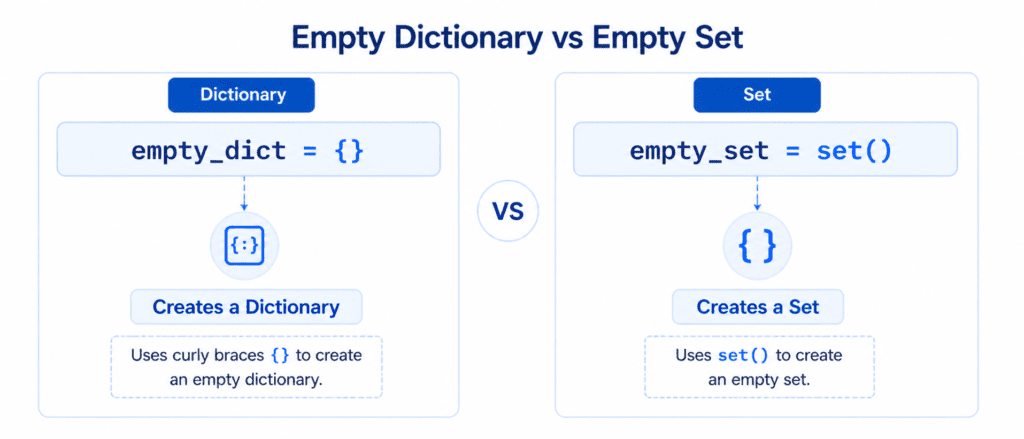
A common point of confusion for beginners is trying to create an empty set. You might assume that because sets use curly braces {}, you can create an empty set like this:
# This does NOT create an empty set!
empty_data = {}
print(type(empty_data))
Output:
<class 'dict'>
In Python, empty curly braces {} are reserved for creating an empty Dictionary. To create a valid empty set, you must use the built-in set() function without any arguments.
# The correct way to create an empty set
valid_empty_set = set()

print(type(valid_empty_set))
Output:
<class 'set'>
Checking If an Item Exists (The in Keyword) #
Since you cannot use index numbers to grab a specific value from a set, you use the in keyword to verify if a specific item is present. This performs a membership test and returns either True or False.
enrolled_students = {"Sarim", "Ali", "Hamza"}

# Check if "Sarim" is in the set
print("Sarim" in enrolled_students)

# Check if "John" is in the set
print("John" in enrolled_students)
Output:
True
False
Comparison Table #
To keep your concepts clear, let’s compare Sets with the other data collections we have covered so far:
| Data Structure | Syntax | Ordered? | Changeable? | Allows Duplicates? |
| List | [ ] | Yes | Yes | Yes |
| Tuple | ( ) | Yes | No | Yes |
| Set | { } | No | Yes | No |