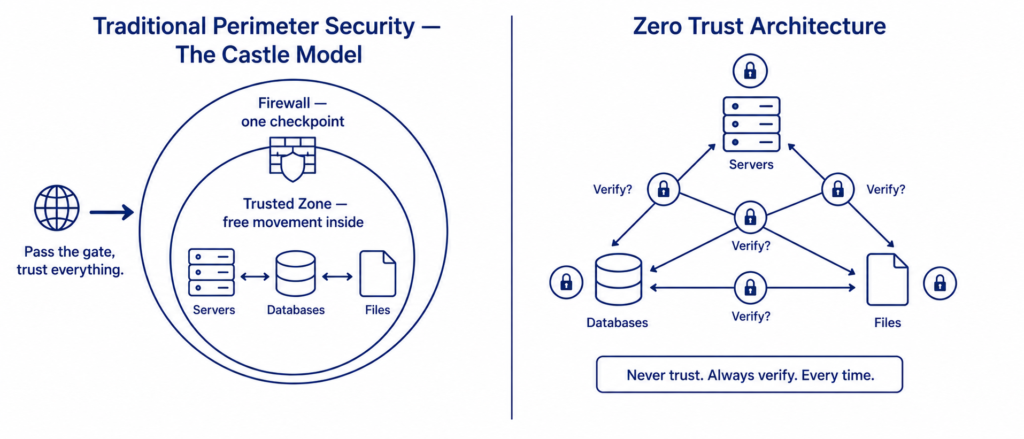
Picture a medieval castle.
Thick stone walls. A heavy drawbridge. Guards checking everyone who enters. Once you are inside the castle, you can walk anywhere — the great hall, the armory, the treasury. Nobody stops you again. You passed the gate. You are trusted.
This is exactly how traditional network security has worked for thirty years.
Get past the firewall — the digital drawbridge — and you are inside the network. Once inside, most systems assume you belong there. You can move between servers, access databases, read files. The perimeter was the security.
In 2026, that model is not just outdated. It is actively dangerous.
The castle wall assumes attackers are always outside. But in modern organisations, the threat is often already inside — through a stolen employee credential, a compromised contractor laptop, a phishing attack that cleared the perimeter cleanly. The average attacker now spends 207 days inside a network before being detected. They crossed the drawbridge months ago. They have been exploring the castle ever since.
Zero Trust is the security model built for this reality.
This article covers:
- Why the perimeter model collapsed — what changed and when
- What Zero Trust actually means beyond the marketing term
- The five core principles that define it
- How it works technically — identity, device, network, and data
- Real implementation challenges that most articles skip
- What Zero Trust looks like for individuals, not just enterprises
- Where the model is heading next
The Collapse of the Perimeter Model
The castle model made sense in 1995.
Every employee worked in the same office. The company’s data lived on servers in that office. The network had a clear edge — inside was the organisation, outside was the internet. A firewall at that edge was a logical, effective checkpoint.
Then three things happened that quietly destroyed the model.
Thing 1 — The workforce moved outside.
Remote work was growing before 2020. After 2020, it became the default for knowledge workers. Employees are now connecting from home networks, coffee shops, hotel Wi-Fi, and airport lounges. The “inside” of the network expanded to include everywhere — and nowhere is inherently trustworthy.
Thing 2 — The data moved to the cloud.
An organisation’s most sensitive data used to live on their own servers, inside their own walls. Now it lives in Microsoft 365, Google Workspace, Salesforce, AWS, Slack, and dozens of other third-party services. The castle walls do not surround any of those. The data is already outside the perimeter — permanently.
Thing 3 — Attackers learned to use legitimate credentials.
Modern attackers rarely break down the front door. They steal a key.
How attackers bypass perimeters in 2026:

Method 1 — Phishing for credentials:
  Employee receives convincing phishing email
  Enters username and password on fake login page
  Attacker now has valid credentials
  Logs in through the front door — firewall sees nothing unusual

Method 2 — Supply chain compromise:
  Attacker compromises a software vendor
  Vendor's update mechanism pushes malicious code
  to all customers simultaneously
  SolarWinds attack (2020): 18,000 organisations
  affected, including US government agencies —
  all through a legitimate software update

Method 3 — Insider threat:
  Disgruntled employee, or employee whose device
  is compromised, already has network access
  No perimeter crossing required

In all three cases:
  The firewall saw: legitimate traffic, valid credentials
  The firewall did: nothing — it passed the traffic through
  The result: attacker had full trusted-zone access
KEY FACT: According to Verizon’s 2025 Data Breach Investigations Report, 74% of data breaches involve the human element — credentials theft, phishing, or misuse of privileges. The firewall stops none of these because they all arrive looking like legitimate authenticated traffic.
The castle wall was protecting against battering rams. The actual attacks were lockpicking and impersonation.
What Zero Trust Actually Means
Zero Trust is not a product. It is not a single technology you buy and install.
It is a security philosophy — a set of principles that change how every access decision in a network is made.
The core principle is one sentence:
Never trust, always verify — regardless of where the request comes from.
That “regardless of where” is the key departure from perimeter thinking.
In a perimeter model: location determines trust. Inside the network = trusted.
In Zero Trust: location determines nothing. Every request is treated as potentially hostile until verified — whether it comes from outside the network, from a remote employee’s laptop, from a server inside the data center, or from an executive’s phone.
The mental model shift:

Perimeter thinking:
  "Is this request coming from inside our network?"
  Yes → Trust it → Grant access
  No  → Block it

Zero Trust thinking:
  "Who is making this request?"
  "Is this the right device for this user?"
  "Is this user's behaviour normal right now?"
  "Does this user actually need access to this resource?"
  "Is this the right time of day for this access?"
  "Has anything changed since the last verification?"
  All satisfied → Grant access, with minimum necessary permissions
  Any failed    → Deny, log, alert
The verification happens continuously — not once at login, but on every request, for every resource, every time.
The Five Principles of Zero Trust
Principle 1 — Verify Explicitly
Every access request is authenticated and authorised based on all available data points — not just a password.
What “all available data points” means in practice:
- Identity — who is the user, verified through strong authentication
- Device health — is the device compliant with security policies, up to date, not flagged as compromised
- Location — is the access request coming from a normal location for this user
- Time — is this a normal time for this user to access this resource
- Behaviour — does this request match the user’s typical patterns
- Risk score — a real-time aggregated score combining all signals
Example of explicit verification in action:

User: Sarah, Finance Manager
Request: Access to payroll database
Time: 2:47 AM
Location: IP address registered to a server in Romania
Device: Unrecognised device, no security certificates
Behaviour: Sarah normally accesses payroll on weekday mornings
           from her work laptop in London

Zero Trust evaluation:
  Identity:  ✓ Password correct, MFA passed
  Device:    ✗ Unrecognised — not registered, not compliant
  Location:  ✗ Anomalous — Romania at 2 AM, not Sarah's pattern
  Time:      ✗ Outside normal access window
  Behaviour: ✗ Multiple anomalies flagged
  Risk score: CRITICAL

Decision: Block access. Alert security team.
          Require additional verification before any access
          from this session.

In a perimeter model:
  MFA passed → access granted → payroll database exposed
Principle 2 — Use Least Privilege Access
Every user, every application, every service gets access to only what they specifically need to do their job — nothing more.
This is called the principle of least privilege and it has always been a security best practice. Zero Trust enforces it strictly and continuously rather than as an afterthought.
Least privilege in practice:

Traditional access model:
  New employee joins finance department
  Gets added to "Finance" group
  Finance group has access to:
    - Finance databases ✓ (needed)
    - Finance file shares ✓ (needed)
    - HR salary records ✓ (not needed, but finance group has it)
    - Executive expense reports ✓ (not needed)
    - Audit trails from last 10 years ✓ (not needed)
  Risk: one compromised finance account exposes everything

Zero Trust least privilege model:
  New employee joins as Accounts Payable Analyst
  Gets access to:
    - Accounts payable database ✓
    - Vendor payment file share ✓
    - Invoice processing system ✓
    - Nothing else
  Access is reviewed quarterly and removed when job changes
  Risk: compromised account exposes only AP data
Just-in-time access takes this further. Instead of permanent access, a user requests access to a sensitive resource when they need it. The access is granted for a specific time window — 4 hours, one day — and automatically revoked when it expires.
Principle 3 — Assume Breach
Zero Trust operates under the assumption that the network has already been compromised — or will be.
This sounds defeatist. It is actually practical.
If you assume breach, you design systems that limit what an attacker can do after they get in. You segment the network so that compromising one system does not give access to all systems. You monitor for lateral movement — the pattern of an attacker who is inside, exploring.
Network segmentation under assume-breach:

Without microsegmentation:
  Attacker compromises marketing employee's laptop
  Marketing laptop has network access
  Network access reaches finance servers
  Finance servers reach HR database
  HR database contains executive salary and personal data
  One compromised laptop → full data exposure

With microsegmentation:
  Attacker compromises marketing employee's laptop
  Marketing laptop can reach: marketing tools, email, internet
  Marketing laptop cannot reach: finance, HR, engineering, admin
  Each segment requires separate authentication
  Lateral movement is blocked at every boundary

Attacker's options: limited to marketing systems only
Principle 4 — Inspect and Log Everything
Every request, every connection, every data access is logged.
Not just failed attempts — everything. Because detecting sophisticated attacks often requires going back through logs to find the pattern that was not obviously malicious at the time.
In Zero Trust, this telemetry feeds into AI threat detection systems that identify anomalies across billions of daily events — the kind of analysis that is impossible for human analysts but tractable for machine learning models.
Principle 5 — Automate Response
Zero Trust systems do not just detect threats — they respond automatically.
When a device fails a compliance check, its access is automatically suspended pending remediation. When a user’s behaviour anomaly score crosses a threshold, step-up authentication is automatically requested. When a lateral movement pattern is detected, that network path is automatically blocked.
The speed of modern attacks — AI-assisted, automated, running at machine speed — means human response time is not fast enough. Automated, policy-driven response is necessary.
The Technology Stack Behind Zero Trust
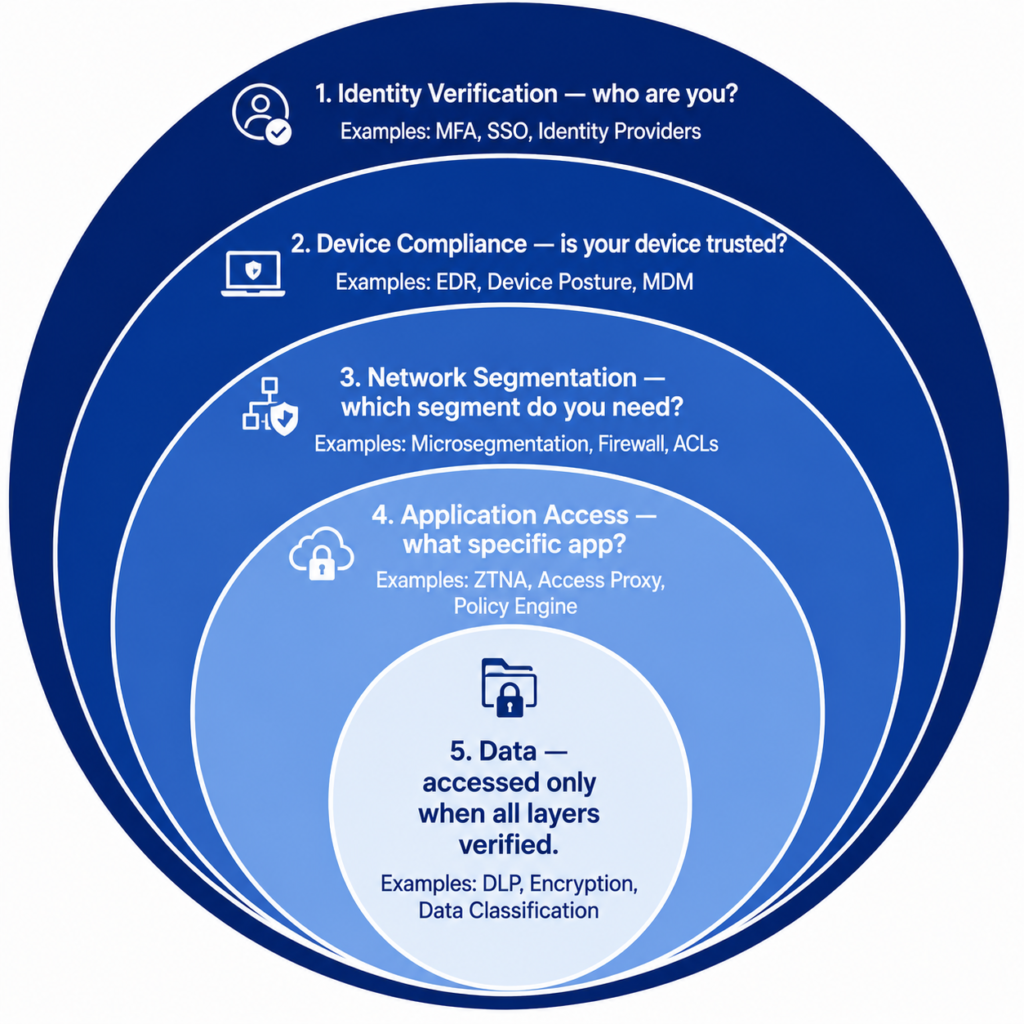
Zero Trust is implemented through a combination of technologies working together. Understanding what each one does helps demystify the concept.
Identity Provider (IdP) — the foundation
Every Zero Trust implementation starts with a strong identity layer. Solutions like Okta, Microsoft Entra ID (formerly Azure AD), or Google Identity provide:
- Single Sign-On across all applications
- Multi-factor authentication
- Conditional access policies that evaluate risk signals before granting access
- Identity governance — who has access to what, reviewed regularly
Endpoint Detection and Response (EDR)
Before any device is allowed onto the network, its security posture is checked:
Device compliance check before access:

Is the operating system up to date?           ✓ or ✗
Is the hard drive encrypted?                  ✓ or ✗
Is the security software running?             ✓ or ✗
Has the device been flagged for compromise?   ✓ or ✗
Is the device registered in our MDM system?   ✓ or ✗

All ✓ → Device trusted, proceed to identity verification
Any ✗ → Access denied until device is remediated
Zero Trust Network Access (ZTNA)
Replaces the traditional VPN. Rather than connecting a device to the entire network, ZTNA connects a user to specific applications they are authorised for — and nothing else.
Traditional VPN vs ZTNA:

VPN:
  User connects to VPN
  VPN creates tunnel to corporate network
  User can reach: everything on the corporate network
  Risk: one compromised VPN session = full network access

ZTNA:
  User authenticates with identity provider
  ZTNA evaluates: identity + device + risk score
  User gets access to: only the specific applications
                       they are authorised for
  User cannot see: other applications, internal servers,
                   network infrastructure
  Risk: one compromised session = only that user's
        specific applications
Microsegmentation
Divides the network into small isolated zones. East-west traffic — movement between systems inside the network — requires explicit authorisation, not just being on the network.
Data Loss Prevention (DLP)
Even when users are authorised to access data, DLP controls what they can do with it. Prevent downloading sensitive files to unmanaged devices. Prevent emailing certain data types outside the organisation. Alert when unusual volumes of data are accessed.
Real Implementation Challenges Nobody Talks About
Zero Trust articles tend to describe the architecture ideally. Here is the reality.
Challenge 1 — Legacy systems that cannot support it
Many organisations run old software — manufacturing systems, healthcare equipment, financial applications — that was built before modern identity standards existed. These systems cannot participate in Zero Trust verification flows. They get excluded, creating security gaps.
Challenge 2 — It is expensive and slow to implement
A full Zero Trust implementation typically takes two to four years for a medium-sized organisation. It requires replacing or upgrading identity infrastructure, network architecture, endpoint management, and application access layers simultaneously.
The cost is significant — implementation projects at large organisations routinely run to seven figures.
Challenge 3 — User friction
More verification means more friction. Step-up authentication, device compliance blocks, and access denials frustrate users who just want to do their job. Poorly implemented Zero Trust creates workarounds — employees using personal devices or unauthorized cloud storage to avoid the friction — which creates worse security than the original perimeter model.
The user friction problem:

Security team perspective:
  "We need to verify every access request to protect data."

Employee perspective:
  "I just needed to quickly check one file and it took
   me 4 authentication steps and my device got blocked
   because my laptop update is pending."

Reality: security that people work around is worse than
         less restrictive security that people actually follow.

The solution: risk-based adaptive authentication.
  Low-risk request (normal user, normal device, normal time)?
  → Minimal friction — let them through
  High-risk request (anomalous signals present)?
  → Step-up authentication — justify the friction
Challenge 4 — Visibility requires centralised logging at scale
Zero Trust requires logging everything to detect threats. Logging everything generates enormous data volumes. Storing, processing, and analysing that data is a significant infrastructure and cost challenge — especially for organisations without mature security operations capabilities.
Zero Trust for Individuals — The Personal Version
Zero Trust is usually discussed at the organisational level. But the principles apply to individuals too.
Your personal Zero Trust posture:
- Never trust a network — use a VPN on public Wi-Fi. Assume any network you did not set up yourself could be monitored or compromised.
- Verify before trusting requests — apply the principle to your own behaviour. Unexpected calls, emails, or messages asking for action? Verify through a separate channel before acting.
- Least privilege for apps — review which apps on your phone have access to your location, contacts, microphone, and camera. Grant only what they specifically need.
- Segment your accounts — use different email addresses for different purposes. A breach of your retail shopping accounts should not cascade to your financial accounts.
- Assume your devices are observable — behave on work devices as if IT can see your activity — because they can. Do not store personal sensitive information on work hardware.
PRO TIP: The most practical personal Zero Trust action most people have not done is reviewing their third-party app permissions. Go to your Google account or Apple ID settings and look at which apps have been granted access to your data. You will almost certainly find apps you no longer use that still have access to your email, contacts, or calendar. Revoking those is a five-minute task with meaningful security benefit.
Where Zero Trust Is Heading
AI-native Zero Trust
Current Zero Trust implementations use AI for anomaly detection — spotting unusual patterns in logs. Next-generation systems will use AI to continuously recalibrate risk scores in real time, making access decisions more nuanced.
Instead of “user’s risk score crossed threshold X, trigger step-up auth,” future systems will predict the probability that a given session is compromised and adjust friction continuously — almost invisible for clean sessions, increasingly strict as risk signals accumulate.
Continuous Access Evaluation
Current systems verify at login and on access requests. Continuous Access Evaluation (CAE) revokes access mid-session when risk conditions change.
Continuous Access Evaluation example:

9:00 AM — User logs in from London. Risk score: low.
           Access granted to finance systems.

9:45 AM — User's device compliance check fails:
           security software disabled 10 minutes ago.

9:45 AM — Zero Trust with CAE:
           Active session immediately invalidated.
           User prompted to re-authenticate from
           a compliant device.
           Finance system access suspended until resolved.

Without CAE:
           Session continues until natural timeout.
           45+ minutes of access with compromised device.
Zero Trust for AI Systems
As AI agents increasingly act autonomously on behalf of users — browsing the web, writing and executing code, sending emails, accessing databases — Zero Trust principles need to extend to them.
An AI agent acting as a user should have the same least-privilege access as that user, its actions should be logged with the same granularity, and its behaviour should be subject to the same anomaly detection. This is an active and largely unsolved problem in enterprise security architecture.
READ MORE: What Is Artificial Intelligence? The Ultimate Beginner’s Guide for 2026
Frequently Asked Questions
Is Zero Trust only for large enterprises?
The principles apply at any scale, but full implementation is most practical for medium and large organisations with dedicated IT teams. Small businesses can adopt Zero Trust principles without enterprise-level tooling — using password managers, MFA on all accounts, cloud identity providers like Google Workspace or Microsoft 365, and keeping devices updated. The philosophy scales down even if the full technology stack does not.
Does Zero Trust mean no trust at all?
Not exactly. Zero Trust means no implicit trust — no trust granted purely based on location or network membership. It does not mean every access request is denied. It means every access request is evaluated against current context before being granted. A verified user on a compliant device making a normal request during normal hours gets access with minimal friction. Trust is earned continuously through verification, not assumed once at the perimeter.
How is Zero Trust different from just using better passwords and MFA?
Strong passwords and MFA are one component of Zero Trust — the identity layer. Zero Trust adds device verification, network segmentation, least-privilege access, continuous monitoring, and assume-breach posture on top of identity. MFA alone does not prevent an attacker who has already compromised a device from accessing all the data that device has access to. Zero Trust limits blast radius — what an attacker can reach even with valid credentials and a compromised device.
What is the biggest mistake organisations make when implementing Zero Trust?
Treating it as a product purchase rather than an architectural journey. Vendors sell “Zero Trust solutions” as if buying one product completes the transformation. Zero Trust requires changes across identity, device management, network architecture, application access, and security operations — simultaneously and consistently. Organisations that buy a ZTNA product without addressing identity governance, device compliance, and microsegmentation have a more expensive network but not meaningfully better security.
Can Zero Trust stop insider threats?
Significantly better than perimeter security, but not completely. Zero Trust limits what an insider can access through least-privilege principles and detects unusual access patterns through continuous monitoring. It does not prevent a legitimately authorised user from misusing their legitimate access — that requires a combination of technical controls, governance processes, and cultural investment. Zero Trust makes insider threats more detectable and more contained when they occur.
How long does Zero Trust take to implement?
For a medium-sized organisation starting from a traditional perimeter model, a meaningful Zero Trust transformation typically takes two to four years. The first year usually focuses on identity — getting strong authentication and device compliance in place. Year two focuses on network segmentation and ZTNA. Year three on data governance and DLP. Year four on refining monitoring, automation, and response. Organisations that try to do everything simultaneously typically either stall or create more complexity than they can manage.
Conclusion
The castle made sense when the enemy was outside the walls.
Modern attackers do not attack the walls. They steal a key, buy a key, copy a key, or convince someone to let them in. Once inside the castle model, they have everything.
Zero Trust was built for this reality. Not because breaches are impossible — they are not — but because assuming breach from the start changes how you design the systems an attacker navigates after they get in.
The perimeter is not dead. Firewalls, intrusion detection, and network edge security still matter. But they are the first line of a defence in depth — not the whole defence. Relying on them alone in 2026 is the same as relying on a lock on your front door while leaving all your internal rooms wide open.
The organisations most resilient to modern cyber attacks are not the ones with the strongest perimeters. They are the ones that assumed the perimeter would eventually fail — and built their systems to limit what that failure means.
Never trust. Always verify. Assume breach. Limit access.
Four principles. One philosophy. The only model that fits the threat landscape we actually live in.
If this article helped you see your organisation’s or your personal security posture differently, share it with someone who still thinks a firewall and antivirus covers it. Leave a question in the comments — security architecture is one of the areas where the gap between theory and practice is widest, and real-world questions are always worth addressing directly.

Author: AI Learner Tech
AI Learner Tech is a premier research and educational hub dedicated to mastering Artificial Intelligence, Machine Learning, and Computer Vision. We bridge the gap between complex academic theories and real-world industrial applications. Join our community to access high-quality tutorials, open-source projects, and expert insights. Website: ailearner.tech